I don't often give presentation-based programs for patrons at my library, but last week I assisted one of my coworkers with a "Using Library Ebooks" program at our local Senior Center. A few things stood out to me during this program that I didn't anticipate, so I thought it might be worthwhile to share them here.
(But again, I don't do this very often, so it might be old news to people that do.)
First of all, we were invited to do this tech program at the Senior Center - they're always happy to have speakers visit them, and seniors seem to be the demographic that we help the most with ebooks and mobile devices. It seemed like a win-win.
The plan was to do a short presentation with slides, then live demonstrations downloading to devices, and finally hands-on helping the seniors with their devices they brought with them. Unfortunately, the Senior Center's wi-fi was down, which pretty much killed any live demo or helping we planned because no one could get online.
My coworker stretched out her slides as long as she could, and then we just talked with the seniors and answered the questions. Although things didn't go as planned, I felt it went really well. The thing about just sitting around talking is that the people felt comfortable enough to ask us just about anything.
So, based on this experience, here's what I learned for next time:
Don't count on wi-fi - this is true for any presentation really, and having backup slides is just good practice. But in our case, having slides that had screenshots of the different websites we were talking about was invaluable, because we could still show what the sites looked like, where important links were, etc.
Make a Large Print Presentation - many seniors read Large Print books for a reason, so it makes sense that they'd be more comfortable with Large Print slides too. Even though it's projected up on a wall, it's still easy to accidentally make the type small to cram a lot of information on a slide. In a few cases I noticed the seniors leaning in towards the screen to read the slides, so this is definitely something I'll keep in mind for future presentations to seniors.
A little harder to manage are screenshots, because you can only get so big with those. But one option is to pull a zoomed shot of the part of the page you want to highlight, so people can read it - but to also show the full page and where that zoomed shot fits in. I could see just a series of enlarged fragments being confusing.
Do these talks before Christmas - conventional wisdom over the last few years has been to offer ebook workshops right after the holidays, in order to help all those people who just received devices as gifts. This program was in early November, and something interesting came up: it was perfect timing, because it caught all of these seniors before they went South to Florida for the winter.
That hadn't really occurred to me before, and if we waited until January for this program we would have missed them. Obviously not everyone goes to Florida for the winter, but in our case it really is a strategy to accommodate.
Another nice benefit of mobile seniors is that they aren't limited to just what this library offers. Chances are the library in where ever they're going also offers ebooks, and it's worth their time to stop in there to ask about it. Some of the seniors in our program own property in Florida and some only rented, so they may or may not be able to get library cards down there depending on library policy. But we can help them with the Collier County Public Library's Overdrive catalog as easily as we can our own, and they seemed to appreciate it.
Be ready to talk about anything - this isn't really something you can prepare for, but it's good to allow time for wide-ranging conversations. In our case, when my coworker mentioned using Adobe Digital Editions, one senior gentleman said he must not be able to use ebooks after all because his computer at home has been telling him to update is Adobe and he can't.
That led to a bit of an explanation on the differences between Adobe the company, Adobe Flash, Adobe Reader, and Adobe Digital Editions. It took some time, but in the end the seniors seem to understand why all of those are different things and not really related, and a problem with Flash doesn't mean he can't read ebooks. Of course I'd talk about this with anyone who asked, but having the freedom to spend some time on this seemed to benefit everyone.
If at all possible, work on their devices - I think every one of our attendees brought their own device, and they also each had unique questions about their experience (and problems) so far. I felt bad that we couldn't get online and address each one of them, because people in general aren't usually interested in the overall Way Things Should Be, they're interested in the very specific Ways It Is For Them.
Bring handouts - my coworker brought copies of her slides as handouts, but what we forgot were the ebook step-by-step booklets we have at the library. I also forgot to bring business cards with my contact information so people could easily contact us for one-on-one tech help appointments. Everyone was very interested in those, and said they'd be stopping by the library for more personal assistance. Which is great, but I feel bad that we didn't think ahead to make it easier for them to do so.
Overall I think it was a very successful program. The six or so attendees really seemed to benefit, and my coworker and I enjoyed the casual instruction. If anyone else has helpful tips to make programs better, please let me know in the comments.
Last week, a patron came in and asked for help using the scanner. No problem.
But while I was helping her, she explained that she has an all-in-one copier/printer/scanner that used to work great but is now giving her trouble, hence the trip to the library. She tried describing to me what the problem was, and it seemed like it should be diagnosable and solvable, but I was just not getting it.
One great thing about the emergence of mobile devices, and increasing prevalence of laptops, is that people can bring them into the library for tech support. But with desktops, and in this case copier/printer/scanners, even something that would be simple to correct continues to plague them because it's too difficult to communicate either the problem or the solution remotely.
So, the idea struck me - why not start a program offering in-home tech support? I think it would be unrealistic to send library staff out to patrons' homes, but how about this: we have a special "tech support tablet" that patrons can check out, and then when they get home, use Skype or some other video chat service. That way, I could actually see what the problem was, read the error messages on their screen, see what lights were flashing, tell them which menus to click, etc.
Really, it'd be offering the same service we currently provide to patrons who can bring their devices to the library, so why not offer it remotely too?
Well, any number of reasons, if you think about it. First, this would still be difficult, and not like being there in person. Second, and maybe more frighteningly, who knows what else might show up on the screen besides tech problems. This was basically the reason this idea went no further.
I mean, I still like this idea, and think it could help people. But it would be tricky, and has a lot of downside potential, so for the time being this is just going to be filed under "maybe someday."
Just about everyone who works in a library is a de facto tech support person - whether it be for your own work station, or helping a coworker or patron. So instead of an normal reference question, hopefully this post will help in answering reference questions.
The tips they provide really run the gamut of applicability, but tips I think are most relevant are:
10. Disable Crap You Don't Need.
Helpful in the way they intend, but also relevant in patron support in terms of "focus on one aspect of the problem." For instance, if a patron says, "I can't download books from Overdrive," you have to go through a mental checklist every single time: is their computer connected to the internet, are they getting to the Overdrive catalog, are they checking out the book properly, is their any kind of block on their account, are they getting the right format for their device, etc. By ignoring extraneous details and deliberately going through the process, you can usually fairly quickly identify whatever the problem may be (fixing it, on the other hand, is a different matter).
8. Talk It Out with a Troubleshooting Buddy
This is good for any type of reference question - if you get stuck, ask a coworker. Any two people will probably approach a question differently, and someone else might think of something you haven't. Relying on colleagues is a great way to provide excellent customer service (well, provided you have excellent colleagues).
7. Make Sure It's Not Just You
I actually use downforeveryone.com frequently (and am always oddly delighted when I find someone else who does too). Patrons seem to be less upset about not being able to get into their email if you can show them that the problem seems to be with their email provider, not the library's network.
3. Use Alternative Search Engines When Looking for Help
Definitely. It's good to be come very familiar with your standard tools, but don't be locked into them. And not just search engines - remember to use the library's print resources, databases, vertical file, local resources, etc, when looking for an answer.
2. Hit Up Helpful Q&A Web Sites
I do this all the time, both for answering patron questions and IT support within the library. Patrons think up some pretty weird things, but chances are someone else on the internet has already figured that weird thing out. Look for help forums, and don't be afraid to interact on them. And tell the patron you've asked their question, just to give them a heads-up that the answer might not be immediately forthcoming. Also, any time I get a strange error code, or try to do something slightly counter-intuitive (like read Kindle books on an iPad), searching web forums is a quick way to pick the internet's collective brain. Likewise, calling other libraries, relevant organizations, or real-life experts can be a good idea, too.
1. Restart
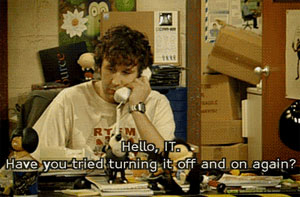
This applies to so many things - from literally restarting a frozen public workstation to taking a fresh tack on a difficult problem. Turn it off and turn it back on again is the #1 suggestion for a reason - and why Roy always answers the phone that way:
Jessamyn's observation on this USB keylogger thing got me thinking - without the context of that article, if I saw one of those in my library, I wouldn't have known what it was.
I would have known it shouldn't have been there, and maybe being plugged into the keyboard would have given me a clue, but I don't know.
This reminded me of a Technology Skills Library Staff Should Have list Sarah posted at ALA Learning (via). I wouldn't expect any staff to recognize a keylogger, but staff do need to be familiar enough with library equipment to recognize when something gets out of whack - printer not working right, copier making funny noises, website down, a monitor cable unplugged, or a foreign device plugged into a computer.
I like her list a lot, and am going to spend some time merging it with the idea from the Wilmington (MA) Library to break tech knowledge up into different levels to form a tech skills matrix.
Tech competencies is a topic I keep revisiting, because it is something that continually evolves - identifying keyloggers are just the latest addition.
Instead of a reference question this week, I wanted to highlight something else from NELA2010.
In the Trends in Reference session, Pingsheng Chen from the Worcester (MA) Public Library discussed the overall trend of reference questions in general - that there are fewer of them, but the questions we do get asked are harder and less traditional.
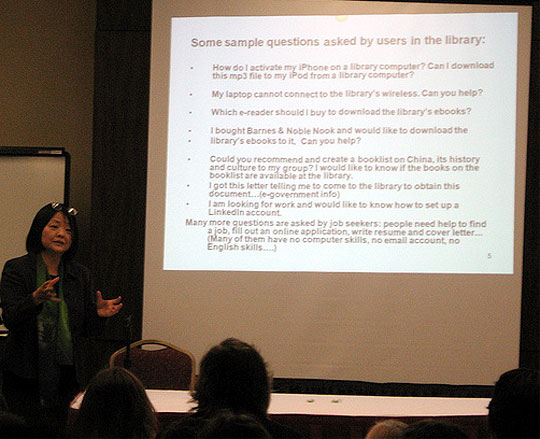
This is due to people turning to the internet to answer the easy factual questions, but still coming to us with the tough ones that require assistance or instruction. Her slide below listed a few example questions she's gotten in Worcester:
I'm sorry the photo is tough to read - the questions are:
How do I activate my iPhone on a library computer? Can I download this mp3 to my iPod from a library computer?
My laptop cannot connect to the library's wireless. Can you help?
Which e-reader should I buy to download the library's ebooks?
I bought Barnes & Noble Nook and would like to download the library's ebooks to it. Can you help?
Could you recommend and create a booklist on China, its history and culture to my group? I would like to know if the books on the booklist are available at the library.
I got this letter telling me to come to the library to obtain this document...(e-government info)
I am looking for work and would like to know how to set up a LinkedIn account.
Many more questions are asked my job seekers: people need help to find a job, fill out an online application, write a resume and cover letter... (Many of them have no computer skills, no email account, no English skills...)
Her question to us was, if you were asked these, how would you answer them?
Most of the libraries represented in the room had at least one person on staff who is the go-to person for "techie questions." But is that good enough anymore? Do you feel the questions above are beyond the scope of reference work, or are you of the opinion that modern reference staff should have the knowledge and training to answer modern reference questions?
So that's the challenge for this week - how would you handle these questions if you were asked them by a patron?
Developed by Alicia Verno, Head of Technical Services at the Wilmington (MA) Memorial Library (who generously agreed to share with everyone), this is a nice staff technology competencies matrix [pdf], breaking down tech skills by subject/software and assigning different skill levels based on position.
Level 2: Intermediate (Department Heads, Information Desk staff, Administration)
Level 3: Advanced (Technology Committee members)
and the required skills are broken out into these categories:
Workstation Basics
Operating System
System Security
Printing
Internet
Email
CASSIE [time management software]
Horizon [ILS]
Horizon (Tech Services staff only)
Microsoft Excel
Microsoft Word
I really like this fine-tuned approach. Assigning library positions to different skill levels is an easy way of being able to find help if a question is over someone's head.
I also like breaking out each skill area. It plainly lays out which skills are important for staff to know, but also shows them skills above their level, perhaps enticing them to be curious and figure things out.
We're going to modify Alicia's matrix [pdf] for use at my library, and I'd like to add:
Museum Passes: booking a pass, deleting a reservation, checking out a pass
ILL Requests: requesting through local catalog/state-wide catalog/OCLC requests, checking on a request
I'm sure it could be an endless list, and I know the point isn't to be exhaustive - nor is it to point out peoples' shortcomings or reasons why someone shouldn't be in the position they're in. Really, competencies lists should identify the areas in which staff feel uncomfortable, so supervisors can make sure they get the training they need.
 I don't often give presentation-based programs for patrons at my library, but last week I assisted one of my coworkers with a "Using Library Ebooks" program at our local Senior Center. A few things stood out to me during this program that I didn't anticipate, so I thought it might be worthwhile to share them here.