Archives for Books:
April 30th, 2009 Brian Herzog
 When it comes to reorganizing books by subject, it turns out that getting it all looking pretty on paper is the easy part.
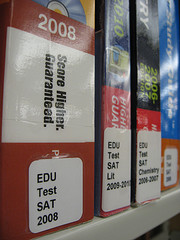
After everything was documented, the first subject we decided to pull out of Dewey order and shelve separately were the test preparation books and college directories (shelved in Dewey 378). We chose this subject to be our first "stand-alone" section because it met a few criteria:
- Contained enough books so that it wouldn't get lost being on its own
- Popular enough so we would see quickly how patrons reacted to not using Dewey
- Specific enough that it didn't really relate to the Dewey numbers around it, and so wouldn't lose context by shelving them separately
We decided to refer to these books as "Education," so all the call numbers would start with EDU. After that, the call numbers would be grouped by type of book (TEST or COLLEGE), and then further specified SAT, ACT, GRE, etc. We're still finessing how to label the college directories, but I think we'll end up with COLLEGE (or maybe SCHOOL?) followed by the type of school: 4-YEAR, GRADUATE, MEDICAL, etc.
Putting it all together, here are a few sample call numbers (including the year makes patron browsing and staff weeding very easy):
All of this seemed obvious, but we ran into our first trouble deciding what to do with books above and below college level. We decided to include any elementary or high school books (such as MCAS test prep, The handbook of private schools and other directories), and also graduate professional schools like Law and Medical schools.
What we did not include, even though we had them shelved in the 378's with education books, were the career tests, like the civil servant exam, NCLEX-LPN, TOFEL, Miller Analogies, etc. We decided to reclassify these into the Dewey 331.702 area, so they'd be next to the career directories.
Having stand-alone shelves for a single subject also means we can put other resources there, too. On top of these shelves we've put financial aid applications and workbooks, course catalogs from local colleges, New England Journal of Higher Education, and signs and bookmarks promoting our online education resources. We're also going to interfile our reference books, too, with prominent REFERENCE stickers on them - we'll see how that goes over.
We're still in the process of recataloging the EDU books, but so far, feedback has been mostly positive. The only complaint I've heard is that the new location (we put them next to the Young Adult section, thinking teens would be the heaviest users of college books) is further away from the Reference Desk than the regular Dewey shelves, so it's a longer walk.
I'm not sure which subject we'll tackle next. Doing this section-by-section is slow, but I think it'll work for us. However, in a recent conversation with a librarian at a nearby library, I learned that they are going to go all-out and redo their entire library bookstore-style. They've developed a list of 21 "neighborhoods" in which to group the books, and although I don't have many details, I'm looking forward to seeing how it goes.
Tags: book, Books, classification, ddc, dewey, libraries, Library, non-fiction, organizing, public, subject, subjects
Posted under Uncategorized | 5 Comments »
April 28th, 2009 Brian Herzog
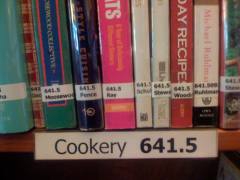 What I want to talk about is supplementing Dewey organization in a public library, to help both staff and patrons. But this post got so big I had to split it in half, so part two will be along soon.
I know there are libraries that have abandoned Dewey entirely, and there are movements afoot to develop a more modern system.
These are good things, but take major effort and investment. We've considered doing this in my library, but decided we just don't have the floor space for bookstore-like subjects and displays. So instead, we're going to start small, think long-term, and hopefully a series of gradual changes will ease us into an improved and patron-centric way to organize our collection.
Subject Sections for Staff
Something I've wanted to do for awhile is to make each part-time reference staffer responsible for the different subjects in the non-fiction collection. The staff librarians primarily do the selection, but I also wanted each subject assigned to a part-time person, who would be responsible for weeding, straightening, and shelf-reading. I also wanted them to assist with selection, by reading the reviews in Library Journal (as well as the articles, to keep on top of the field).
To try to make this easy, I came up with a list of Dewey ranges (see below) that fell into each subject heading that Library Journal uses in their book review section. They lined up with Dewey pretty well, but there are a few subjects that always have patrons checking different parts of the collection for very similar (to them) books.
A couple examples:
- Career Books: resume/interviewing books are Dewey 650-656, but job/career directories and encyclopedias are in Dewey 331
- Books for the Home are in a lot of places: gardening is 630's but landscaping is in 700's; repair and construction could be in 620's, 640's, 680-690's or 740's
- And I won't even mention oversize books, the bane of my existence
After I had the list, I counted up the number of shelves we had in each Dewey range, grouped them in logical chunks, and then let staff choose which sections they'd be responsible for. After a bit of finagling, everyone ended up with about the same number of shelves, and so far things are going well.
Links to my subject listing is below - keep in mind I am a reference librarian, not a cataloger, so this is more from an end-user point of view. Another problem are the subjects in which we only have five or six books. I'm sure this won't work for any library but mine, but it's a start:
It's certainly not rocket science, but creating this list let me see on paper how we might need to rearrange Dewey in order to organize books by subjects. And by counting the shelves in each section, I also get an idea of how much space we'll need. This sets us up pretty well to start pulling subjects out of the non-fiction stacks to make more attractive and logical subject groupings, bookstore-style, instead of just having a solid mass of books.
Tune in on Thursday for our first foray into subject section shelves...
Tags: book, Books, classification, ddc, dewey, libraries, Library, non-fiction, organizing, public, subject, subjects
Posted under Uncategorized | 11 Comments »
April 1st, 2009 Brian Herzog
 Although the Kindle and other ebook devices are growing steadily in popularity, there is one advantage that libraries and bookstores still have: author visits and book signings.
Getting to listen to and meet an author in person is a great experience. And it's something that you can only do in person - right? Not any more. Amazon has announced a new program in an effort to recreate this experience for its Kindle customers.
The new "Online Book Signings" portion of their Digital Text Platform lets Kindle customers watch a live webcast of an author talking about their book, and ask the author questions via realtime chat.
But the best part is that people who buy a Kindle version of the book will also be able to get it personalized and signed by the author. A demo (Kindle not required) of three titles is below - click a title, type in your name, and then download the signed book to your Kindle. Pretty neat.
This might start a whole new market for digital autographs - so collect all three!


Tags: amazon, april, book, Books, ebook, ebooks, fool, fools, joke, jokes, kindle, kindle2, libraries, Library, online, online book signings, public, Random, signing, signings, slooflirpa, Technology
Posted under Uncategorized | 3 Comments »
March 19th, 2009 Brian Herzog
Finding information on library shelves always has an element of serendipity to it, but I experienced a bit of it with my request list and patron donations. Here's what I've been reading/watching this recently:
 Dead Like Me - I've been watching this series on DVD for the last couple months, and the last movie came in last week. It's about a girl who is a grim reaper, living on earth in secret, helping souls cross over (and it has a frog in it).
 Meet Joe Black - I'd never seen this movie, so when a patron donated the DVD, I took it home to watch it. It's about a guy who is death who visits earth, in secret, and helps a soul cross over.
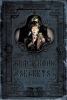 The Black Book of Secrets - I requested this YA book months ago, and it came in last week. It's not about death, but is about the black and sinister secrets everyone carries with them in their lives (and it has a frog in it).
 Blank Spots on the Map - This is the book I leave at work to read during lunch. It's about all the secret places in the country the government uses for intelligence work and top secret programs - in other words, Black Ops.
I always have a lot of things on request, and I thought it odd that this group would all find their way to me at about the same time. Perhaps, rather than serendipity or coincidence, this concurrent collection is actually revealing my true nature in all its secretive blacky deathness.
Or, perhaps I just like spies, YA novels, Mandy Patinkin and Brad Pitt. And frogs.
Tags: black, Books, chance, coincidence, death, dvds, items, libraries, Library, Personal, public, Random, secrets, serendipity, similar
Posted under Uncategorized | 8 Comments »
March 12th, 2009 Brian Herzog
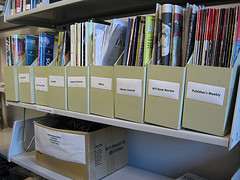 I have always struggled with doing selection, but it only recently occurred to me that technology could make the process easier.
My normal procedure for selection was to pick one Friday a month and go through whatever review journals I could find in the library that I hadn't already looked at and read reviews. This rarely happened each month as planned, and I'd slip further and further behind - making catching up that much more daunting.
I decided my relying on journals was the problem - it wasn't something I routinely did, so it was easy to forget or ignore. But, I do check rss feeds in my Bloglines account almost every day, so I thought if I could get reviews delivered to me (into a "Selection" folder), selection could become something I did for a few minutes each day, instead of an entire afternoon once a month.
So far, I've found a few good sources for rss feeds, and am always on the lookout for more:
- Feeds from BookLetters
My library subscribes to BookLetters to offer our patrons readers advisory resources through our website. Most of their various reading lists are available as rss, so that's perfect. I added the Books on the Air, Book Sizzle (ie, "hot" books), Nonfiction Preview and Nonfiction Best Sellers feeds, although they have plenty more to choose from
- Feeds from Amazon.com
Amazon also offers both best seller and new release lists as rss feeds. Each grouping is also broken down by subject, so I can grab the feeds for just the nonfiction subjects I do selection for - for instance, Travel best sellers and Travel new releases
- Feeds from Library Journal
Library Journal offers a ton of different feeds, but I'm still experimenting to see which is the most useful. Most include subjects I'm not interested in, or news and articles beyond just book reviews, so I'm going to keep refining how I use their feeds. However, as opposed to being a "new" source like BookLetters and Amazon, this is just getting in a new format the same information I've been using for years
Of course, I'm not abdicating my responsibilities as a professional librarian just because I'm getting information from sources other than print journals and vendor catalogs. I still read the reviews, check local holdings, and make educated decisions about the books on these various lists, just like I would if I learned about a book from a print journal.
As I see it, here are the pros of this method:
- It fits better into the way I work, which means it gets done better and faster than something that doesn't (which means my patrons get better service because I'll mark books to order on a daily basis instead of a monthly [or worse] basis)
- My library is very much a popular materials library, and these are reliable sources for what's popular right now
- When reviewing books on Amazon, a greasemonkey script linking right from the Amazon page to our catalog makes seeing if we already own it very easy (another greasemonkey script lets me add it to our ordering queue with just a single click, too)
- If a title is showing up on multiple lists, it's a pretty good indicator of how many copies my patrons will demand
However, there are also things to watch for:
- Amazon often pushes things, like Kindle editions, that I'm not interested in
- Re-releases and paperback editions will also show up on these feeds, and since the greasemonkey script does an ISBN search, double-checking with a title search to make sure we don't already own a copy is important
- Many new books don't have online reviews (even using my online book reviews search)
I've only been using this method for a couple months, but already I feel like I'm ordering more books, and more quickly. Anything that makes selection easier is a step in the right direction - and it's certainly easier than trekking all over the building to find out who had Library Journal last.
Tags: book, Books, buying, coll dev, collection development, feed, feeds, libraries, Library, material, materials, public, reviews, rss, selecting, selection, Technology
Posted under Uncategorized | 9 Comments »
February 26th, 2009 Brian Herzog
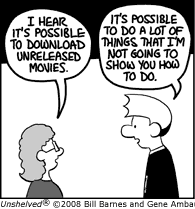 In December, I had a series of posts concerning Overdrive's mp3 audiobooks. At the time, they were brand-new to my library, and I hadn't had a chance to experiment with them. Now I have.
Since Overdrive was previously so top-heavy with the DRM, I was curious just how "mp3" their mp3 files would be - would they be totally open like mp3 files should be, or would they be pseudo-mp3s, still with some kind of DRM wrapper or innards?
I never feel like I really understand something until I'm able to take it apart and put it back together to see where the flaws are, so here are the results of my experimenting:
During the checkout process (which still requires five clicks to accomplish after finding a book and entering my library card number), Overdrive hits you with their mp3 terms of service. Items 3 and 4 below are what really come into play here:
The title(s) and file(s) in MP3 format ("Content") you have selected to download are licensed to your Library under an agreement with OverDrive, Inc. who is authorized to supply the Library with the Content by publishers and other copyright holders. Prior to accessing the Content, you are required to accept and agree to be bound to the Terms of Use as described below.
Please read the following carefully and click 'Yes' to accept to continue for access to the titles or 'No' to decline should you not agree.
- I agree to be bound by the applicable laws that apply to my use of the Content and the library download media service ("Service"). I acknowledge that the Content embodies the intellectual property of a third party and is protected by law. All rights, titles, and interest in the Content are reserved, and I do not acquire any ownership rights in the Content as a result of downloading Content.
- I will only use the Content for my own personal, non-commercial use. I will not, perform, sell, distribute, transmit, assign, sell, broadcast, rent, share, lend, modify, adapt, edit, sub-license, or otherwise transfer the Content.
- The license granted to me to use the Content is for a one-time limited right to borrow the Content for a specific, library designated, limited duration ("Lending Period"). I agree and acknowledge that at the end of the Lending Period all rights to access the Content expire and terminate.
- At the end of the Lending Period, I will delete and/or destroy any and all copies of the Content, including any copies that may have been transferred to, or created on portable devices, storage media, removable drives, CDs & DVDs.
- I acknowledge that the library is providing access to the Content as a service to me so long as I and other users of this Service abide by these Terms of Use. In the event the library, OverDrive, or rights holder determine you or other users of this Service are violating these Terms of Use, the Library and/or OverDrive reserves the right to suspend or terminate your ability to use the Service and to borrow Content.
Click 'Yes' to indicate that you agree to these terms and to proceed to checkout.
Click 'No' to indicate that you do not agree to these terms. You will be directed back to your bookbag where you can remove MP3 title(s) should you want to check out titles in other formats.
The legal limits are clear, but I still wanted to know what was possible. My patrons ask me these things, and I think an informed answer is better than "I dunno, I never tried it."
So I downloaded the rights and the mp3 files for the book Little Brother, by Cory Doctorow, and waited our two week loan period. After the two weeks, when I tried to open the book through the Overdrive Media Console (OMC), the software deleted any obvious trace of the mp3 files from my computer. If I wanted to listen to the book again, I would have to download all 327MB of it again - which is no small time investment.
I was surprised that the OMC deleted it, but decided that since the software knew the path to the mp3 files, it might be the only weapon Overdrive has to enforce their terms of service.
So I downloaded the book again. This time, in addition to opening the book through the Media Console, I also copied the mp3 files into a different directory, and saved one to a flash drive. I wanted to see if Overdrive would seek-and-destroy any and all copies of the files, or just the copies it knew about in the one designated directory.
After another two weeks, I open the files in the OMC, and they were duly deleted. However, when I browsed to the files in the alternate directory with Winamp, those played just fine. The files on the flash drive played, too (I don't have an iPod so I couldn't test what happens there - but my guess is nothing).
This reaffirms that these are in fact true mp3 files. Overdrive is therefore relying on the delete-what-we-can-reach tactic, and that Overdrive users have agreed to the terms of service and so are obligated to delete anything the OMC can't reach.
So once again, the Unshelved strip is in effect - in the world of publishers and copyright, there is a stark difference between possible and legal.
Tags: audio, audiobook, audiobooks, book, Books, crack, cracking, hack, hacking, hacks, ipod, libraries, Library, mp3, overdrive, public, Technology, unshelved
Posted under Uncategorized | 4 Comments »