January 28th, 2012 Brian Herzog
 This reference question happened over the course of two days. This particular patron is in the library almost every day doing anti-abortion research, so this type of question isn't actually all that unusual for us - but I thought the details were interesting.
She came up to the desk with an article quoting President Obama talking about adoptions that initiated with Planned Parenthood, and another article citing the number of abortions they perform every year. She wanted to verify each of the numbers, and then find out the ratio of abortions-to-adoptions.
I thought the most reliable place for statistics like that would be the Planned Parenthood website, so we started there. Their About Us section had a link to their Annual Reports (perfect!), and the most recent one listed was for 2009-2010.
We clicked into the report itself, and on page five we found what we were looking for:
| Health Service |
2009 |
2010 |
| Abortion Procedures |
331,796 |
320,445 |
| Adoption Referrals to Other Agencies |
977 |
841 |
Those were a little off from the numbers given in the article, but she was happy with that, and wanted me to print a copy for her records. Sounds straight-forward, right? Turns out, it's not. Planned Parenthood uses issuu.com to host their documents, and in order to print anything, I had to sign up for an issuu.com account. I did, but then had to wait for the verification email before I could print.
Our email server doesn't deliver messages instantly, because it holds them to filter out spam. And of course, all this was happening fifteen minutes before we closed, and the verification email didn't arrive in time. The next morning I verified my account and printed the information for the patron.
But she also wanted the ratio, so that was my next task. But when I asked myself, "what is the ratio of 329,445 to 841," I could not for the life of me remember how to do that. I thought I just needed to divide 329,445 by 841, but I did that on a calculator and it didn't seem right.
I thought Google could do that calculation (329,445:841), since it does others, but it didn't. Next I searched for a simple online ration calculator, but couldn't find that did what I wanted.
Then I remembered about Wolfram|Alpha, which was designed not just as a search engine, but as a computational engine. When I typed 329,445:841 into that it gave me an answer - and to my surprise, it was the same answer I got myself on the calculator.
So the answer is that, in 2010, Planned Parenthood performed 392 abortions for every 1 adoption. The patron felt this number was way low, according to other news articles she had read, but I showed her the data and the calculations. She reluctantly accept it and thanked me - I was just glad I actually remembered some of my grade school math.
Posted under Uncategorized | 4 Comments »
January 24th, 2012 Brian Herzog
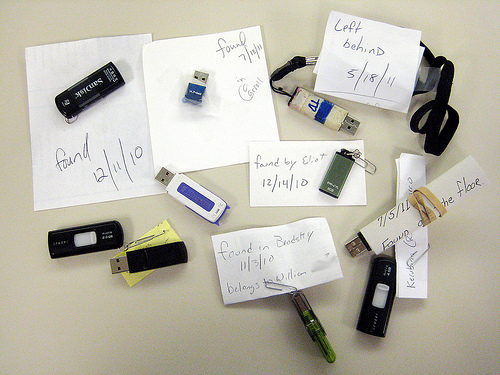
I feel like I've talked about this before, but it's something that continues to puzzle me. Every week or so we find flash drives left behind in the public work stations after patrons leave - here's what we've got in our Lost & Found bin now:
Most of the flash drives we find get returned because our policy is to check the flash drive to look for a resume or something that has contact information in it.
But of the others, no one ever comes looking. And it seems that every time someone comes to the desk to ask if we found their flash drive, none of the ones we have belong to them. I find this odd.
Two other things I find interesting: one is the different kinds of drives people use (and the ones that are the same), as well as the different ways staff has of marking the drives as to when and where they were found (all our public workstations are named after authors).
Posted under Uncategorized | 8 Comments »
January 19th, 2012 Brian Herzog
![[don't censor the web]](https://www.swissarmylibrarian.net/wp-content/uploads/2012/01/dontcensortheweb.gif "XKCD SOPA/PIPA blackout comic") I thought it was great how many websites participated in yesterday's blackout protest of the SOPA and PIPA bills. Partly, because I ended up explaining what was going on to quite a few people.
I thought it was great how many websites participated in yesterday's blackout protest of the SOPA and PIPA bills. Partly, because I ended up explaining what was going on to quite a few people.
BoingBoing has a quickie recap of the effect the protest had on some Senators and Congressmen, and SOPATrack.com allows you to view, by State, who supports, opposes, and is undecided about the bills - also, how much money they've accepted from pro- and anti-censorship lobbyists. According to FightForTheFuture.org, there are now 35 Senators publicly opposing PIPA. Last week there were 5. Huge success, but it takes 41 to stop the bill completely.
For what it's worth, here's a few anecdotes from my day:
- A couple weeks ago, I used Senator Scott Brown's contact form to request a meeting with him to talk about PIPA. Nothing happened until yesterday, when I got a call from someone in his Boston office, thanking me for contacting them and saying Sen. Brown will oppose PIPA. That's great.
- Next I tried to contact Senator John Kerry. I called his DC office and got a busy signal, then went to his website to get the number for his Boston office - but the website was down. I found the number elsewhere online, but when I called it rang and rang then went to voicemail, but then a message said the voicemail box was full. I was disappointed I couldn't contact my Senator, but hopefully that meant that so many other constituents were contacting him that his methods were just overwhelmed.
But it's not over. The Senate vote on PIPA is still scheduled for Tuesday, Jan 24th, so keep contacting your Senators and ask them to explain the bill. Also, it looks like SOPA is scheduled to be revived in February, so also contact your Members of Congress. XKCD had a great shortlist of links to check out:
WTF Wikipedia
Of course, the funniest part of yesterday were all the tweets from people who didn't know what was going on - lots of desperate students unable to do their homework, but of course it's bigger than that. Still, they're worth a skim.
Tags: blackout, censorship, congress, libraries, Library, pipa, protest, public, senate, sopa, Technology
Posted under Uncategorized | 1 Comment »
January 14th, 2012 Brian Herzog
 I found this question interesting, even though I couldn't help much. An older woman came up to the desk one afternoon and said:
I have message from my granddaughter on my cell phone that I would like to save. How can I record that to a CD so I can listen to it whenever I want?
As you might suspect, I'm decently competent when it comes to tech questions, but I know nothing about cell phones. However, I suspected there must be some web interface she could log into and see all of her account's voicemail as mp3 files or something - at least, I hoped there was. Short of that, there was always the low-tech method of simply holding her phone close to a tape recorder.
Her carrier was AT&T, so I called the local AT&T store and asked them about downloading voicemail files - this is the guy's response:
No, we don't have anything like that - just tell her to hold her phone up to a tape recorder*.
Man. Yeah, I'm sure it'll work, but the quality would probably be pretty bad. So, I tried searching online for recording voicemail from cell phone and after reading a few posts, I found the obvious answer of using the phone's headphone jack to plug into a computer and use that to record.
The Ask MetaFiler post was particularly informative, as it provided multiple options including a list of the different hardware and software options available. Of course, we didn't have any of this in the library, so I couldn't help the woman directly. But it did provide me with enough information to call around to a few local computer repair shops, and ask them if they had the equipment and ability to record her message for her.
Of the shops I called, one said they'd do it for $10 and one said they'd do it for free, and the woman was very happy. She said she's try the free one first, and if it didn't sound good enough, she'd try the other.
It's kind of too bad we didn't have the right cable to do this - now I'm really curious to see if it works (but not enough to actually get my own cell phone).
*The guy at the AT&T store also did say that if the woman was being threatened she should take it to the Police, but that wasn't the case.
Tags: cell, cell phone, cellphone, headphones, libraries, Library, message, phone, public, record, recording, Reference Question, Technology, voice mail, voicemail
Posted under Uncategorized | 2 Comments »
January 12th, 2012 Brian Herzog
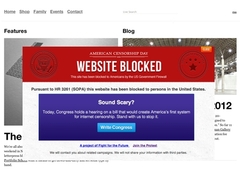 This is the last cause I'll promote (for awhile), but it's a big one. Hopefully by now you've heard of the two bills in Congress that threaten the future of the internet - SOPA in the House and PIPA in the Senate.
If you're not sure how either of these will affect you (and libraries), here's a few quick descriptions I've seen recently:
From BoingBoing's SOPA and everyday Americans:
The harm that does to ordinary, non-infringing users is best described via a hypothetical user: Abe. Abe has never even so much as breathed on a company’s copyright but he does many of the things typical of Internet users today. He stores the photos of his children, now three and six years old, online at PickUpShelf* so that he doesn’t have to worry about maintaining backups. He is a teacher and keeps copies of his classes accessible for his students via another service called SunStream that makes streaming audio and video easy. He engages frequently in conversation in several online communities and has developed a hard-won reputation and following on a discussion host called SpeakFree. And, of course, he has a blog called “Abe’s Truths” that is hosted on a site called NewLeaflet. He has never infringed on any copyright and each of the entities charged with enforcing SOPA know that he hasn’t.
And yet, none of that matters. Under SOPA, every single one of the services that Abe uses can be obliterated from his view without him having any remedy. Abe may wake up one morning and not be able to access any of his photos of his children. Neither he, nor his students, would be able to access any of his lectures. His trove of smart online discussions would likewise evaporate and he wouldn’t even be able to complain about it on his blog. And, in every case, he has absolutely no power to try to regain access. That may sound far-fetched but under SOPA, all that needs to happen for this scenario to come true is for the Attorney General to decide that some part of PickUpShelf, SunStream, SpeakFree and NewLeaflet would be copyright infringement in the US. If a court agrees, and with no guarantee of an adversarial proceeding that seems very likely, the entire site is “disappeared” from the US internet. When that happens Abe has NO remedy. None. No way of getting the photos of his kids other than leaving the United States for a country that doesn’t have overly broad censorship laws.
A much more succinct description, from Consumer Electronics Association president Gary Shapiro (also via BoingBoing):
[SOPA is championed by] politicians who are proudly unfamiliar with how the internet works, but who are well familiar with favors from well-heeled copyright extremists.
And Stephen Colbert explains it well too:
[video link]
Of course there's lots more reading to be done on this if you're interested:
No call to action will work unless people actually take action. Right now many Congressmen and Senators are still at home on vacation, but will be back in session in the next week or two. Now is the time to contact them, as them to explain what these bills are, and urge them to vote against them. Here are some things to help:
But most importantly, if you're not already familiar with SOPA and Protect-IP, read through some of these links - it's worth it. Thanks.
Tags: bill, bills, censored, censorship, congress, house, libraries, Library, oppose, pipa, protect-ip, public, senate, sopa, Technology
Posted under Uncategorized | 5 Comments »
January 7th, 2012 Brian Herzog
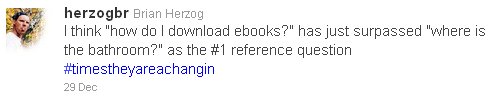
As we have come to expect over the last couple years, the first few weeks after the Christmas holidays means a rather dramatic spike in the number of questions about ebooks. The effect this year seemed more profound that usual, which led me to this conclusion:
This year, my library planned a program on using ebooks with library resources for the first Saturday in January. The plan was for me to talk about Overdrive, and give live downloading demos for a Kindle, iPad, and Nook. Also, we invited a sales associate from the local Radio Shack to come talk about the non-library aspects of ereaders - buying ebooks, the differences between the devices themselves, and hopefully answer a few hardware tech support questions.
Our meeting room is big enough, and ereaders are small enough, that I didn't think just holding one up would really help people in the back see which buttons to press. I got the idea of using a camera, pointed at a Kindle or Nook, to project what I was doing to it up on a screen, to make it more visible. I have a little external webcam that I plugged into a computer, and clamped it so it's pointing straight down at a table (where the ereader will sit). Then I found this software called FSCamView which does nothing but take the feed from the webcam and display it full-screen on the laptop. Then, plugging the laptop into a digital projector shows whatever I put in front of the webcam up on the big screen. How could that go wrong?
And since my library is lucky enough to have two digital projectors, I also plan to have a second computer to project the Overdrive catalog. This way, hopefully, people (even in the back) will be able to watch me search the Overdrive, checkout an ebook, download and transfer it to the ereader, and simultaneously see it actually show up on the device.
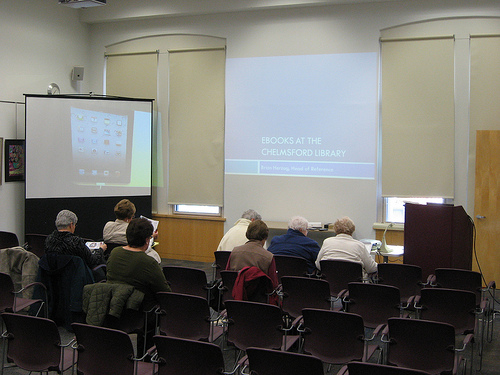
Here's what the setup looked like 20 minutes before we started:
We presented from the podium in the right corner. Slides (and websites) on the computer were projected onto the wall in the center by our in-the-ceiling projector, and the webcam/projector/ereader setup was on a little table next to the podium, projecting onto the screen on the left side of the photo - you can see an iPad up there now.
It worked well enough for our purposes, and I think people were happy to (sort of) see what we were doing. The problems we had were that the camera wasn't very high resolution, and the lighting was tricky - not to mention glare off the devices.
Even still, the program was a huge success. We had over 100 people in the room (which seats 80), and had to turn people away. On the spot we decided to hold a repeat program in a couple weeks for all the people who couldn't attend this one. I think everyone learned something, and many said that after seeing the steps it takes to download ebooks from Overdrive, they now understand and can do it themselves. Yay for that.
I'm going to keep fiddling with the webcam/projector setup, because there's got to be an easy way to improve that. Then it'll be fun to think of other programs that might benefit from projecting physical objects up on the wall. Hmm.
Tags: ebook, ebooks, ereader, ereaders, kindle, libraries, Library, nook, overdrive, Programs, public, Reference Question, sony, Technology
Posted under Uncategorized | 6 Comments »