January 6th, 2011 Brian Herzog
 Have you heard about Library Renewal? It's been percolating on liblogs lately, and sounds like a great (and sorely needed) initiative.
From their website:
Our goal is to find new econtent solutions for libraries, while staying true to their larger mission.
Concise and focused, and something libraries really do need. They will be hosting a series of events, will offer speakers, and invite librarians to participate via Twitter, Facebook, blog, and their mailing list.
An initiative like this is long overdue for libraries. A lot of the services we offer are not quite good enough, let alone outstanding - and it is only by banding together that we'll be able to force positive change. Thanks to the Library Renewal board for getting things started.
Tags: content, ebook, ebooks, econtent, electronic, libraries, Library, library renewal, public, remaining relevant, Technology
Posted under Uncategorized | Comments Off on Library Renewal: Developing Econtent Options
January 4th, 2011 Brian Herzog
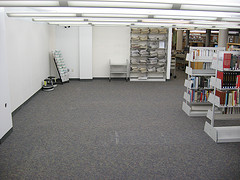 This project has been underway at my library for the last month or two, and the beginning of a new year seems like a very appropriate time to mention it. We are in the process of removing our Reference shelves so we can repurpose the space.
This is a major project for us. It was brought about by two main factors:
- The community primarily uses my library for popular materials and assistance with projects (homework, hobbies, etc) - hardly anyone does in-library research, so our Reference collection hardly every got used
- Our patrons are constantly asking to reserve our (single) quiet study room, and we often had more requests for it than we could accommodate
So, we came up with a plan to build three new 8' x 8' study rooms. Big enough for one or two people, but small enough that we could fit more than one into the available space.
To make space for them, we developed a new approach (for us) to our Reference collection. For the last month or so, I've been weeding with these new criteria:
- Anything that seemed like a reference book and could be easily photocopied - World Book and Encyclopedia Britannica, Farmer's Almanac, Statistical Abstract of the United States - remained "Reference" and will be shelved close to the Reference Desk (more on shelving in a minute)
- Anything that seemed like a reference book but required more reading is being recataloged with a new "7 Day Loan" designation. These books will circulate for only 7 days (instead of our regular 3 week loan for books), but cannot be renewed or requested by other libraries. The goal here is to make the books more useful to people by letting patrons take them home when needed, but make the circulation rules such that the books will also get back on the shelves quickly and so be available when other patrons or staff need them. Also, very importantly, these will be interfiled on our regular non-fiction shelves, so all information on a subject will be same place*
- Anything that wasn't pure reference, and didn't seem like something someone would need to lay their hands on immediately, was recataloged as regular circulating non-fiction. There were far more of these than the 7 Day Loan books, which I thought was a good thing
- Everything else got weeded. I've been wanting to do this for the last few years, so have been slowly deemphasizing the Reference Collection by putting new books as they came in into our circulating collection. As a result, quite a few Reference books could be deleted because we already had newer editions in the circulating collection. Others got deleted because it was a duplicate copy, we had lots of other material on the subject, we had better resources available online, or it was simply outdated (I've been ordering new items as updates). Another criteria was the good old "dust test" - if blowing on the book produced a plume of dust, I took that as a sign that it was not used, and only kept it if I felt it was absolutely vital. This process illustrated how bad of a job I did with regularly weeding the Reference Collection, because we had lots of shelf space to keep things
My goal for this project, in addition to providing study space that our community is demanding, is to increase the usefulness of our entire collection by letting patrons use it the way they want to - at home. Also, by interfiling all of our material, hopefully the "reference" books will get a new lease on life, as many patrons previously couldn't even be enticed into the Reference area - more than once I handed a patron a reference book open to the page that answered their question, but since they couldn't take it home they wouldn't even look at it.
Of course, there have been problems, too. Most notably, we don't have the space on our non-fiction shelves to absorb all of the Reference books we're shifting down there. This prompted major weeding of the circulating collection (which, again, was probably overdue).
Another solution was to pull out discreet subjects and reshelve them elsewhere in the library. The study rooms we're building won't take up all of the floor space in the Reference area, so we're putting in three new index tables and using them as "subject tables." These subjects will be auto repair (629.287), career (331.702 and 650.14), genealogy (929, plus a few other hand-chosen items), and maps (mostly our oversized atlases, but also geography reference like the Columbia Gazetteer). All of the general encyclopedias and other books that are remaining true Reference items will also be on one of these tables.
Another issue has been peoples' concern about how many books we're getting rid of. It certainly has been a lot, and I understand why it might shock some people. But I'm evaluating the entire collection almost on a book-by-book basis, so I have a reason for every decision I made. Like I said above, usually it's because the book is out-of-date or we have enough complimentary materials and don't have room for everything. Again though, if I had been weeding properly all along, it wouldn't be such a monumental task right now.
We're still in the process of weeding, recataloging, and shifting. Construction of the new rooms is suppose to start next week, and everything should be finished by the end of the month. Transition periods are always difficult, but I think once things are finished our collection will be much better and more useful.
Something else that makes me happy is that all of these changes were driven by patron behavior. I'm glad that we can adapt to the changing needs our our community.
*Damn you, Oversized Books - you are the bane of my existence. Sadly, much of our recataloged Reference collection is ending up on our Oversized shelves, but that is a project for a later date.
Posted under Uncategorized | 9 Comments »
December 21st, 2010 Brian Herzog
 You probably heard last week that someone leaked that Yahoo was planning on shutting down Delicious - but then later said it will be maintained until a good home could be found.
When I first read this, two things struck me:
- This is very bad, considering my library website's subject guides rely on Delicious, plus I've been telling people for years to convert to Delicious
- This isn't so bad, because the demise of Bloglines was announced and averted
So, for the time being, I'm not panicking - but it is a perfect reminder that we need to face the realities of third-party tools with eyes wide open. You can integrate anything you want into your website, but remember it may go away at any time. David Lee King has a great post on this (and gwern0's comment is spot-on).
What is a librarian to to? Our options are:
I'm going to be doing a little bit of all of these. Since there is no imminent deadline, I'm going to ignore all of this until after the holidays. Then, I'll backup my bookmarks and start looking at alternatives in case migration becomes necessary. I had been wondering if there was a host-your-own option, so I'm happy to see that. However, although it would be nice to have control myself, I like the shared aspect of these tools. Not to mention I'd be responsible for the maintenance, and there is always the danger of getting stuck in yet another information silo.
If we do have to move, right now I'm leaning towards Diigo because it seems to match most closely the Delicious features I use - namely, linkrolls and a bookmarklet (or toolbar). I haven't investigated very far, but it also looks like importing Delicious links will be easy.
This is just life on the web - nothing is permanent and nothing is irreplaceable. However, the initial "sunset" announcement struck me like a bad Christmas present.
Speaking of which: as usual, I'll be visiting my family for the week of Christmas, and so won't be posting. Because driving this time of year is always weather-dependent, I've been playing with Weather.com's Travel Weather Summary - you type in points along your route and the times you'll be passing through, and it tells you if you'll hit snow there. It's neat, but the interface could be slicker. I've never used it before, so we'll see how accurate it is, and if it's reliable enough to embark on a two-hour detour.
Happy holidays to everyone.
Tags: del.icio.us, delicious.com, diigo, libraries, Library, linkroll, linkrolls, mashup, mashups, public, subject guide, subject guides, Technology, yahoo
Posted under Uncategorized | 4 Comments »
December 18th, 2010 Brian Herzog
 Here's a good example of why having some readers advisory background is very helpful when doing reference - and how not taking shortcuts can save the patron's time.
A young patron came to the desk and says,
I'm looking for a book - I borrowed it from a friend of mine, but only got like 25 pages into it, and then he took it back. Can you find it for me, because I want to finish it.
She couldn't remember the author, but she was sure the title was The Alchemist.
No problem, I thought, as I walked her down to Y/Fic/Coelho - but after skimming the first few pages, she said it wasn't the right book. Then I took her to Y/Fic/Scott, thinking she might have meant The Alchemyst instead of The Alchemist, but that wasn't the right one either. Nor was it Fullmetal Alchemist.
So we walked back up to the desk to search the catalog, and on the way she told me what she remembered from the story: a guy walks into a private detective's (or a psychiatrist?) office and tells her his life story, and that he has been alive for hundreds of years. Since she'd only gotten twenty pages into the book, the only real detail she could remember is that the guy was described has having very engaging colorful eyes, that changed color sometimes.
She texted her friend to ask him who the author was, while I searched our catalog for The Alchemist. However, she didn't recognize any of the covers and the book records didn't include descriptions.
Since she kept talking about the guy telling his life story in the office, I thought we might hit on it by searching the internet. We tried searching online for things like "the alchemist" detective "life story" and alchemist "life story" -Coelho -fullmetal and "life story" book eyes change color but weren't getting anywhere. She was interested and engaged in the search, so I probably continued with web searching longer than I should have.
Eventually, (finally) I switched to Novelist to just see a list of books called The Alchemist and read their descriptions. #26 on their list was one by Donna Boyd, with this description:
As Dr. Anne Kramer listens to Randolf Sontime, who is confessing to a horrific crime that has shocked the world, she is drawn into his story and transported back to the House of Ra, an isolated oasis in the Egyptian desert of an ancient time.
She said that sounded promising, so we looked it up on Amazon for additional description, and then she was sure it was the right one. Yay.
I then searched in our catalog for the author's name, and found that we did indeed own the book - but it was "Lost." Of course it was. I apologized, but she was happy with just requesting it from another library in the consortium.
I also apologized to her for taking so long to find this book - it was a good ten minutes from when she walked up to when we placed the request. I think this would have been cut down to about two minutes if I had just taken the time to search on Amazon for the books in our catalog that didn't have descriptions. I don't know what that didn't occur to me up front, so I subsequently took a very roundabout path to the answer. This girl didn't seem bothered in the least, but it really bugs me to make such a dumb and time-wasting mistake.
There are also two postscripts to this story:
- Quite literally the very second I clicked the "submit" button to request the book for her, she got a text back from her friends saying that author of the book he had was Donna Boyd. That even made her laugh.
- I know there's nothing to stop an author from titling their book the exact same thing as a very famous work, but it sure makes finding the less well-known works difficult. If I ever write a memoir, I think I shall call it, Harry Potter and the Three Cups of Tea of the Da Vinci Code.
Actually, slightly related to this is that I've sort of considered writing a biography of the author Saul Bellow, but only because it could be published with the exact same cover as one of his novels:
Aren't I clever?
Posted under Uncategorized | 2 Comments »
December 16th, 2010 Brian Herzog
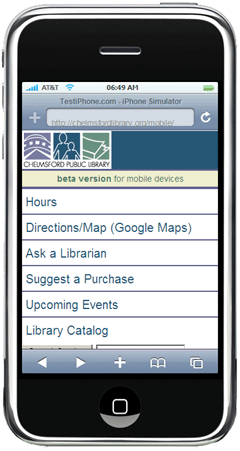 Remember a few months ago, when I was inspired by Steve Butzel's presentation at NELA2010 and created a mobile version of my library's website? I bet you have that date marked on your calendar.
Anyway, one lingering problem I had was some mechanism to automatically detect mobile devices when they visited our website, and reroute them to the mobile version instead of the full web version. I finally had some time this week and was able to accomplish that - aided by the fact that it was easier than I expected.
The ultimate goal is to redesign our entire site along the lines Brett suggested, by creating a stylesheet specifically for mobile devices. Brad pointed out that the Canton Public Library employs this, awesomely: visit their site and slowly make your browser window smaller, and watch the website flip from "full web" mode to "mobile" mode.
That was more than I could handle this week, so I opted for the detect-and-redirect approach. I had found online instructions using both javascript and php, and I went with the php method because
- I think php is more reliable than javascript, because javascript depends on the browser whereas php runs on our server
- Php is more fun, and I know our server runs php
The website offering the php method is http://detectmobilebrowsers.mobi, and very happily they make it available free for non-profits. Here's what I did:
- Read and reread their website
- Downloaded the main bit of code, and uploaded it to our web server
- Used their Function Generator to create the snippet of code to paste into the top of our homepage. I chose to treat all of their options as a mobile browser, and redirect them to http://www.chelmsfordlibrary.org/mobile - the resulting code looked like this:
require_once('mobile_device_detect.php');
mobile_device_detect(true,true,true,true,true,true,true,
'http://www.chelmsfordlibrary.org/mobile',false);
(this should be two lines of code, but it wraps because of the width of my blog - if you use this code, make sure the second and third lines above are actually one long line)
- I copy/pasted that code into our index.html homepage. However, because this is php code, it had to go between php tags, (<?php and ?>), so the complete code I actually added to the top of our page was:
<?php
require_once('mobile_device_detect.php');
mobile_device_detect(true,true,true,true,true,true,true,
'http://www.chelmsfordlibrary.org/mobile',false);
?>
(again, see note above about line wrapping)
- Note that the path in the "require_once" line must match where on your web server you actually saved the mobile_device_detect.php file (downloaded in Step 2)
- Now, the last step was a little tricky, because it involves editing the .htaccess on the server. It's easy though, and one of their faq answers explains it.
Basically, .html files don't normally run php code - .php files do that. So if our homepage was index.php instead of index.html, I could have skipped this step. Instead, in order to make .html pages execute php, I had to add a few lines to our server's .htaccess file - which was no trouble at all - and then everything worked splendidly
That is, at least, so far. I've done some testing with mobile devices and (as suggested) with the User Agent Switcher Firefox add-on, and all of that has worked. But please, if you have a mobile device, visit our homepage (http://www.chelmsfordlibrary.org) and let me know if you don't get redirected to our mobile site.
A couple other notes:
- I also added a link to the mobile site in the upper-left corner of the homepage, in case the redirect doesn't work
- I only added this auto-detect to the homepage. I thought about adding it to every page, but our full site has a lot of information our mobile site doesn't - especially descriptions of our events. If I added the redirect to every single page, people with mobile devices basically wouldn't have access to any of that. So, my thinking is to provide mobile users with the (robust) basics, but if they want more than that they'll have to endure our not-great coding until we're able to redesign the entire site to be mobile-friendly
This was easier than I was expecting, which makes me think I missed something.
Update: someone pointed out a gap in my logic. On the mobile site, there is a link to "Visit our main site" which linked back to our full homepage. However, since the homepage redirected people to the mobile site, anyone clicking that link from the mobile site just got looped right back to the mobile site. So, I changed that link to go to our About page. Again, this is a good reason to just have mobile-friendly stylesheets like Brett and Brad suggest above.
Tags: auto-detect, cell, cell phone, code, coding, conference, detect, iphone, libraries, Library, mobile, phone, phones, PHP, public, redirect, smart, smart phone, smartphone, steve butzel, Technology, website, Websites
Posted under Uncategorized | 10 Comments »
December 14th, 2010 Brian Herzog
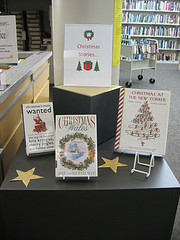 One question I get asked all the time, by patrons who were attracted by one of our book displays and then spent a few minutes looking at all the books, is, "can these books be checked out?"
The answer is of course yes (that's why we put them on display). I don't actually mind answering the question, but any time I'm repeatedly asked the same question, I think there has got to be a better way to communicate the answer.
Signs are always the first option, but signs can go wrong quickly.
Then it struck me to use the same trick that restaurateurs and buskers use - you know when you see a tip jar with money already in it, you're more likely to put some in yourself versus a jar with nothing in it?
To translate this theory to book displays, we could start using dollar bills as bookmarks in display books, but I thought a better idea would be to always leave one of the display stands empty. It's subtle and non-verbal, but if someone sees that someone else has already checked out one of the books from the display, it might communicate to them that it's okay for them to check one out, too. Which is what we want them to know, especially if no staff person is around for them to ask.
I did this on all the displays around the Reference desk last week, and I'm waiting to see if anyone asks about checking out a display book. Usually it happens a couple times a week - so far so good.
What do other people do to let patrons know it's okay to check out display books?
Tags: book, Books, communicating, communication, display, displays, libraries, Library, Marketing, public, sign, signs
Posted under Uncategorized | 15 Comments »