September 7th, 2010 Brian Herzog
 Last week I started talking about newspaper obituaries. Today's post details how we're improving access to the obituaries we do have in our newspaper microfilm records, using an online index created with Yahoo Pipes.
Our microfilm records of the local papers go back to 1940. But microfilm is primarily an archival format, rather than an accessible format, so it can be cumbersome to use. Our biggest impediment was that we didn't know what was there - when a patron contacted the Reference Desk asking for someone's obituary, it was very time-consuming for us to search the microfilm for an obituary, which may or may not have even appeared in the paper - we wouldn't even know until we checked.
So we created an online searchable index to the newspaper's obituaries - not the text of the obituaries, just a name/date/page index. Patrons and staff can use this to know whether someone's obituary appeared in our newspaper, instead of having to check the microfilm every time.
Here's how we did it: first, for about the past 10 months, volunteers have been going through every microfilm reel we have, page by page, and building an Excel spreadsheet with the following information:
| Newspaper |
Year |
Month |
Day |
Page |
FirstName |
MiddleInitial |
LastName |
Maiden-Jr-Sr |
The first column is necessary because we have records for both the Chelmsford Newsweekly (1940-1993) and the Chelmsford Independent (1986-present). The middle columns are reference and retrieval information. In the last column, we included extra information, like maiden name, whether a person was a "Jr." or "Sr." etc., and anything else that was random and didn't fit into another column.
The spreadsheet itself is useful, but I wanted to put this online so anyone could search it. The tool I chose was Yahoo Pipes, which has both pros and cons:
Pros:
- It's easy to play with and learn (like most Web 2.0 tools), but is also very powerful so we can grow into it
- It can use a csv file for the data, which is easy to create with Excel
- Beyond a simple search, it also provides fancy features like RSS feeds and tie-ins with other social media tools
- Using Yahoo Pipes is covered in Chapter 7 of Library Mashups, written by Nicole Engard
- The data is easy to update as the file continues to grow
- It worked
Cons:
- Searching a database is not what Pipes is intended to do, so it's probably not the best tool out there (I wanted to use DabbleDB, but they're in transition right now)
- The csv file must be ftp'ed to the webserver, which will be increasingly problematic - right now the file is 17,000+ lines and over 1MB. It will only get bigger, and the entire thing needs to be uploaded each time it's updated
- Pipes has funny rules that you don't know about until something breaks. For instance, field names must be single words (hence "FirstName" and "Maiden-Jr-Sr"), you can't use certain characters in the data (like /), the search doesn't let you combine keywords (so far - I'm sure there must be some kind of fancy loop setup that will allow it, but right now people can only search either by first name or last name or year)
- There isn't an easy way to embed the search box back into our website (there are Badge options, but only for search output) - you have to use the Pipe interface to search
- There doesn't seem to be a wildcard for search
- The results can't not link to something - I wanted the names and dates just to be displayed, but the way Pipes works requires the results to link to something
The last point was initially a pain, but it forced me to be creative, and I think the solution is actually more helpful for patrons than what I originally wanted. Now, when a patron finds the obituary listing they'd like to read, they click the link, and it automatically fills the obituary information into an email contact form on our website. That request gets sent to Reference staff, who then have an easy time of retrieving the obituary from the microfilm. Unfortunately, our microfilm machine isn't connected to a computer, so we'll just print and mail or fax the obituary to the patron. When possible we'll type them in and email them, and of course that will go into the searchable database too.
To make the connection from the Pipes listing to our email form, I had to use some javascript (which introduced another glitch: javascript makes names like O'Conner problematic, because it stops at the ', but I'll worry about this later).
Here's what the whole Pipe's source code looks like:
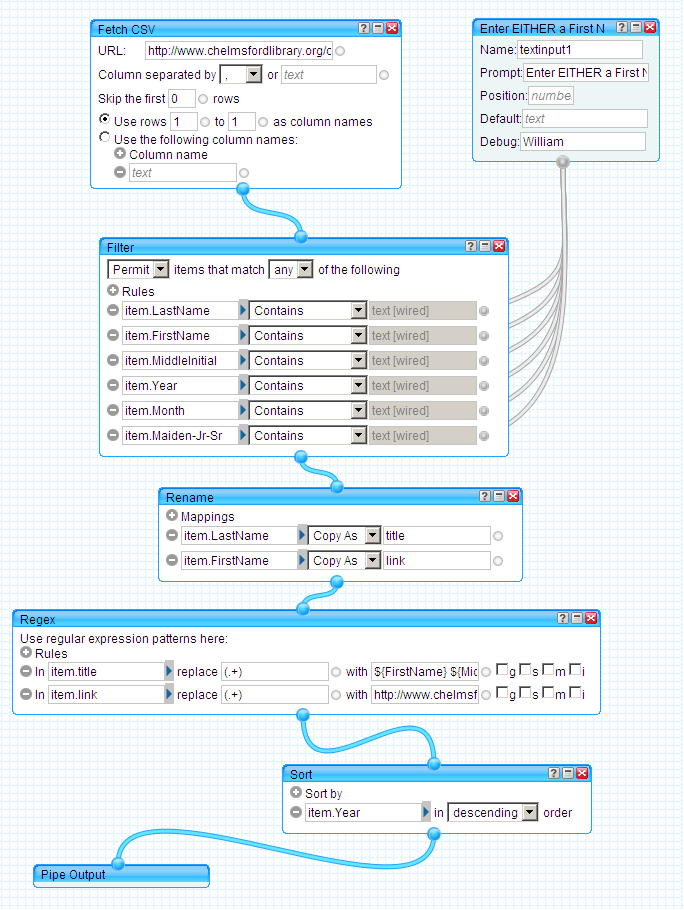
Here's what it does:
- The "Fetch CSV" module is the path to the csv file on our webserver
- The module to the right of that controls what the patron search input box looks like. The "Label" field is "Enter EITHER a First Name, Last Name OR Year:" and you can see where that displays on the Pipe page
- Both of those modules feed into "Filter" module - this one takes what the patron enters into the search box and filters the data from the csv file to create a subset of just matching records. Whatever the patron enters gets searched for in all the fields listed in the "Filter" module
- The next module is "Rename" and I'm not sure I'm using it properly - I needed to create two new fields, so I'm just taking two existing fields, copying them, and renaming them so I can work with them later. The fields that got copied still exist untouched
- Next is the "Regex" module, which is the most complicated and powerful, and I use it to create what the patron sees for the search results. The "Title" field is one I created, and here I'm replacing the contents from when I copied it to display what the patron will see on the screen - the code for it is "${FirstName} ${MiddleInitial} ${LastName} ${Maiden-Jr-Sr} - ${Newspaper}, ${Month} ${Day}, ${Year}, Page ${Page} ${Obituary}" which also includes punctuation formatting. So, for example, the result looks like this:
Katherine M. Polley - Chelmsford Newsweekly, December 31, 1940, Page 7
Because this field has to be a link, I also had to define what it links to, which is what I'm doing in the "Link" field. The value for that field is being written as
http://www.chelmsfordlibrary.org/reference/ask_us-obits.html?obit=${FirstName}+${MiddleInitial}+${LastName},+${Newspaper},+${Month}+${Day},+${Year},+Page+${Page}
which carries the data over to the library's website and some javascript pulls the data from the url and puts it in an email form. The patron can fill in their name and contact info into the form and submit it to us as an email message
- The "Sort" module is self-explanatory, and I chose to list them with most recent first
This feels far more complicated than it should be, and I'm sharing it here to both save someone else from having to figure it all out again on their own, and to hopefully get suggestions on how to simplify/improve it.
Although, speaking of improving it, I do have one idea for future development: the local Cemetery Department has spreadsheet online listing complete burial locations - it would be neat to mashup up that data, so the obituary is linked to the cemetery plot location.
That's down the road a bit, so in the meantime I just keep adding whatever new obituaries appear in the paper to the csv data file - I had planned to do that weekly, but lately there have been many weeks without any obituaries in the paper (see my previous post). Anyway, we'll see how this works - it only went live last week, but already patrons have been using it, and it certainly does save a lot of staff time.
Tags: index, libraries, Library, newspaper, newspapers, obit, obits, obituaries, obituary, online, pipes, public, Resources, search, Technology, yahoo, yahoo pipes
Posted under Uncategorized | 3 Comments »
September 4th, 2010 Brian Herzog
 Last week, a fairly well-dressed older male patron, carrying a leather briefcase, approached the desk. He explained he making a driving trip from Ottawa, ON, to Saint John, NB, for three weeks this October, and wanted to know how much rain there will be.
This actually reminded me of reference question from a couple years ago, and again I reached first for the same resource - the Old Farmer's Almanac we keep in Ready Reference. However, our edition only covers the US.
So I turned to the internet, and a search for longrange canadian weather forecast led to the long-range section of the Old Farmer's Almanac website. The page was for the US but it linked to Canadian listing.
We checked both regions he would travel in - one region said it would have a wetter-than-normal October, and the other drier-than-normal.
To get a better idea of what "normal" was, we also looked at historical weather data from The Weather Network (Canada's weather channel). This was great because it allows historical searches for a date range, which can be a tough thing to find when you need it. I've done this a couple times for local weather, so was quite pleased that my first search for Canadian weather was this successful - and the patron was happy, too.
And speaking of traveling, if you need a laugh, check out my latest passport photo - somehow I ended up as red as the maple leaf on the Canadian flag. Le sigh.
Posted under Uncategorized | 1 Comment »
September 2nd, 2010 Brian Herzog
 One function of public libraries is to be a repository for community history. The extent to which a library can do this will vary, but at the very least, the library has holdings of the local newspaper, which patrons can use to look up obituaries of local residents.
But the reality of this is changing. As newspapers struggle to stay alive, they're exploring new revenue streams - our local paper recently started charging families to list obituaries, instead of providing that service for free. The paper is only published once a week for a town of 32,000 residents, but you can still see the effect below:
| Year |
#/Obits |
| 2000 |
444 |
| 2001 |
527 |
| 2002 |
523 |
| 2003 |
566 |
| 2004 |
556 |
| 2005 |
479 |
| 2006 |
500 |
| 2007 |
220 |
| 2008 |
215 |
| 2009 |
80 |
| 2010 |
26 (as of Aug.) |
And of the 80 obituaries in 2009, only 12 were from June-December. With dramatically fewer obituaries appearing in the paper, the long-term research value of a library's newspaper holdings is diminished. There must be other factors at play too, but hopefully newspaper revenues will stabilize and this downward obituary trend will be reversed. Regardless, there will always at least be a gap for anyone doing genealogical research or just looking up a friend of family member.
And this doesn't seem to be just a local thing. A Slashdot post describes the same thing on a bigger scale. There's also a Boing Boing post that looks into Legacy.com, the company many newspapers are using to outsource obituary listings. The bottom line in both posts is that obituaries and death notices are turning into a cash cow business - and as it becomes more and more expensive to run an obituary, there are going to be fewer and fewer of them.
So, all of that is sad news - doubly so since it's out of the control of libraries (unless we start publishing family-written obituaries on our own websites for free). But at my library, we have been working to improve access to what we do have. Tune in next week for Part Two of this post, detailing how we created an online index to the obituaries in our newspaper microfilm records, to make then easier for patrons and staff to locate.
Posted under Uncategorized | 7 Comments »
August 31st, 2010 Brian Herzog
 Sometimes when I am working on a post, I wonder if another library blogger has already covered it - an am afraid I'll look kind of dumb rehashing something.
So I thought, wouldn't it be great to set up a Google custom search engine to search all library-related blogs? Before I did, I checked if anyone already created one, and it turned out Library Zen had - four years ago (I'm even further behind than I thought).
LISZEN Search searches over 500 library blogs, and has an accompanying wiki to keep track. If you write about the library world, add yourself.
Something related that would also be nice is a custom search of just library websites - so it would be easy to quickly see what other library's policies are regarding ebooks, or circulating laptops, or how much they charge for printing, etc. But considering the breadth of libraries and the complexity of maintaining it, just using regular Google might be more realistic.
Tags: blog, blogs, co-op, cse, custom search engine, google, librarian, librarians, libraries, Library, liszen, public, search, Technology, Websites
Posted under Uncategorized | 10 Comments »
August 28th, 2010 Brian Herzog
 This was sort of a frustrating question, but in the end was fun - mainly because I get to tag this post "gonzo reference."
A patron came rushing up to the desk (literally) and said he quickly needed to know John Philip Sousa's religion. Since time was important, I gave the patron Encyclopedia Britannica and showed him how to find the John Philip Sousa article, while I searched Wikipedia. Neither identified his religion, so the next step was to grab the one Sousa biography we had on the shelf, and the patron looked through the index under "faith," "religion," etc., while I kept searching our databases and the internet.
Again, neither of us located anything quickly, except for a quote online attributed to Sousa:
My religion lies in my composition.
That didn't exactly answer the patron's question, but he felt Sousa must have meant that, regardless of what religion he was officially, he wasn't himself a very religious person, and that was good enough for the patron. He thanked me and rushed out.
But I was still surprised that such an simple fact wouldn't have been more readily available. I decided to keep searching until I found it, and then add the fact to Wikipedia - mainly because I can. I was already in the library's catalog, so I requested a Sousa biography from another library (John Philip Sousa: American Phenomenon) that seemed likely to have the information.
When it arrived, I started flipping through it, then wondered if this had been scanned into Google Books - turns out, it had. I searched the content of the book for "religion" and found the answer I was looking for at the bottom of page 102.
I then composed a little paragraph and added it to Wikipedia:
Although Freemasonry is an organization influenced by religious beliefs, John Philip Sousa himself was not. He was an Episcopalian, and while tolerant of religious beliefs in general, he personally regarded music as providing more Divine inspiration for people than Sunday sermons.[13] He is also widely quoted saying, "My religion lies in my composition."[14]
So I was feeling pretty good with myself for tracking down this information and contributing it to Wikipedia - with the logic of, "if you can't find a reference, make a reference." But then it occurred to me: if the book I found the information in is in Google Books, why didn't show up in my initial internet search.
I don't know if it did then and I just missed it, but now this book, linking directly to page 102, is showing up as the fourth result for a search on "john philips sousa religion." Hmm. So despite my boasting last week, even information professionals can miss things. Oh, and by the way, he was Episcopalian.
Posted under Uncategorized | 2 Comments »
August 21st, 2010 Brian Herzog
 This question might get me into a little trouble* but it's a good example of the importance of librarians, so here goes:
The phone rang, and the person on the other end said she was a librarian fresh out of library school, working at elementary school in Colorado, and having trouble locating some poems her teachers wanted for class. She knew the titles and authors, but couldn't find the actual text in her library or online. She called me because she likes my website and hoped I could help.
My first suggestion was Granger's Index to poetry - it wasn't in her collection but was in her local public library. But because online resources are more useful for these long-distance questions, and it was a very quiet afternoon at work, after we hung up I thought I'd try searching for the text myself, too.
The four poems she was looking for were Eating the World, Last Kiss and Statue by Ralph Fletcher, and Spaghetti by Cynthia Rylant. I started by searching for title/author combinations, grouped together with quotes (ie, "ralph fletcher" "eating the world"). I was somewhat surprised that, even after going through the few pages of results, the texts weren't there.
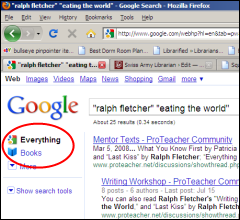
Then I thought maybe they were scanned as part of the Google Books project, so I clicked the link on each page to switch to searching Google Books (see image above). And if I was surprised at not finding the texts in a regular web search, I was doubly surprised to find they were the first or second result when searching Google Books.
So far, including the phone call, this all took me literally less than ten minutes.
I emailed the four story links to the librarian, and she replied that they were exactly what she needed. So that's nice.
But I do think this is also a nice example of why librarians remain relevant in the internet age - an inexperienced searcher may not have known to enclose the author names and titles in quotation marks, or may not have known to try the more specialized Google Books search when the first attempt produced no results (keeping in mind that there are also lots of non-Google tools available, too), or may not have recognized the answer even though it was in a form other than what they were expecting (these poems turned out to be short stories).
This is especially true in light of the recent Northwestern University study that shows "digital natives" aren't actually all that web-savvy. The study's results seemed to imply that kids expect the internet to present them with the answer to their question, rather than expect to be engaged in the information search and critically evaluate resources themselves.
My favorite quote:
During the study, one of the researchers asked a study participant, "What is this website?" The student answered, "Oh, I don't know. The first thing that came up."
If it were someone from the iGeneration searching for these stories, it seems likely they would have stopped after the first search, empty-handed. So, yes, there certainly is, and will be, a need for librarians and experienced information searchers.
*Since I work in a public library, my tax-funded salary is intended to be spent on helping local patrons. It's hard for me to say "no" when people ask for help, but I do not (and ethically can not) make a habit of helping other librarians with their questions on work time - unless, of course, I'm contacted to check a resource my library owns. There are forums that can help with questions like this, such as Unshelved Answers, the PUBLIB mailing list, the Internet Public Library question form, Ask Metafilter, and many others of varying degree of credibility. Something I love about librarianship is the collaborative and cooperative nature of the profession, but I guess there has to be limits, too.
Tags: google, google books, libraries, Library, poem, poems, public, Reference Question, search, searching, stories, story
Posted under Uncategorized | 3 Comments »



