January 21st, 2015 Brian Herzog
If you work on your library's website, this infographic on when to use different graphic formats might be useful. Tech things like this always interest me (if you're only a little interested, skip down to the What Should You Use section at the very bottom for the summary). (via)
And speaking of image stuff, Here's a List of More Than 30 Free Image Sites That Don't Look Stock-y. Nice-looking free images are always a good resource. (via)
Tags: file, format, gif, graphic, graphics, image, images, internet, jpeg, jpg, png, Technology, web, web design, Websites
Posted under Uncategorized | 6 Comments »
December 15th, 2011 Brian Herzog
 There was an article in our local paper this week about a resident's experience volunteering in the community. Nice, but what I especially like is that he cited http://www.chelmsfordvolunteers.org as the way he found his volunteer opportunity.
This stood out to me (and others at the library) because this website was created and maintained by the library - yay us! The article doesn't mention the library at all, but it's still a win because the resident found what he was looking for.
I'll be the first to admit that the Chelmsford Volunteers site isn't a marvel of design. We created it a few years ago to be a centralized listing of organizations in town that have volunteer opportunities, because this is something we get asked about a lot. It's evolved over time, and now a simple WordPress website, with a calendar of upcoming events, and one page for each organization so that it's easy for people to search.
The reason I bring it up here is because I was curious if any other libraries maintain websites under a domain different from the main library's website. My library also maintains the website for our town-wide history project.
Our logic for creating these as separate websites includes:
- branding: it's easier to remember "chelmsfordvolunteers.org" than "chelmsfordlibrary.org/volunteers" or something else
- shared resource: the chelmsfordhistory.org is a project involving other organizations in town, and I think having a non-library website makes us all co-owners of the project, instead of the other groups just contributing to a library project
- focus: the library does a lot of things, but each of these separate websites are very focused on one specific area - having standalone websites lets visitors see only what's relevant to that topic, instead of all the other stuff we do, which might be a distraction
- it's easy: all our websites are hosted at bluehost.com - creating a new website is a matter of buying a new domain and clicking a button, and it's ready to go
I'd be very curious to hear about other libraries' experiences with maintain websites beyond the primary web presence - how you do it, why, is it successful, etc. If this is something you do, please leave a note in the comments with a link to your website - thanks.
Posted under Uncategorized | 5 Comments »
July 19th, 2011 Brian Herzog
 For anyone who uses WordPress, here are a couple resources you might want to check out:
Using WordPress as a Library Content Management System
A recent Library Technology Reports covers using WordPress to run your entire library's website. My library uses WordPress just for our two blogs right now, but are looking to migrate the entire site to a CMS. Thanks to Michael Stephens for highlighting this, and linking to the full-text of the first chapter.
2011 WordCamp Boston
For those in the Boston area, WordCamp 2011 is happening this weekend at BU. I'm looking forward to it because I've never actually attended an official WordPress-devoted event - I'm going to attend sessions everywhere from basic introduction to advanced fanciness. It's $40 for the weekend, which is less good than free, but I think it's still well worth the price. And for people who can't make it to Boston, look for a WordCamp in your area.
Tags: 2011, ala, boston, cms, Library, library technology report, ltr, Technology, Websites, wordcamp, wordpress
Posted under Uncategorized | 2 Comments »
May 5th, 2011 Brian Herzog
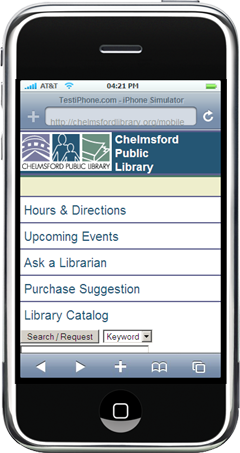 I'm doing a few talks this year about how to build a mobile website for libraries - based, mainly, on my posts about the one I made for my library. This Friday is the first of those talks, for the New Hampshire Library Association's Spring Conference.
For a sneak preview, I put my slides and a few more "going mobile" type resources up at SwissArmyLibrarian.net/mobile.
I also posted there my first attempt at a downloadable template version of the site I made, that other libraries can use to build a mobile site for themselves. It takes a lot of customization (obviously, it all has to be customized with your information), but I tried to provide instructions. If anyone tries it, please let me know how it can be improved.
I've never been to NHLA before, but I have heard nothing but good things, so I'm looking forward to it. Besides, any time spent in New Hampshire is time well spent.
Tags: Conferences, libraries, Library, mobile, new hampshire library association, nhla, nhla11, nhla2011, public, website, Websites
Posted under Uncategorized | 2 Comments »
November 16th, 2010 Brian Herzog
Whoa - check out the new website for the San Jose Public Library:
Sarah goes into some detail about the features of the new website and their reasoning behind it, which is worth reading. Here's my two cents too:
- I love that they've done away with organizing their website along library department lines (Reference, Childrens Teens, etc.)
- The design is wonderful - so clean and simple, yet colorful, engaging and informative. It's so different it's shocking at first, but once your eyes and mind adjust to the new design, everything is just there
- Actually, now that I think of it, the homepage reminds me of the app icons on a smartphone - which is an interface that increasing numbers of people are becoming familiar with
- I like embedding functionality, so two things I'd be curious to try to see if they'd work are:
- In the New and Events block, instead of a picture to click on, embed a scrollable list of upcoming events to bring that info one step closer to the patron. Also include the link to drill down into the rest of that section
- In the Locations block, again instead of a picture, it'd be neat to just embed the Google Map right there, and have each of the branch location markers include address, phone, email, and hours. That would put so much information right on the homepage, and of course again include a link to get into the rest of the section
- But these might be overwhelming, so you'd have to try them to see
My library is planning to redesign our website, ahead of our migration to Evergreen. I'm definitely going to lobby to use SJPL's design as one of our models. Good job guys.
Posted under Uncategorized | 4 Comments »
October 19th, 2010 Brian Herzog
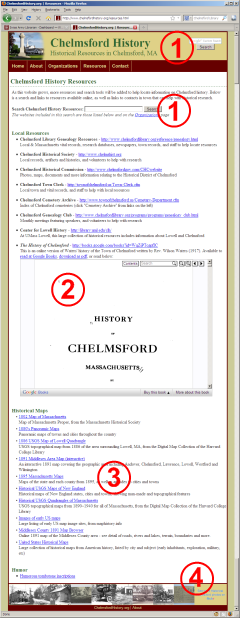 As part of NELA2010, I'm doing a poster session on Quick and Easy Website Mashups - very simple ways to add more information and utility to library websites.
The image at right is an example of the Resources page on the ChelmsfordHistory.org website (a town-wide history project my library participates in). Embedded in the page are four different mashups, which makes it both more useful to researchers, and easier to maintain. Win-win.
If you're interested in seeing easy examples of adding more content to your website, check it out.
Tags: Conferences, libraries, Library, mashup, mashups, nela, nela10, nela2010, new england library association, Technology, web2.0, website, Websites
Posted under Uncategorized | 2 Comments »



