Archives for Reference Question:
October 22nd, 2011 Brian Herzog
 Sometimes, it's not the difficult questions that are the most engaging - but then again, I can be entertained by very little (remember, I'm the kind of guy that is content reading the phone book).
A patron came to the desk and asked if we had any typing tutorial software she could check out. I knew we had books on learning to type, but no software, so I just did a quick search for "typing tutorial" online and the first result is exactly what the patron wanted.
She was happy, and I set her up on a computer to work on it. But then of course I was curious, and started playing with the website myself - and it turns out it is a very fun and addicting program. It gives a live words-per-minute speed indicator, so my game was to get that up as high as possible (also remember, I only use three fingers when I type).
This is also another example of "everything is on the internet, but it took asking a librarian to find it" - but then, I wouldn't expect someone learning to type to be good and online searching. And in this case, I was happy she asked, because not only could I show her how to do an internet search, but now I also have a fun new game that might actually improve my own typing.
Tags: keyboard, keyboarding, learn to type, libraries, Library, public, qwerty, Reference Question, Technology, touch-typing, tutorial, type, typing, typing tutorial
Posted under Uncategorized | Comments Off on Reference Question of the Week – 10/16/11
October 15th, 2011 Brian Herzog
 This was not a difficult question, and not the first time I've encountered it. But the patron was funny, and I was actually surprised how well this particular tool worked.
About eight minutes after we opened one morning, a woman comes to the desk and says,
You have to help me - I'm desperate.
And then she walked away. It didn't take my librarian-sense tingling to know she wanted me to follow her, back over to the computer where she was working.
She sat down and said (without looking to see if I had, in fact, followed her),
I can't print out this project. My son the poor kid wrote it at home and our printer is busted so I came here to print it for him but your computer won't let me open it and he needs it today so can you print it for me it's in my email do I need to save it to a disk it won't open...
You know, one of those situations when the patron won't let you get a word in edge-wise, even to answer their question. Obviously she was in crisis-mode, but was kind of humorously fatalistic about it, because apparently everything had been going wrong: their home printer broke, come to the library to print but can't open the file, etc.
She had emailed the file to herself (which was good), and I could see the attachment was a .odt file, which is the extension of a document created with Open Office. I thought Microsoft Work was able to open that file type, but when I downloaded her file and tried it (which I think is exactly how far she had gotten), it didn't work.
So first I explain to her why it doesn't work - because she created the file with Open Office (which she knew, and that was good), but that we don't have the right software to open that file type. Then I started to explain that she'd have to go back home and use Open Office to save the file in a format Word could open - .doc, .rtf, etc. She then started in (crisis-thinking again) on whether she should have saved it to a CD (which is never the answer), name the file something else, and all kinds of other options.
While she was talking, it occurred to me that we might just be able to use a file converting website, without her having to go home. So while explaining what a converter website is, I did a quick search for convert odt to doc and spotted a website called ConvertFiles.com.
It was perfect, and easier to use than any other converter website I've found (usually my go-to is Zamzar). You just upload your file by clicking the Browse button, choose the format you'd like to convert to, and then click convert. It took maybe twenty seconds, and then we could open the file in Word.
What I liked about this website was that it let you open the file right away, instead of them emailing it to your account as an attachment.
And boy, when her son's report popped up on the screen, she almost cried. She also tried to print it as quickly as possible, just in case it suddenly went away like some cruel trick.
In my library, printing costs $0.15 per page, and her son's report was two pages. She immediately pulled out a dollar bill, handed it to me and said, "keep the change." But she must have known we can't accept tips, because when I showed her how to use the pay-for-print machine, she took her change back - and then hugged the printed papers to her chest and kept saying, "oh, thank you thank thank you..." all the way back to her workstation.
From start to finish, this entire reference interaction took about three minutes - and in that time, this woman's emotions went from one extreme to the other. It was a very small part of my day, but I think it had a huge impact on her's (and her son's) - which is why I think a converter website like this should be in every reference librarian's toolbox.
Tags: conversion, convert, converter, doc, file, libraries, Library, odt, open office, pubic, Reference Question, Technology, word
Posted under Uncategorized | 11 Comments »
October 8th, 2011 Brian Herzog
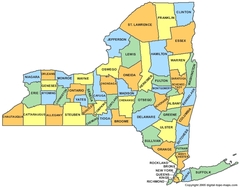 I've been out most of this week at conferences and meetings, so haven't been in the library enough to get a really good reference question. But I did get one directly from someone who reads this website, which I thought would be fun for other people to try. His question:
Here is a nice reference question for you. I tried to answer it but couldn't. It's a question I got from a colleague (at the university I work for) who got it from his daughter (a junior high student).
In the state of New York there are several places that are also found in a number of other states. Name the New York places that match these descriptions.
Place 1
Is also located in 11 other states: Delaware, Indiana, Iowa, Kansas, Michigan, Minnesota, New Jersey, Ohio, Oklahoma, Pennsylvania.
Place 2
Is also located in 15 other states: Colorado, Georgia, Indiana, Iowa,Louisiana, Maine, Maryland, New Hampshire, North Carolina, Ohio, Oregon, South Dakota, Texas, West Virginia, Wisconsin.
Place 3
Is also located in 27 other states: Arkansas, California, Connecticut, Georgia, Illinois, Indiana, Iowa, Kentucky, Kansas, Louisiana, Maine, Massachusetts, Michigan, Mississippi, Missouri, Nebraska, New Hampshire, New Jersey, North Carolina, Oklahoma, Oregon, Pennsylvania, Utah, Vermont, Virginia, West Virginia, Wisconsin.
Place 4
Is not only located in 9 other states: California, Illinois, Indiana, Iowa, Oregon, Pennsylvania,Virginia, Wisconsin
But is also the name of a Canadian province.
I found a Wikipedia page (but not the right answers) and a page made by Dan Tilque which was about toponyms
I believe I found the Wikipedia page he referenced, as well as an About.com page, but they didn't answer the question. The reference to Dan Tilque ended up leading to a journal named Word Ways: The Journal of Recreational Linguistics. He apparently was the author of an article in 2001 named Common Place Names, but when I tried finding that journal in our databases, the coverage only goes back to 2002 - that's frustrating.
The Most Common US Place Names Wikipedia article cites the Census Bureau's American FactFinder as the source, but I played with their interface and couldn't find any kind of listing that would help with this question (but did learn that they're releasing a new version of the FactFinder soon).
I tried searching online for things like toponym trivia "new york", but had no luck - does anyone know a resource to answer this type of question?
Posted under Uncategorized | 12 Comments »
October 1st, 2011 Brian Herzog
 In library school, one things I was taught was the way a library is organized allows for a great deal of serendipity. This isn't really a reference question and doesn't have anything to do with the way a library is organized, but when I came in to work one day, two of my coworkers filled me in on this odd case of serendipity.
About 10:45 that morning, a patron came to the desk and said,
I left my laptop here last night - did anyone find it?
My library is on two levels, so we have one lost-and-found at the Reference Desk (downstairs) and another upstairs near the Circulation Desk. The person on duty at the Reference Desk checked our lost-and-found box, and not finding a laptop there, went upstairs to check the other one.
Nothing there either, so she came back down to the Reference Desk to search a little more thoroughly - thinking that if someone had found a laptop, perhaps they put it somewhere a little more secure than just the lost-and-found box (which is a drawer in the Reference Desk). She searched all behind the desk, and after not finding it, started looking in the Reference Office (which is right behind the desk).
The only thing she found back there was a laptop in a Black & Decker bag that had been left here over a year ago. The battery was dead and we didn't have a charger for it, so we couldn't turn it on to try to identify it. I didn't want to just throw away a laptop, so it just sat in a corner of the office - literally for over a year.
The staff person knew that couldn't be it, but picked it up and showed it to the patron anyway saying something like, "this is the only lost computer we have."
Apparently, the patron looked at it intently, paused, looked at it again, and then said,
Well, wait. That is my laptop. It's not the one I lost last night, but it's mine - I lost it like a year ago just before I stopped working for Black & Decker.
How bizarre is that? Since he had the timeframe right, she gave it to him - but it still didn't help find his most recently-lost laptop.
By then it was 11:00 AM, and the second reference person was just getting to the desk to start her shift - and, it just so happened that she was the person who had closed the night before. She remembered the patron, because just before closing time the previous night, she had seen a laptop sitting unattended on a table, and asked him it if was his (since he was one of only two patrons still there at the time). He had said it was - but even with this reminder, apparently he forgot to take it with him.
Since the laptop was nowhere else to be found, she walked over to the table where she had seen it last night - and there it was.
The patron was happy to have both laptops back, and left - and the Reference staff were kind of baffled that he had them running all over the building looking for it, without even checking to see if it was where he had left it the night before.
Lost and Found Policy
I was happy too, because it made me feel vindicated for not chucking out that laptop long ago. I didn't want to get rid it of without knowing if there was private or personal information on it, but I also didn't feel right drilling or otherwise destroying it.
But this makes me curious what other libraries do with found laptops. For flash drives, I look at the files and 90% of the time find a resume that allows me to contact the owner and return it. Otherwise, our policy basically is keep everything until we run out of room, and then get rid of the really old stuff to make more room (and delete all files on any disk before we recycle it).
Posted under Uncategorized | 10 Comments »
September 24th, 2011 Brian Herzog
 A patron came up to the desk with "SONY" written on a piece of paper. He said,
This is the kind of TV I have; can I plug headphones into it? I looked at the television but there are so many little plug holes that I don't know what they're all for.
I explained that Sony makes lots of different models, some with and some without headphone jacks. We really needed the actual model number of his television to answer this, so he said he'd go home and look for that and call me when he found it.
20 minutes later he calls, and I do an image search for sony kdl32l5000 to look at the pictures. My logic was that a headphone jack would probably be right on the front of the television if anywhere, so it should be easy to spot. If that didn't work, then I'd look for specs or a manual.
I found lots of pictures of the front, back, and sides of the television, but didn't see a headphone jack anywhere. None of the reviews mentioned headphones either. To double-check, I visited the Sony's product webpage for this television. I did Ctrl+F to search for headphone on the page, but there was no mention - and disappointing product images, too.
All the while, the patron had been describing the jacks he could find - none of which had a picture of little headphones next to it.
For a quick last attempt, I did another search for kdl32l5000 headphones and found the manual, and also the chat log of someone offering support for this exact question. I found the chat log hilarious, but between that and everything else I'd found, the conclusion was that there is no headphone jack on this television.
The patron was fine with that when I told him. However, in the meantime he had inadvertently pulled all the other wires out of the television while sliding it around, so the headphones were now the least of his worries.
Tags: headphone, headphones, jack, kdl32l5000, libraries, Library, public, Reference Question, sony, television, tv
Posted under Uncategorized | Comments Off on Reference Question of the Week – 9/18/11
September 3rd, 2011 Brian Herzog
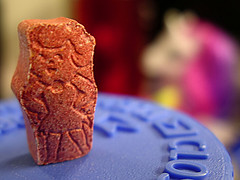 Right as I got to work one day, the coworker I was relieving said a patron had just called in with a question that she hadn't been able to research yet. It was this:
They say that Flintstones vitamins are healthy for kids, but aren't those artificial colors they use dangerous?
It seemed to me that if this were true, then we'd all hear about it in the news, or they wouldn't be allowed to use the colors.
Anyway, my first stop was the Flintstones vitamins website, which has an ingredients listing. As I suspected, the colors listed were the common Red #40, Yellow #6, and Blue #2 that you see in other food products - which I'm sure must have been approved by the FDA to be used in anything someone, especially children, would consume.
To be on the safe side, I did another search for flintstones vitamins colors danger, which produced, among other things, a link to an FAQ on the Flintstones vitamins website. An excerpt:
What colors/dyes are used?
All of the dyes that are used in our products are approved by the Food and Drug Administration (FDA). The dyes used are as follows:
FD&C Red #40 Aluminum Lake
FD&C Yellow #6 Aluminum Lake
FD&C Blue #2 Aluminum Lake
Why do Flintstones multivitamins contain aspartame (artificial sweetener)?
The Flintstones Complete formula and Plus Calcium formula contain aspartame. The aspartame masks the bitter taste of calcium found in both of these formulas. Sugar would be needed in large amounts to mask such a bitter flavor and would make the tablet too large.
Is aspartame safe?
Yes. It is important to note that aspartame is one of the most tested food additives in history and has been approved by the Food and Drug Administration for use in multivitamin products.
That was informative, but again, not a surprise - of course a company is going to explain why its product is safe.
However, the "among other things" listed in my second search were lots of websites explaining the dangers of Flintstones vitamins. Namely, that the coloring ingredients can lead to ADHD, there's too much sugar in them, and more. However, many of the dangers seemed like they could be associated with any processed food, and one website also even said that that evidence of any danger was controversial.
I called the patron to let her know what I found, and to ask if she'd like me to do more intensive research by looking at peer-reviewed scientific journals. She said no, she had just seen a television commercial that made the vitamins look like candy, and it struck her that anything that looked like candy couldn't possibly be good for kids.
In the end, she wasn't all too impressed that the colors are all FDA-approved, but she accepted it and thanked me.
Meanwhile, I was left with all my childhood memories of my siblings and I around the breakfast table each morning trading Flintstones so we all got the character we wanted. Ah, carefree childhood.
Posted under Uncategorized | 8 Comments »



