April 27th, 2013 Brian Herzog
 A patron came up to the desk, saying she had an email question.
After a bit of a convoluted story, it boiled down to this: she was applying for a job, and emailed her information to their HR person. But she never got called for an interview, because the HR person said she had never received the patron's information. The patron wanted to know if there was a way to prove that the HR person did get it, because she knows she sent it.
The patron seemed to be fairly knowledgeable about computers and email, but I explained anyway that it is certainly possible for something not to get delivered, or get blocked for whatever reason, or go into a spam folder, etc.
Having a message in her own Sent folder would indicate when it was sent. That can probably be manipulated so I don't know if it'd be admissible in court, but in this case it might be good enough if the HR person was willing to listen.
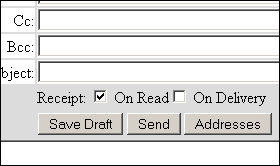
But what the patron really wanted was confirmation that the HR person received the email. I didn't know how to find out after-the-fact (other than subpoenaing their server logs), so I told her about delivery receipts and read receipts. These are the little confirmation messages that come back to let you know someone got and opened your message.
Since it was the closest thing to what she wanted, we went into her email account so I could show her how to use them. However I explained that these aren't foolproof either - not all email clients will honor them. In fact, the email client I use offers a setting to ignore them.
She had both a Gmail and a Yahoo account, and it turns out - much to my surprise - neither one lets you request receipts.
I did some quick checking online, and it seems like Yahoo doesn't offer receipts at all, and Gmail only with their business accounts (not the free version).
Well, like I said, I was surprised. I tried searching for ways to make it happen anyway, and it looks like there are only two options: use an email client like Thunderbird or Outlook (which, for a patron using a library's public computer, isn't actually an option), or use one of the many email receipt services out there. Another website I found had some trickier solutions, but were too complicated for our purposes. There's also Boomerang for Gmail, but since that needs to be installed in the browser, it likewise wasn't appropriate.
Until this day I didn't even know these existed, so I have no idea how well they work. The patron was interested in the free web-based services, but only future-tense. Unfortunately, it looked like she was out of luck with her original question. I think she knew that before she even asked, but hoped librarians had some magic we could work - I hate disappointing patrons.
Tags: delivery receipt, email, gmail, libraries, Library, public, read receipt, receipt, Reference Question, Technology, yahoo
Posted under Uncategorized | 2 Comments »
April 24th, 2013 Brian Herzog
 Here's something that will hopefully have a significant impact on libraries in the future: there's a state-wide ebook initiative getting underway in Massachusetts.
This project was begun after hearing about the Douglas County (CO) Libraries "host your own ebooks" platform (and why). However, instead of just a single library system, Massachusetts wants to involve all the libraries in the Commonwealth.
Also, the end goal is a little different than Douglas County. Instead of hosting all the content we buy ourselves, the Massachusetts Library System (who is spearheading the project with support from the Massachusetts Board of Library Commissioners) is looking to develop a "discovery layer" interface that can search multiple vendors' ebook catalogs.
That way, patrons will just have one place to search all available ebooks, no matter which publisher or vendor they come from. This is good because the project includes all types of libraries - public, academic, school, special - which all have different ebook requirements. In the public world, people like to download fiction; in the school world, simultaneous online access to textbooks is required. This model is designed to accommodate the gamut.
My library is one of 50 pilot libraries that will begin testing this summer. The initial collection should be approximately 10,000 titles, negotiated directly with as many content providers as possible.
The current status of the initiative is, I believe, that proposals from vendors are still coming in. The project seems like it has a very quick timeline (see the project timeline & FAQ [pdf]), but I think that's a good thing.
In addition to the Colorado project, the Califa Consortium in California is also engaged in a similar endeavor. The Massachusetts project is unique in that it is the only state-wide program. Hopefully, as projects like this become larger and more numerous, libraries across the country will be able to adopt or join to give libraries a larger voice in the future of ebooks.
This is definitely something I'll be talking more about in the future. It's still early days yet (for the pilot libraries), but we're excited to get going.
Posted under Uncategorized | 4 Comments »
April 20th, 2013 Brian Herzog
This week I have almost nothing to say. First, everyone here has been focused on the bombings in Boston and the ensuing manhunt, which thankfully ended with an arrest Friday night. Secondly, this week was also school vacation week in Massachusetts, which always makes for a slow time at the Reference Desk.
 As a result, the most notable question of the week was actually the lack of a particular question. Friday, April 19th, was the first day since January that not one person asked me for tax forms. Now that is a milestone worth celebrating.
Hopefully next week things will return to normal, and I'll get back on track with library stuff - and put away our tax form display for another year.
Posted under Uncategorized | Comments Off on Reference Question of the Week – 4/14/13
April 13th, 2013 Brian Herzog
 This might surprise non-librarians, but reference staff doesn't just sit around all day answering regular questions. Sometimes, you get something like this:
A 20-something patron walked up to me at the Reference Desk one evening and said,
You know that bulletin board in your teen area that always has different stuff on it? I don't know if you take suggestions from people, but here's a puzzle kids might like to try to figure out. I say "try" because I show this to lots of people and no one has solved it - even math teachers.
With that, he takes a piece of scrap paper, writes four 9s on it (as in, just 9999), and explains the puzzle.
The goal is to use these four nines, and any mathematical symbols, and have the result equal 100. You can use any combination of symbols - +, -, /, x, ( ), etc. - but the result must work out to be exactly 100.
Just then his ride came to get him, so he flipped the paper over, wrote the answer on the back, and said he hoped the kids would have fun with it.
So there I was - it was a slow night, I've got an "unsolvable" puzzle in front of me, and the answer is also at my finger tips. Such a temptation to cheat, but I gave it my best shot, trying all kinds of different ideas over the course of the night. No matter what I tried though, I just couldn't get it, so eventually I had to look at the answer.
I'm sure this puzzle (and the solution) is on the internet somewhere, but if you're interested, give it a try. If you give up, or want to check your answer, this link will launch the solution in a new window (this is exactly what the patron wrote on the back of the scrap paper).
Posted under Uncategorized | 4 Comments »
April 6th, 2013 Brian Herzog
 This wasn't a very difficult question, and although it didn't have a great ending, I thought it was interesting anyway - and happy we could help because the patron had no where else to go.
A patron walked up to the Reference Desk and asked to use the phone. We generally only let people use desk phones to call for rides or other quick things, mainly to make sure phones are available for staff to answer incoming patron calls.
Since it was fairly early in the day, I asked him if he was calling for a ride, and he said,
No, I need to call email tech support. I called them last night to help with my email, but he said I needed to be in front of the computer. I don't have one at home, so I always use the library computers. I don't have a cell phone either, but I think this computer here in the corner is close enough to the Reference Desk that I could stretch the phone cord across the aisle while I talk to him. It should be a quick call.
Okay, by the time he was finished speaking, all kinds of red flags were waving for all they're worth.
I sympathize with people trying to use technology without actually owning their own technology - libraries are great, but obviously some things are much easier to do at home. However, also obviously, I couldn't allow this patron to:
- block an aisle way by stretching a cord across it
- engage in a phone conversation at the public workstation, since we routinely ask people doing this very thing to take their cell phone call in a different area of the library so as not to bother the other computer users near them
- tie up one of the Reference Desk phones for this long a time - no tech support call in history has been "quick"
Hoping to avoid this situation entirely, I asked the patron what he was trying to do, and if I could help. His answer kind of surprised me:
I've always used Hotmail, but now I'm switching to Gmail. The Gmail people said they were able to import everything from my Hotmail account, except what was in my Drafts folder. But when I went in to move those myself, I accidentally deleted some, so I called Hotmail to see if they could be restored.
First, I had no idea that Gmail offered a migration service, but they do. Neat. Secondly, I think he's right in that he'd need Hotmail tech support to recover deleted messages. I did check his account with him, just to see if there was something he overlooked, but from what we could tell the draft messages in question were gone.
And so, this left us with the original question of how he could use a phone and a computer at the same time. Eventually it dawned on me that he could borrow one of the laptops we loan to the public, and the Reference Desk's cordless phone,* and sit in an area of the library where his talking wouldn't bother anyone. It seemed like a good solution, and he was happy.
45 minutes later(!) he came back, a little dejectedly, and said Hotmail couldn't recover his messages after all. He wasn't entirely sure of the reason, but by this point had accepted it. The messages weren't critical, but he certainly would have preferred to have them. I apologized and we commiserated a bit about technological dependence, then he thanked me for the library being able to accommodate his situation, and left.
So in case anyone was wondering, the digital divide is still alive and well. It also made me wonder: do any libraries loan cell phones to patrons? I'm not an expert on cell phone technology, but I think there are the the kind where patrons could just pay to put minutes on them, so it wouldn't cost the library anything. It would have been helpful in a case like this, or if a patron was going on a trip or something and wanted the security of being in touch. It seems like a good idea, but I'm sure I'm overlooking some vital flaw.
*Our Reference Desk has two phones at the desk (and two computers), as well as a cordless phone in the Reference Office behind the Desk. We carry this with us when we know we'll be away from the desk, because it sure beats trying to sprint back to the desk when the phone rings while you're in the stacks.
Tags: computer, digital divide, email, gmail, hotmail, libraries, Library, migrate, phone, public, Reference Question, tech support, Technology
Posted under Uncategorized | 14 Comments »





)