September 6th, 2011 Brian Herzog
 Thanks everyone who contributed their favorite keyboard shortcuts. I picked what I thought were the most helpful for someone fairly new to computers, and put together a little handout:
It's for new users, so I stuck with, basic, simple, and common. I hope it'll be helpful, but depending on the person, it might still be overwhelmingly complicated. But if it is well-received, I'll do a second one with the more advanced helpful shortcuts that people submitted.
Feel free to use or adapt it - I made it so it was easy to change the letters on the keys, so feel free to modify and expand.
And please let me know if you see any mistakes, or thought of a way to make it clearer or more helpful - or if you have an image better that the Microsoft clipart I used.
 Mac Users
I added a note at the bottom about how to use these shortcuts for Mac, and I wanted to show what the Command key looked like. While searching for the image online, I also came across the origin of the Infinite Loop symbol, which I had never really wondered about before. Interesting.
Update 10/11/11
Thanks to Adam Van Sickle of the Teton County Library - he worked to have the handout translated to Spanish, and allowed me to post the English/Spanish version here [pptx] for anyone to use. Thanks Adam!
Tags: computer, computers, handout, handouts, keyboard, libraries, Library, public, shortcut, shortcuts, Technology
Posted under Uncategorized | 4 Comments »
September 3rd, 2011 Brian Herzog
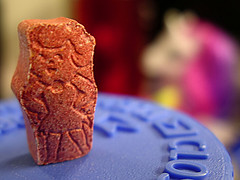 Right as I got to work one day, the coworker I was relieving said a patron had just called in with a question that she hadn't been able to research yet. It was this:
They say that Flintstones vitamins are healthy for kids, but aren't those artificial colors they use dangerous?
It seemed to me that if this were true, then we'd all hear about it in the news, or they wouldn't be allowed to use the colors.
Anyway, my first stop was the Flintstones vitamins website, which has an ingredients listing. As I suspected, the colors listed were the common Red #40, Yellow #6, and Blue #2 that you see in other food products - which I'm sure must have been approved by the FDA to be used in anything someone, especially children, would consume.
To be on the safe side, I did another search for flintstones vitamins colors danger, which produced, among other things, a link to an FAQ on the Flintstones vitamins website. An excerpt:
What colors/dyes are used?
All of the dyes that are used in our products are approved by the Food and Drug Administration (FDA). The dyes used are as follows:
FD&C Red #40 Aluminum Lake
FD&C Yellow #6 Aluminum Lake
FD&C Blue #2 Aluminum Lake
Why do Flintstones multivitamins contain aspartame (artificial sweetener)?
The Flintstones Complete formula and Plus Calcium formula contain aspartame. The aspartame masks the bitter taste of calcium found in both of these formulas. Sugar would be needed in large amounts to mask such a bitter flavor and would make the tablet too large.
Is aspartame safe?
Yes. It is important to note that aspartame is one of the most tested food additives in history and has been approved by the Food and Drug Administration for use in multivitamin products.
That was informative, but again, not a surprise - of course a company is going to explain why its product is safe.
However, the "among other things" listed in my second search were lots of websites explaining the dangers of Flintstones vitamins. Namely, that the coloring ingredients can lead to ADHD, there's too much sugar in them, and more. However, many of the dangers seemed like they could be associated with any processed food, and one website also even said that that evidence of any danger was controversial.
I called the patron to let her know what I found, and to ask if she'd like me to do more intensive research by looking at peer-reviewed scientific journals. She said no, she had just seen a television commercial that made the vitamins look like candy, and it struck her that anything that looked like candy couldn't possibly be good for kids.
In the end, she wasn't all too impressed that the colors are all FDA-approved, but she accepted it and thanked me.
Meanwhile, I was left with all my childhood memories of my siblings and I around the breakfast table each morning trading Flintstones so we all got the character we wanted. Ah, carefree childhood.
Posted under Uncategorized | 8 Comments »
September 1st, 2011 Brian Herzog
 My friend Chris forwarded me a news story about a DVD vending machine being installed in the library in Strongsville, Ohio - but instead of a RedBox, it vends the library's DVDs.
Some libraries do have a RedBox, but that approach never sat well with me - it seemed like an uncomfortable competitive fit. But an easy-access vending machine that distributes library materials? Great.
I contacted the Cuyahoga County Public Library system for more information, and here's what I learned:
- The machine holds 700 DVDs (or CDs, and larger capacity also available), and uses special black cases instead of regular DVD cases
- Theirs is from Public Information Kiosk, Inc. (distributed by 3M), and they chose it over competitors (Brodart also has one) because they felt it had the most RedBox-like interface, thus should be easy for people to use. Also, PIK developed some custom graphics for them, and looks sleeker and snazzier all around, rather than just looking like a regular vending machine
- The machine is indoor-only, so they placed it between the inner and outer doors of the library lobby - the outer doors remain unlocked 24 hours a day, so patrons always have access to the machine
- It's still new to them so they're slowly rolling out features, but the machine is designed to handle checkouts, checkins, and even holds placed through the online catalog - neat
- One drawback they have noticed is the machine's use of the company's own 2D barcode system, instead of the library's barcodes - this requires extra work in cataloging, and also causes some inaccuracies with records (showing the wrong cover art when there is more than one movie with the same name, movies showing up in unexpected places in the genre listing [ie, Wall-E listed as sci-fi])
- More details on the product spec sheet [pdf]
This is the first of two machines they purchased, with an LSTA grant from the State of Ohio intended to explore ways to meet the needs of underserved patrons. These machines are ideal for serving patrons where a library branch can't be built.
The second machine will be installed in a local hospital, serving as another 24x7 library location. Similarly, a library in Iowa is considering installing one in the headquarters of a large local business - another nice example of bringing the library to the patrons (although it also sounds like something you'd find in the Googleplex).
These vending machines serve other uses too - after conducting a patron survey on how to deal with DVD theft, the Arapahoe Library District in Colorado in the process of installing installed them to help protect their collection.
 And other libraries have been using vending machines for awhile. In Connecticut, the Oliver Wolcott Library has had one since 2010.
However, my favorite is what the Ottawa Public Library is doing - putting vending machines at their commuter rail stations and community centers (via).
In the age of downloadable ebooks and streaming video, using vending machines to distribute physical library materials might already seem outdated. But don't forget, public libraries serve a spectrum of patrons, all with different interests and needs. After all, despite the popularity of smartphones, our public fax machine is used just about every day (our microfilm machine and typewriter aren't exactly idle, either).
Anything we can do to make library services available outside the library's building and operating hours - in a variety of ways to meet a variety of patron needs - is a good thing.
Tags: dvd, dvds, libraries, Library, library media box, media box, movies, pik, public, Service, Technology, vending, vending machine
Posted under Uncategorized | 18 Comments »
August 30th, 2011 Brian Herzog
 Over on LISNews, Blake has a series of posts on IT security in libraries, and it's absolutely worth checking out. So far there are five parts:
- IT Security For Libraries
- Practical Tips For Online Privacy
- Practical Advice On Choosing Good Passwords
- Staying Safe Online
- 20 Common Security Myths
It's good for library staff to know and abide by this information, but it is also very useful material for building a online safety program for the public.
Another of my favorite security-related posts is the Email Scam Competency Test, to see if you can tell legitimate email messages from scams. At the end of the test, click the "why" links to see the clues for telling the difference.
Posted under Uncategorized | Comments Off on LISNews Series on IT Security in Libraries
August 25th, 2011 Brian Herzog
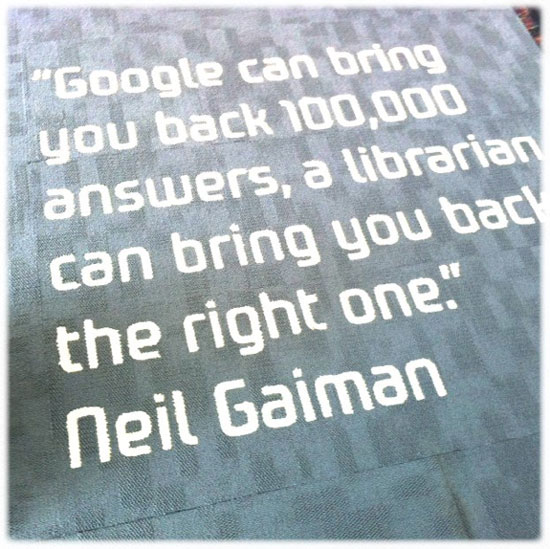
This photo (of the carpet at the Gungahlin Public Library in Canberra, Australia) has been making the rounds, but succinctly sums up why librarians aren't going anywhere:
Thanks Chris.
Tags: australia, canberra, carpet, gaiman, gungahlin, libraries, Library, neil gaiman, public, quotation, quote, quotes, Random
Posted under Uncategorized | 22 Comments »
August 23rd, 2011 Brian Herzog
![I [heart] Ctrl+F](https://www.swissarmylibrarian.net/wp-content/uploads/2011/08/iheartctrl+f.jpg "Available as a t-shirt, I'm sure") I was surprised when I read a recent article reporting that 90% of people don't know how to use CTRL+F.
I was surprised when I read a recent article reporting that 90% of people don't know how to use CTRL+F.
I don't expect most patrons I work with to know keyboard and mouse shortcuts, but it's obviously more widespread than that. I use shortcuts a lot, and will sometimes get stopped during a meeting or presentation and asked what the heck I just did. Which might be the best way to teach shortcuts - in context and with a demonstration*.
But of course, my first impulse when reading the article was to make a list of common and helpful shortcuts to hand out to patrons - so I added that to my to-do list. There already are lists of available shortcuts, even a list of lists, but I like BoingBoing's approach - make a short-list limited to ten (or three) that can improve everyone's computer experience.
So here's what I've come up with so far (which are Windows-centric) - do you have any more to add to the list?
| Shortcut |
Description |
| CTRL+C |
Copy highlighted text |
| CTRL+X |
Cut highlighted text |
| CTRL+V |
Paste highlighted text |
| CTRL+Z |
Undo last action |
| CTRL+Y |
Redo last undo |
| CTRL+P |
Open print window |
| CTRL+F |
Find on page |
| CTRL+H |
Find and replace |
| Right-click |
With mouse; provides useful menu on just about anything |
A little more advanced shortcuts...
| Shortcut |
Description |
| CTRL+TAB |
Go to next tab (in Firefox and other tab-based applications) |
| CTRL+SHIFT+TAB |
Go to previous tab (in Firefox and other tab-based applications) |
| ALT+TAB |
Tab through open applications |
| ALT+SHIFT+TAB |
Tab through open applications backwards, but it's awkward (for me) to press these keys |
| WindowsKey+E |
Open Windows Explorer File Manager (I wouldn't add this one to the list for patrons, but I didn't know about it so just wanted to share it here) |
Again, these are primarily for Windows, since that's what we use in the library. I'll work on making up a handout for patrons and post it here in case anyone else would like to use it too.
It'll be handy for the library, but since most new devices don't use physical keyboards, we'll also have to learn a whole new crop of shortcuts and methods. For instance, a patron wanted to copy/paste something on her iPad, and we had to look it up on YouTube to figure it out.
via Slashdot
*When helping patrons, I always point out the shortcut codes on the right of menus - almost everyone misses those. I tell them not to try to memorize all of them, but if they find they're going back to the same menu item often, see if using the shortcut is easier. Of course, Office 2007's ribbons don't display the shortcut codes, so that has changed things.
Posted under Uncategorized | 21 Comments »