February 17th, 2011 Brian Herzog
 Jessamyn's observation on this USB keylogger thing got me thinking - without the context of that article, if I saw one of those in my library, I wouldn't have known what it was.
I would have known it shouldn't have been there, and maybe being plugged into the keyboard would have given me a clue, but I don't know.
This reminded me of a Technology Skills Library Staff Should Have list Sarah posted at ALA Learning (via). I wouldn't expect any staff to recognize a keylogger, but staff do need to be familiar enough with library equipment to recognize when something gets out of whack - printer not working right, copier making funny noises, website down, a monitor cable unplugged, or a foreign device plugged into a computer.
I like her list a lot, and am going to spend some time merging it with the idea from the Wilmington (MA) Library to break tech knowledge up into different levels to form a tech skills matrix.
Tech competencies is a topic I keep revisiting, because it is something that continually evolves - identifying keyloggers are just the latest addition.
Tags: competencies, computer, know, knowledge, libraries, Library, public, skill, skills, tech, Technology
Posted under Uncategorized | 2 Comments »
February 15th, 2011 Brian Herzog
 Did you read the story about a library in England that found two devices, designed to steal patron information, plugged into their computers?
It almost sounds like an urban legend, but even if it were it's still a good remind to all of us that this could happen anywhere.
The devices are USB keyloggers - someone would unplug the keyboard from the computer, plug the keyboard into this device, and then plug it back into the keyboard's USB port. With this device between the keyboard and computer, it can record every keystroke made on the computer - including websites visited, username/password combinations, credit information, etc.
The best defense against this is for library staff to check for these, or anything attached to a library computer that shouldn't be there. The article also suggest plugging keyboards into the front of computers, to make spotting them easier.
To notice something like this, of course, library staff must be familiar with what should and what shouldn't be there. I don't mean to be all preachy, but this is a good opportunity to familiarize staff who may not be really tech-savvy with library equipment. And another thing: take a few minutes today and check all of the computers in your library.
Thanks Dale for sending this to me, and it was also on LISNews.
Tags: computer, computers, equipment, identity, keylogger, keyloggers, libraries, Library, public, security, Technology, theft, usb
Posted under Uncategorized | 10 Comments »
February 12th, 2011 Brian Herzog
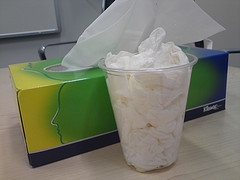 This question was new to me, but apparently it's been around awhile. A patron asked:
Is it more environmentally-friendly to throw a used tissue in the trash can or to flush it down the toilet?
While I thought about how to find an answer for that, the patron laid out some of the logic: if you throw a tissue away, it goes to the landfill where it takes time to decompose, plus there is the environmental cost of the pollution from the trucks driving it there. On the other hand, flushing a tissue uses water, and also puts more contaminants into the wastewater system.
Through searching online, I did find a few websites that addressed the question. These seemed good, but to get a more authoritative answer, I also asked my town's Department of Recycling and Solid Waste, and a friend of mine who is an aquatic resource biologist in South Carolina (I also wrote to the EPA library and their regional library in Boston, but no response from them yet).
From what I could gather, the consensus seems to be:
- It's okay to flush a tissue if
- it is specifically designed to break down in water (like toilet paper), and
- you were going to flush the toilet anyway, and
- the toilet goes to the municipal sewer, and not a septic system
Otherwise, you're wasting water and/or potentially adding unnecessary pollutants (in the form of dyes and chemicals that might be in the tissues) to the water system.
- Throwing them in the trash can isn't a great option because
- it can take years for tissues to actually break down
- you're putting whatever chemicals and dyes that were in the tissue into the ground
- and of course there's all the fuel burned moving our trash around
- Composting is an option that the patron hadn't considered, but this option is only really viable if
- you're not composting a whole lot of tissues, and
- you only compost tissues with no bleaches or chemicals or dyes so that you're not polluting your soil
- A fourth option is burning them, which actually seems like the best option because
- if you've already got a fire going, there are none of the environmental impacts listed above, and
- there is the beneficial result of giving off heat
Of course, most people (in this country) don't often have a fire going, and I don't know if saving them up for when there is a fire is entirely hygienic. But it's not wholly impractical, and does sound like the most environmentally-friendly option.
I provided this information to the patron over the course of a couple days (after waiting for return emails and continued searching after the patron had left), and he was pretty happy. I don't think composting or burning were of interest to him - he just wanted to know if flushing was better than trashing.
In that case, it sounds like the best thing to do is blow your nose on toilet paper, and throw it in the toilet - but don't flush it until you actually need to. And when you buy tissues and toilet paper, get the kind without any bleach or chemicals, so that when they end up in the landfill or treatment plant, they break down quickly with as little impact as possible.
Alright, so nose-blowing isn't all that pleasant a topic, but I personally found this question fascinating. It's one of those "how can I make the world a better place in little ways" approach to life that may or may not have any impact at all on a personal level, but seems like it would make a huge difference if everyone did it. Besides, it's the perfect set-up for this joke:
Hey, want to hear a joke about tissues?
It's going to be disgusting, like flushing them down the toilet, isn't it?
No itsnot.
Ha, I'm so glad my inner child has never left the playground.
Update 2/16/11
I got a message back today from the EPA, and their response was interesting:
Thank you for your inquiry to the EPA Web site. Your request has been received by the Headquarters Public Access Service, a contractor operated reference and referral service.
You asked whether it's preferable to dispose of facial tissues in the trash or the toilet.
EPA does not have any information on this topic on its website. However, many local government websites do, and the consensus seems to be that flushing of anything other than human waste and toilet tissue creates a burden or causes damage to the sewer system.
King County, WA - Wastewater Treatment:
This resource covers several aspects of this topic, and states:
"You'll also conserve water by not using your toilet as as a trash can. Each unnecessary flush of trash uses at least three gallons of water that could be saved for better uses."
Pender County Utilities advises:
"Never use the toilet to dispose of cleansing tissues, cigarette butts or other trash. This can waste a great deal of water and also places an unnecessary load on the sewage treatment process."
City of Tampa, FL - What Happens After the Flush?
We hope you find this information helpful.
Thank you.
Thank you EPA - this information is very helpful.
Tags: environment, environmentally-friendly, flush, garbage, libraries, Library, low-impact, public, Reference Question, throw, tissue, tissues, toilet, trash
Posted under Uncategorized | 5 Comments »
February 10th, 2011 Brian Herzog
 In the course of looking at scanning digital barcodes, I also ran across some resources for making print barcodes.
Since most libraries rely rather heavily on barcodes, this might be news to no one but me - but I still had fun with it. Did you know there are lots of websites that let you type in numbers to create free custom barcodes? The internet thinks of everything.
My two favorite are:
All of the websites I played with will generate a barcode image that can be saved, printed, etc. Some also had the Web 2.0 embed function, which is useful for embedding in a page meant to be displayed on a mobile phone.
But being able to generate and print custom barcodes is what I liked - perfect for those library patrons who have memorized their library card number over the years, but lost their physical card. Now, instead of having to give them a new card with a new number, we can just print a new barcode for their old number, put it on a new library card with tape or a barcode protector, and they are back in business.
Not to mention, of course, the endless possibilities for using QR codes in libraries.
Another fun thing - barcodes aren't just for numbers:
Posted under Uncategorized | 10 Comments »
February 8th, 2011 Brian Herzog
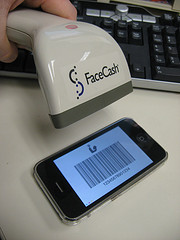 Something I really like about smartphones are apps like CardStar and Key Ring - they let you input the numbers from all the club and rewards cards from your keychain and display the barcode on your phone.
Patrons also use these apps for their library card numbers, and some libraries aren't sure how to handle the library-card-on-smartphone situation. It hasn't really come up in my library, but I know our traditional scanners won't read barcodes off a smartphone screen. So, I thought I'd do some research to find out what it would take to accommodate these patrons.
The reason it doesn't work is because traditional barcode scanners are designed to read laser light reflected off a solid surface. Smartphone screens are emitting light, so an entirely different technology is needed.
The scanners that can read barcodes on smartphones are called CCD scanners (what that stands for is less important than a short description or a compare/contrast between CCD and traditional laser scanners).
After learning this, I started looking around at the different models and costs of CCD scanners. I stumbled across a Quora post mentioning a company called FaceCash* which sells scanners for $30. That's cheap enough for experimentation, so I contacted Aaron Greenspan (FaceCash founder) and bought one.
And it worked. I plugged it into a computer's USB port, held it up to an iPhone with a library card displayed on it, and Beep, the scanner read it just like it should. I'm always shocked when tech things work right out of the box. And happily, the scanner also reads** regular barcodes too.
So now, for just $30, my library can accommodate those patrons who make their lives easier*** through mobile technology.
Recent studies show this is fast becoming the standard in the business world - especially airlines. So the only question is whether or not libraries are willing to honor "virtual" library cards.
I don't see why not. It doesn't seem like fraud would be any more of an issue with this than with regular library cards. When we sign up a patron for a new library card, we give them a wallet card and a keychain card - so already there is more than one copy of the card in existence, which means more than one person could be using it. Since we don't make people show a picture ID when they present their library card, people could already be using someone else's card and we'd never know. Besides, if it's good enough for the TSA and airline security, I think we can manage.
But best of all, accepting these means that it's easier for patrons to bring their library card with them to the library. This is both better customer service and will save staff time in not having to look patrons up. Now that I have this scanner, I just have to wait for a patron to come in who needs it - what a strange feeling to be ahead of the curve.
 *FaceCash is a new way to pay for things - you add money to your FaceCash account, and install the FaceCash app on your phone. Then when you're in a store or restaurant that accepts FaceCash, the app displays your account barcode for the business to scan, and also a picture of your face, so the clerk can verify that you are actually you. With more and more personal data being stored in phones, the visual verification is a great idea. If my library charged fines, I'd want to sign up us to accept FaceCash.
**One limitation of CCD scanners is their short range - just a couple inches, compared to 8-10" range of traditional scanners. Plus, the scanner I bought is trigger-operated, rather than motion-operated like our existing scanners. So, even though it can read both physical and digital barcodes, I don't think we'll swap out what we've got for it, but instead just plug it in and use it when a smartphone patron comes to the desk.
***I like just about anything that reduces waste and clutter. These apps let you store useful information easily, instead of lugging around a whole deck of various cards, and that makes life better. Read a few more tips to simplify your wallet, so you don't end up like George:

Tags: barcode, card, device, devices, libraries, Library, mobile, phone, phones, public, scan, scanner, scanning, Service, smartphone, smartphones, Technology
Posted under Uncategorized | 40 Comments »
February 5th, 2011 Brian Herzog
 I apologize in advance for this week's question - it won't help anyone, and I was trying to avoid the topic this year, but it seems like it's the only thing on patrons' minds lately.
Now, repeat the following conversation about one million times:
Me: Hi, can I help you?
Patron: I saw all your tax forms, but there were no instructions for the 1040 - do you have any more?
Me: No, I'm sorry, we haven't received those yet. We put out everything we get as they arrive, and we do expect to get some, but we don't know when they will arrive.
Patron: Do you know when you'll get some?
Me: No, I'm sorry, they just come whenever they're printed and shipped.
Patron: Well how does the government expect us to get our taxes in on time when they don't...
[insert any number of rants and complaints here, with varying levels of anger and annoyance]
I always try to tell people that tax forms are delayed this year because the tax cut extensions that were voted on in December pushed everything back. I also try to tell them that everything is available online (which most people don't care about), and that there are still months left before taxes are due, so there is still plenty of time (sometimes that elicits looks like I suggested they go kick a puppy).
Patrons ask if we can call them when the instructions come in (we don't do that), and if we can post on our website when they arrive (we will do that). What bothers me the most are the people who, since they can't get what they want, take one of everything we have (instructions for the 1040A and 1040EZ), "just in case." They take a couple copies of the forms too - and I'm worried that when they do come back to get the instructions, they'll take more copies of the forms then, which will cause us to run out of things sooner, which causes us to reorder more from the IRS, which means they print more, which drives up their printing costs, which defeats the purpose of not mailing forms to peoples' homes in the first place.
I'd be very curious, after tax season is over, to hear how this year's approach to tax forms went. Not mailing them to peoples' homes and getting them out late was just a unfortunate coincidence, but still, I wonder how much money they're saving, how many people will file late or incorrectly (which probably also drives up staffing costs for the IRS), and if it was worth it.
And of course, the conspiracy theorist in me wonders if there's more to it: between IRS changes and changes to the way Massachusetts did tax forms this year, it really is extremely difficult for an individual to do their own taxes. I wonder if there is some powerful Tax Preparer lobby that wants to make it impossible for people to do their own taxes, thus driving up their profits and taking one more bit of self-reliance and freedom away from citizens. Hmm - seems far-fetched, but then all of my favorite conspiracies are.
Posted under Uncategorized | 8 Comments »



