April 5th, 2008 Brian Herzog
 I enjoy working with little kids at the reference desk - especially kids who are enthusiastic about whatever it is they are doing.
A little girl (maybe a fifth grader) came to the reference desk and asked if I could help her find a picture on the internet. She said she had found it at home using Google image search, but their printer is broken. However, now that she's at the library and can print it, she can't find the same picture again.
She was looking for pictures of the characters from the Ivy and Bean books to put in a school report. She couldn't remember her exact search terms, so we first started searching Google with just "ivy and bean."
We looked through the first four or five pages, but she didn't see the pictures she was looking for (drawings of the characters from the stories, and not just the book covers). We then tried a variety of other phrases, like "ivy and bean" pictures, "ivy and bean" annie barrows, and even criss cross applesauce, which apparently is what the character says in one of the pictures she saw.
But after five or ten minutes of trying various keywords, we still had nothing, and my little patron was getting discouraged.
LibrarianInBlack often reminds people not to rely on just one search engine, so I switched over to AllTheWeb's image search. The patron was reluctant, because she knew she had seen them in Google images search, but she went along with it - and we were rewarded quickly.
On the first page of a search for "ivy and bean," we found one of the pictures she had seen. Every search results page after that had additional images, and she got more and more excited with each picture we found.
She wrote down the URL and raced back to the computer she was using - overjoyed to continue with her homework.
Tags: alltheweb, bean, image, images, ivy, ivy and bean, libraries, Library, public, Reference Question, search
Posted under Uncategorized | Comments Off on Reference Question of the Week – 3/30/08
March 6th, 2008 Brian Herzog
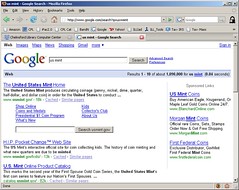 When I use Google to find information, I often use the "site" limiter to improve the returns.
For instance, when looking for information on the new economic stimulus tax rebate thing, a search for "tax rebate site:irs.gov" gives much more direct information than does just searching for "tax rebate." Which is great if you know the domain to which you'd like to limit your search, but yesterday, I didn't.
Someone was looking for information on the James Madison dollar coin, and the U.S. Mint website seemed the most logical place to look for it. However, I didn't know the Mint's domain name. So before my usual site-specific search, I first searched for "us mint" to get the domain, and then I was going to run a second search limited to that domain.
But Google is one step ahead of me (I don't know if this is a new feature or if I just never noticed it before): my search for U.S. Mint returned the Mint's website as the first result, and the listing included a site search built right in to the search result (see picture).
Neat. And it saves me a step. Searching there for "james madison dollar" gave exactly what the patron was looking for as the first result.
I'm generally skeptical of Google as a company for hording private data, but they do have smart people working there.
Posted under Uncategorized | 2 Comments »
March 2nd, 2007 Brian Herzog
A post on Slashdot today talked about an interesting visualization of search terms used between 1997 and 2001.
Interesting because of the way the data is displayed (which took a little getting used to), but also interesting in how it shows the maturation of the web, and what people use it for. The data seem to show that in 1997, sex- and chat-related searches where the most popular, but by the end of the data set, people were searching the internet for information and shopping.
I wonder what the trends will be ten years from now, or if this model of searching will even still apply.
chris harrison, search, search clock, search terms, searchclock, searching, terms, visualization
Posted under Uncategorized | Comments Off on Search Terms Study
February 20th, 2007 Brian Herzog
 A patron came into the library last week, looking for news stories about a woman in the Air Force who got into trouble for posing for Playboy. She remembered the woman's name, Sgt. Michelle Manhart, and asked if I could check a news website to get more information.
I went out to Google News and typed in "Sgt. Michelle Manhart." As expected, a few news stories did show.
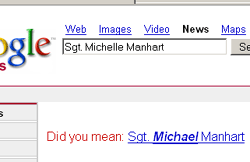
But, I was surprised to see Google's "Did you mean" feature asking if I meant to search for "Sgt. Michael Manhart." I almost ignored it, thinking it was suggesting an alternate spelling of the female sergeant's name, but then noticed it was instead substituting the male Michael for the female Michelle.

Odd, I thought. I clicked on the link, wondering if Google's algorithm would do the same thing (in reverse) if I searched for "Sgt. Michael Manhart" - ask if I meant Sgt. Michelle Manhart.
But surprisingly, it didn't. It just showed search matches for Michael (which actually were all news stories about Michelle).

So then I wondered if it was the "Sgt." part of the search that was confusing it. Could Google's search algorithm really be sexist? Would it see the "Sgt." part and "think" that only men are Sergeants?
So I tried a search for just "Michelle Manhart," expecting Google to offer a "Did you mean" for "Michael Manhart". But it didn't, and just showed the matching news stories.
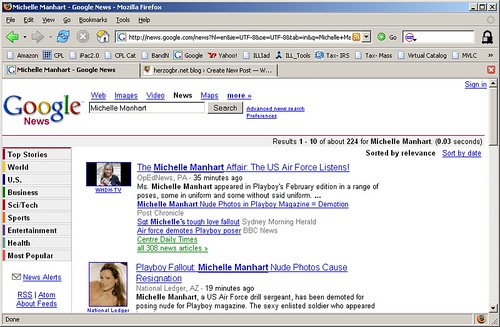
I'm sure this isn't intentional sexism on Google's part, as this "Did you mean" algorithm is just supposed to reflect prevalent search patterns. But how ingrained must a concept be for software like this to pick up on it - and what does that say about how far our society has actually progressed?
google, google news, michell manhart, search, search algorithm, sexism
Posted under Uncategorized | 1 Comment »



