August 12th, 2008 Brian Herzog
 My Library subscribes to a lot of periodicals, but the one I always make a point of checking out each month is CQ Researcher. For professional reasons, I know I should keep an eye on current topics in as many of our periodicals and resources as possible, but CQ Researcher is usually interesting beyond professional reasons.
I like the format, too - the entire slim issue is devoted to a single topic. The most recent issue, August 1st, was devoted to Internet Accuracy.
The section I found particular interesting, titled "How to Evaluate Blogs and Online Information Source," can serve a good checklist for anyone doing internet research. I wish I could reproduce the whole thing, but here's me paraphrasing:
- Look closely at the URL - the domain name can sometimes tell a lot of about the nature of the website
- Locate the main website - try deleting everything that comes after the domain suffix (the .com or .edu, etc) and see what the rest of the site is like
- Can a real person be contacted? - if there isn't an "about me" page or way to contact the author, there's reason to be suspicious
- Are there additional links? - reliable websites usually link to additional resources, or at least other pages within that site
- Are there misspellings and typos? - lots of grammatical errors can indicate untrustworthiness, because little errors often coincide with big errors
- How long has the blogger been at it? - reliable bloggers usually indicate how long they've been writing, and as with anything, bloggers get better over time
- How many topics does the blog cover? - if the blog has too many categories, then this person is certainly not an expert
- What is the blog's format? - websites that use the default look or theme may indicate that not much effort has been put into the project, whereas a personal brand shows the blogger cares enough to establish an image
I like this list so much that I'm going to co-op it into a post for my Library's blog - and maybe a bookmark.
The rest of the issue is good, too. The major article talks about the reliability and use of websites like Wikipedia, traditional news outlets, blogs, and what turns up in search engines. There are also sections on where people go for answers (58% go to the internet, 45% to friends and family, 13% to the library), where the most well-informed people get their information (with The Daily Show and The Colbert Report out ranking every other source), and a bibliography, position papers on current topics, and more.
All in all, definitely an issue worth reading. Sadly, their website does not allow open and free access, but check for it at your local library.
Tags: accuracy, blog, blogs, cq press, cq researcher, cqpress, cqresearcher, internet, libraries, Library, public, reliability, Technology, trustworthiness, truthiness, website, Websites
Posted under Uncategorized | 2 Comments »
July 1st, 2008 Brian Herzog
 I know I'm a couple months late to the party, but this past weekend I upgraded this blog to WordPress 2.5.1 (I upgraded the library's blog, too, but more on that in a minute).
Upgrading SwissArmyLibrarian.net
The upgrade went fairly smoothly, and I think this website is operating normally. If you seen anything different or wrong, please let me know in the comments.
A few backend issues still need to be dealt with. For some reason, the comment admin screen is not displaying comments. If I search for them, they appear, but when I click the Show All Comments I get a "No results found" message. Odd. And, I'm having trouble with the ftp settings. Which should be fairly straight-forward, so I'll keep trying.
Beyond these issues, I'm also still getting used to the new look and design of the admin interface. I'd heard it was very different (and not necessarily better), so I was prepared. Even with accounting for bias, I do think I like the old version better, but we'll see.
The upgrade itself went smoothly. WordPress makes is pretty easy, with their upgrade instructions. It really was as easy as the directions indicate, despite me making a few mistakes along the way (hurray for backups).
Upgrading ChelmsfordLibrary.org/blog
However, I must say that it was not as easy as upgrading my library's blog. Our website is hosted at Bluehost.com, which offers many web services and programs pre-installed through Fantastico. I know Fantastico has some issue, but it sure does make upgrades like this easier. What took me a few hours to do on my own for swissarmylibrarian.net took perhaps ten minutes through Bluehost (and I didn't see the problem with comments and ftp settings).
I don't want make a sales pitch for them, but if a library is looking for a place to host their website, we've been very happy. It's cheap (something like $7 a month), their tech support has been great, and so much software comes preinstalled that it's easy to manage and try out new web tools without having to do all the installations yourself.
But if you are a library looking for web hosting, definitely check out LISHost.org. They specialize in hosting library websites, offer a lot of the extras, and will also help design a website.
Tags: 2.5, 2.5.1, bluehost, host, hosting, libraries, Library, lishost, public, Technology, upgrade, upgrading, web, web hosting, website, Websites, wordpress
Posted under Uncategorized | Comments Off on Upgrading and Hosting
September 18th, 2007 Brian Herzog
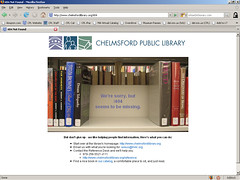 Sparked by a discussion in the ning Library 2.0 forum, I recently revamped my Library's 404 error webpage (what displays when the webpage someone is looking for is not found).
Until earlier this year, we just had the standard "404 error: file not found" page, which is common and boring. I had made it a little more interesting just by adding our logo and some helpful information. But Darlene's call for injecting humor and casualness in this situation got me to rethink it, and I came up with our current page.
Libraries are always fighting the traditional stuffy stereotype, and little things like this can make the patron experience more interesting and memorable. Also, it really was fairly easy to do, and I think in this case, a little effort goes a long way (of course, ideally, this page would never be seen).
But let your 404 page be seen - Darlene also started a flickr Library 404 Page group, so please add your screenshots. Also, some live, non-library examples are available at sendcoffe.com.
And before anyone asks: I didn't put too much thought into the books in the photo. This is just the shelf closest to the Reference Desk. But really, I think these titles lend themselves pretty well to the process of discovery of something missing - plus, this is the "self-help" section.
404, 404 error, chelmsford, chelmsford library, error page, librarian, librarians, libraries, library, public libraries, public library, web page, website
Tags: 404, 404 error, chelmsford, chelmsford library, error page, librarian, librarians, libraries, Library, Marketing, public libraries, public library, web page, website, Websites
Posted under Uncategorized | 1 Comment »
August 23rd, 2007 Brian Herzog
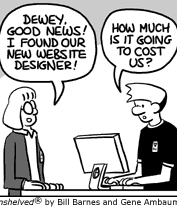 The Unshelved comic strip is generally pretty good, but this particular strip (and the next few days) really made me laugh.
As a librarian and a web designer, I can certainly relate. But increasingly, based on what I'm hearing at various meetings around the region, the budget itself isn't the real issue - it's staff and time. Either libraries have a staff member who knows how to maintain a website but doesn't have the time to do it, or they have someone willing and able time-wise, but who doesn't have the actual skills necessary to maintain a good website.
What librarians I know keep asking for (in desperation, in some cases), is an easy and quick way to update content on their website.
They don't necessarily want to outsource, don't want to heap all the responsibility onto one staff member, and also don't want to spread around responsibility (because that usually diminishes the quality and coherentness of the site).
CMS tools like Joomla and Drupal keep getting talked about, as do blog software like WordPress. There's a growing buzz about Scriblio too, but no one seems to know enough about it to view it as anything but a distant glimmer. Libraries in my consortium are considering moving from Frontpage to Dreamweaver, which seems to me to be more of a lateral move than an actual improvement.
All of these have a learning curve, plus time and effort to migrate/recreate the existing website. Which I think is acceptable, if the library knew that maintenance, once there, will not require a great deal of knowledge or time.
Library 2.0 tools are great, as they save the patron's time and let them get a better web experience without requiring a lot of web-savviness. But saving patrons effort usually means the library is doing more work, and a lot of us, again, don't have the time or skill to integrate these tools into our websites.
And this is just websites - online catalogs are a whole different story.
Errg. A solution? Anybody?
</frustration>
cms, libraries, library, overdue media, public libraries, public library, unshelved, web design, website, website design, websites
Tags: cms, libraries, Library, overdue media, public libraries, public library, Technology, unshelved, web design, website, website design, Websites
Posted under Uncategorized | 1 Comment »
March 1st, 2007 Brian Herzog
 My library has both a website and a blog. The blog, powered by WordPress, has an rss feed built in, but our website, which is mainly static html, has no rss feature.
Until we can convert to a more Web 2.0 way of doing things, I've been testing the talked-about Page2RSS service.
I set it up for our homepage, and so far, it works well. It is not pretty, but it works. I feed it into my bloglines, and it displays only whatever html code has changed on the page. Which means, the output depends on the changes, and hence is not necessarily formatted in a nice or readable way.
But for my purpose, it works well. It seems to check for update once every one or two days, and our homepage is updated with about the same frequency.
(Which, honestly, in my overbearing and nitpicky way, is part of the reason I am monitoring our homepage. Rather than having a single person updating the website, we've got about seven or eight, all with differing skill levels, interest and time availability. I cringe at way some of our pages look, because a basic understanding of web coding would take care of a lot of the problems. But I don't want to step on anyone's toes or hurt anyone's feelings, so I don't say anything and just do what I can.
But our homepage is different. I will correct things other people did, if I can make it look better. So, by monitoring our homepage via Page2RSS, I can see when other people make changes, and if a little more editing needs to be done. I feel like a jerk doing this, but I'd rather our patrons see a clean and useful homepage than one with obvious mistakes.)
So if this test continues to go well, we'll be able to offer an rss feed to patrons, which is the ultimate goal.
libraries, library, page2rss, public libraries, public library, rss, rss feed, rss feeds, website, websites
Tags: libraries, Library, Marketing, page2rss, public libraries, public library, rss, rss feed, rss feeds, Technology, website, Websites
Posted under Uncategorized | 2 Comments »
October 1st, 2006 Brian Herzog
I've had a personal website pretty much since about 1996. It has varied greatly in how much attention I have given it, but for the last six or so years, it has pretty much gotten no attention from me. However, in the last month, I've decided to revamp it a bit - give it a face lift, convert it from flat HTML files to PHP, etc. And as part of The New Way, I'm starting a blog, too. I can't make any promises on being better with my attention, though - because I hear everyone else is going to jump off a cliff, so I'm going to need to go soon. But until then, let me say welcome.
Posted under Uncategorized | 4 Comments »



