April 1st, 2013 Brian Herzog
 My parents downsized from a house to a condo last year, so we went through the process of getting the house ready to sell. Which means, each room had to be "staged" to show prospective buyers the house's potential.
But you know, I thought, why stop at just arranging pillows on a couch to suggest how comfortable it would be to take a nap in a sun-lit nook, or strategically placing chairs to show how enjoyable it would be to relax in a certain room? I mean, instead of just staging furniture and decorations, why not just use actual people to flat-out perform these nice homey tableaux? I call it "live-staging."
My suggestion was met with eye rolls all around, but I'm finally getting to implement this idea - at my library.
See, one thing that always astounds me in the library are the patrons who say things like, "wow, I've never been on this floor before," or happen to notice our very prominently-displayed public fax machine and say, "I had no idea the library had a fax machine!"
I'm always trying to think of better ways to publicize everything the library offers, and it occured to me that live-staging is the perfect method.
So, my library hired a group of actors to live-stage library resources.
For instance, one will very conspicuously (and enthusiastically) use the fax machine. Another will "discover" that the library offers ebooks and ask staff for more information in a very noticeable way. Two will play chess to promote our gaming table, while another will excitedly find out about home-access for our databases, and someone else will talk up an upcoming evening program.
Really, the possibilities are endless. And the actors are excited too - we've given them the resources we want to highlight, and general guidelines about how to get the attention of other patrons without actually being annoying about it. Otherwise though, they're free to ad-lib and interact with patrons and staff however they feel will best draw attention to these services (and we're not telling staff who the actors are).
So as not to be too obvious, we'll be rotating different actors and services, so our cast of actors is currently up in the hundreds. After all, we didn't want our patrons seeing "reruns" of the same "patron" learning over and over that we have a typewriter.
I can hardly wait to see how this works. It launches today and will run for the entire month of April. We did a benchmark survey last year, to find out which services people know about and use. We'll do the same survey again after this live-staging, and I am 100% positive patrons' awareness will be through the roof.
After all, we're paying for these actors with our entire year's materials budget, so it better work.
Posted under Uncategorized | 11 Comments »
March 30th, 2013 Brian Herzog
 While sitting at the Reference Desk with a coworker one day, the phone rang - she answered it before I did, which is too bad because I would have loved to hear a patron ask this question:
Can you tell me where I can play pickleball in Chelmsford?
I think if there is anything bizarre in the world, eventually someone will ask about it at the library.
Neither of us had heard of pickleball, but apparently it is a thing. A quick web search turned up a surprisingly legitimate-looking and extensive USA Pickleball Association website. They have a "What is Pickleball?" page, but basically it seems to be a combination of tennis, ping pong, and badminton. Here's a very long demo video, with loud and crazy music:
Anyway, back to the question at hand. The USAPA website also had a "Places to Play" page, which allows you to limit by state. The Massachusetts list had a lot of places, some not too far away, but sadly none in Chelmsford yet. There is also a pickleball waiting list on Meetup.com, and pickleball made it into the Boston Globe.
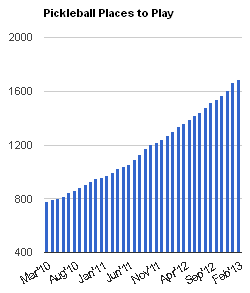 This definitely seems like a regional sport, based on existing pickleball meetup groups and and the USAPA.org's regional links (bottom of the left navigation bar). It also seems to be growing fast, according to the USAPA's chart of places to play pickleball.
I think the patron was a little disappointed there wasn't a local group of players she could join, but good for her for being one of the early adopters in this area.
I'll be curious to see if this sport catches on here. It reminds me of cornhole, which I discovered in library school at Kent State. One day I had never heard of the game, and then suddenly the next day everyone was playing it.
Although, I also have to admit that new games like this always remind me of Guyball. Sadly, that doesn't seem to have caught on yet.
Posted under Uncategorized | Comments Off on Reference Question of the Week – 3/24/13
March 29th, 2013 Brian Herzog
Just a few unrelated bits and bobs:
- The big news from yesterday is that Amazon bought Goodreads. This seems like a major development for the reading and library world, and Tim Spalding of LibraryThing.com has a good summary of where that leaves the reading social networking sites. The comments are also good, and this is definitely something to keep an eye on.
- I was at a meeting last week when someone mentioned https://www.facebook.com/thebig6ebooks - a Facebook page devoted to highlighting that "Six major publishers are making it difficult, if not impossible, for libraries to purchase eBooks." It lists bestsellers, and indicated whether or not they're available to libraries - and why. Neat. Thanks Deb.
- A helpful skill for librarians is being able to tell accurate information/resources from junk. Boing Boing recently pointed to some tips on how to tell if a photo has been faked. Good stuff, especially the tip on using Google Image Search as a reverse image search (click the little camera by the blue search button). Its like Tineye, but Google, so probably more powerful.
- And finally, in the same "how to look smart" category, my coworker Sharon sent me a link explaining what different browser errors and codes mean. This will be very basic for some people, but will pull back the curtain for many others and show that the internet isn't run by magic, and error codes are knowable and logical. And often, even helpful.
And now back to your regularly-scheduled Friday.
Posted under Uncategorized | 2 Comments »
March 27th, 2013 Brian Herzog
 Last week's reference question reminded me to post about a new service we've just started offering in my library - wireless "print from anywhere" for patrons.
We use Envisionware's LPT:One for our pay-for-print station in the library, which does have wireless capability. But patrons need to install a driver on their laptop, and only really works within the library - which is great for people printing from their own laptops, but we were hoping for more.
A couple nearby libraries were using PrinterOn, and that's what we decided to go with. It is web-based printing, which lets people really print from anywhere - the library, home, the coffee shop in the Town center, their smartphone while standing on the sidewalk, Canada - anything that can get to the internet can now send print jobs to be picked up at my library. Pretty neat.
Getting it Set Up
Of course we kept LPT:One for printing from our public workstations, because it works really well. Our initial intent was to integrate the wireless printing with our existing pay-for-print station, so it would be totally self-serve for patrons. However, when we spoke with our printer/copier management company, the cost of integration was prohibitive (about $4,000, mainly to update the hardware already in place) - especially for a service that we had no idea how much use it would get.
So we decided to do it the cheap way and run everything out of the Reference Desk. We lose the self-service aspect, and staff have to release each print job and manually handle patron payments, but it was worth it for a trial (and, if use justifies the $4,000, I'm sure we can negotiate with the print management company later on).
The PrinterOn software works well and was easy to install. There was a $200 setup fee and about a $500 annual subscription (roughly - and our Friends group provided the funding), and PrinterOn tech support installed everything we needed on our existing network server. The only other cost was that we bought a new printer, because we wanted to offer B&W and color, single- and double-sided printing, all from one printer. The printer we chose was the Xerox Phaser 6500, which, so far, has been just fine.
How It Works
To use it, patrons start at http://www.chelmsfordlibrary.org/webprint, and it's pretty straight-forward. You can upload a file from your computer or print a website, choose between B&W/color, single- or double-sided, and page orientation. Patrons both name their print job and get a job number, so we know which is theirs when they pick it up. There's also an option to print from email - you just email an attachment to our "print" email address (provided by PrinterOn), and the software knows to add the attachment to the print queue.
When patrons come to the Reference Desk, we log into the print queue and locate their job, hit print, and then calculate cost X number of pages after the job prints. We charge $0.15 for B&W and $0.25 for color, and charge based on pages - so, printing double-sided still only counts as one page. We also set it so jobs stay in the queue for 72 hours - after that, they automatically disappear.
Promotion and Results
We've got handouts for in-library promotion, and we're going to try to leave them at other likely spots around town - coffee shops, hotels, etc. It's fairly simple, but anyone is free to use and adapt it for your library if you like:
We launched this service about two weeks ago, and I have been shocked at how much it's been used so far - about once a day, at least. When it was ready, I added a link to our homepage (and mobile and Library Anytime sites too), and we put it on Facebook and in our weekly email newsletter. The next day three different patrons casually picked up print jobs, as if we'd been offering it for years.
But best of all, all patrons have figured out the interface, and no one has had any trouble sending print jobs.* The whole thing couldn't have gone more smoothly, and I love offering library services people can use from home.
*We did encounter one Acrobat PDF that the system couldn't handle - a complex text form that had a special print button built in, but we sometimes have trouble with PDFs on our public workstations, so I can't fault PrinterOn for that.
Tags: libraries, Library, mobile, print, print from anywhere, printeron, printing, public, Service, Technology, wireless
Posted under Uncategorized | 2 Comments »
March 23rd, 2013 Brian Herzog
 One of the most common questions we get at the Reference Desk is something along the lines of:
I tried to print something, but all I got was this blank page. Can you print it for me?
The reason this happens (I think) is that a lot of web pages - especially news sites and free email accounts - compartmentalize information using frames*, and many web browsers have a difficult time trying to print all these different frames at the same time.
When patrons try to print a page like this just using the browser's File > Print function, it often doesn't work. The page designers know this, so they usually embed a little printer icon somewhere within the content frame the person wants to print - the body of the email, the news story, etc. It generally seems to appear in the top-right corner of the content window, and when you click it, opens the important content in an entirely new window that will print nicely. However, it is often so subtle that people never notice it.
But check this out: I stumbled upon PrintFriendly by accident, and I love the idea. It is specifically designed to make printing these annoying pages easier. You can copy/paste in the URL of the page you want to print, it grabs the content, and then you have full control over which parts of the page actually print - it lets you remove anything you don't want.
What I thought was even more useful is their bookmarklet that you can stick right in your browser - that way when you want to print a page, the PrintFriendly button is always right there, instead of having to mess with copy/pasting the URL. Neat.
Since finding this, I've been testing it every chance I get, and it seems to work about 90% of the time. Usually, exactly what I want to print is the only thing that shows up. But even when extra sidebars and things do show - like in this Lowell Sun newspaper article (source) - PrintFriendly makes it so easy to remove all the junk (just click on whatever you want to delete). This means the good content fills the page (a single page), instead of being a very narrow column four pages long.
It didn't work everywhere though. For instance, Zap2it.com listings seem to print much better the normal way than through PrintFriendly.
A few more neat features: once you render a page to print in PrintFriendly, it gives you the option to print, create a PDF, or email it. Very handy.
Of course, my first thought was to put the bookmarklet in all the browsers on our public workstations. This still might be a good idea, but patrons will need to be trained to use it, which will be a challenge. Everyone is so conditioned to File > Print, and usually people don't know something went wrong until after they've paid for their print job (why doesn't anyone File > Print Preview?!?).
So for the time being, this might just be a handy tool in the librarian toolbox (but I do have it installed on my computer).
I have no idea how long PrintFriendly has been around, so I might be the last person to know. Has anyone been using this? I'm curious to see how well PrintFriendly works on a wider array of websites.
*Frames is an HTML way of embedding multiple "windows" into the same webpage. The best clue for knowing whether or not there are frames on a page is to notice if there are scroll bars inside the page. There will always be the main vertical scroll bar all the way on the right edge of the browser window (for pages longer than the screen), but sometimes there are additional vertical scroll bars in the page itself, that just moves some content in a little window. This is a frame, and may or may not print when you print using the browser's File > Print functionality.
Posted under Uncategorized | 11 Comments »
March 21st, 2013 Brian Herzog
 In case you haven't heard, the Supreme Court issued their decision in Kirtsaeng v Wiley, and common sense has carried the day. Publisher's Weekly has a good write-up, and so does SCOTUSblog.
This of course doesn't mean libraries will never face another copyright-related threat, but it does prevent things from getting ludicriously horrible right now. If you're interested in following copyright and intellectual property news, I highly recommend the Copyfight blog, written by Alan Wexelblat.
And speaking of copyright, this decision also reminded me that I never posted a link to this great Copyright Guide from Cornell. It's a handy little quick-reference to figure out if something is or is not covered by copyright. Thanks Jason, and I'm sorry for taking so long to post it.
And finally, one of my pet-peeves: remember world, the past-tense of copyright is "copyrighted," not "copywritten."
Posted under Uncategorized | Comments Off on Copyright Good News



