Here's a list of things I've been meaning to include in a post somehow, but haven't been able to work in. I'm leaving for a week's vacation tomorrow, so I thought this list of links will keep people going in the meantime (because I know everyone's lives revolve around my website):
For those keeping track, here's a New York Times article about the future plans for Delicious (via). It sounds like dramatic changes are coming, for the interesting:
[T]he new Delicious aims to be more of a destination, a place where users can go to see the most recent links shared around topical events, like the Texas wildfires or the anniversary of the Sept. 11 attacks, as well as the gadget reviews and tech tips.
Last but not least, the Copyright Clearance Center's mini-movie "Copyright Basics". In the movie, Jim the Librarian explains to a colleague the ins and outs of content use
Update: Oh, I forgot this one. A website called CommonPlace approached us (and other community organizations in town) about starting a CommonPlace Chelmsford community. Started by a Harvard student, and launched in Falls Church, VA, it seems like a Facebook/Craigslist hybrid, but for locals only - interesting, but gasp, one more thing to update
This week's question is one we get asked many times a day - it's not difficult at all, but this time had a sort of heart-wrenching twist.
A woman in her early twenties walked up to the desk. Very politely, and with a little hesitation, she asked:
I just printed something for my school, but I don't know where to pick it up. Can you please help me?
For public printing in my library, we use Envisionware's LPT:One, which works well for us. All the print jobs from our public computers go to a central print release station, where patrons pay for their job before it actually gets printed. So that patrons know which print job is theirs, when they print they get prompted to name their job:
Once a patron goes through this once, they understand how it works. But the first time isn't totally intuitive, so we do get asked for help in printing frequently.
My personal rule is this: if someone asks me where they pick up their print job, I take that to mean they've never printed here before, so I go with them over to the print station and walk them through the steps to pay for and release their print job.
That's what I did in this case, and while walking over to the printer, I asked the patron if she had entered a name for her job. She replied,
Well, a little box asked me to name my job, so I typed in "waitress."
I don't know why this struck me as so sweet and sad - maybe her innocence and naivety, maybe the idea of someone working their way through college. Maybe I'm just getting sentimental in my old age. She didn't mean anything by it though, so when we got to the print station, I showed her how to select the job named "waitress" and print it out. She thanked me and left.
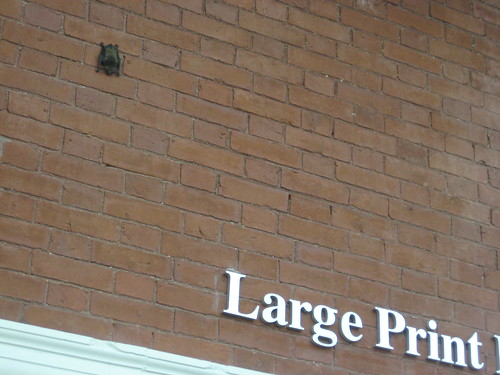
We had a little excitement Wednesday afternoon, when staff noticed a brown bat hanging on the wall inside the library. This is actually the second library bat since I've worked here - this time I got some photos and a video of the rescue.
Sadly, this photo is a little blurry - I was trying to sneak around the library and take pictures without alerting patrons to what I was doing. We had no idea how people would react.
Eventually I was able to get pretty close - the bat was either asleep or indifferent, because at one point a man sat on the bench right below him with no response.
We called animal control, but they had already closed for the day, so one of our maintenance guys volunteered. He got a butterfly net from the Children's Room display closet, a piece of cardboard from the recycle bin, and got the bat out of the building - with no injuries.
Make sure you turn the sound on when watching the video - you can hear the bat screeching/chirping about being in the net.
Someone checked the net about ten minutes later, and the bat was gone. I'm sure this a common occurrence in libraries, but it was a nice little diversion for us (but probably not for the bat).
Thanks everyone who contributed their favorite keyboard shortcuts. I picked what I thought were the most helpful for someone fairly new to computers, and put together a little handout:
It's for new users, so I stuck with, basic, simple, and common. I hope it'll be helpful, but depending on the person, it might still be overwhelmingly complicated. But if it is well-received, I'll do a second one with the more advanced helpful shortcuts that people submitted.
Feel free to use or adapt it - I made it so it was easy to change the letters on the keys, so feel free to modify and expand.
And please let me know if you see any mistakes, or thought of a way to make it clearer or more helpful - or if you have an image better that the Microsoft clipart I used.
Mac Users
I added a note at the bottom about how to use these shortcuts for Mac, and I wanted to show what the Command key looked like. While searching for the image online, I also came across the origin of the Infinite Loop symbol, which I had never really wondered about before. Interesting.
Right as I got to work one day, the coworker I was relieving said a patron had just called in with a question that she hadn't been able to research yet. It was this:
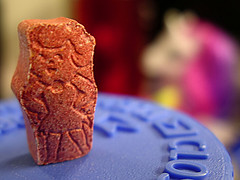
They say that Flintstones vitamins are healthy for kids, but aren't those artificial colors they use dangerous?
It seemed to me that if this were true, then we'd all hear about it in the news, or they wouldn't be allowed to use the colors.
Anyway, my first stop was the Flintstones vitamins website, which has an ingredients listing. As I suspected, the colors listed were the common Red #40, Yellow #6, and Blue #2 that you see in other food products - which I'm sure must have been approved by the FDA to be used in anything someone, especially children, would consume.
What colors/dyes are used?
All of the dyes that are used in our products are approved by the Food and Drug Administration (FDA). The dyes used are as follows:
FD&C Red #40 Aluminum Lake
FD&C Yellow #6 Aluminum Lake
FD&C Blue #2 Aluminum Lake
Why do Flintstones multivitamins contain aspartame (artificial sweetener)?
The Flintstones Complete formula and Plus Calcium formula contain aspartame. The aspartame masks the bitter taste of calcium found in both of these formulas. Sugar would be needed in large amounts to mask such a bitter flavor and would make the tablet too large.
Is aspartame safe?
Yes. It is important to note that aspartame is one of the most tested food additives in history and has been approved by the Food and Drug Administration for use in multivitamin products.
That was informative, but again, not a surprise - of course a company is going to explain why its product is safe.
However, the "among other things" listed in my second search were lots ofwebsites explaining the dangers of Flintstones vitamins. Namely, that the coloring ingredients can lead to ADHD, there's too much sugar in them, and more. However, many of the dangers seemed like they could be associated with any processed food, and one website also even said that that evidence of any danger was controversial.
I called the patron to let her know what I found, and to ask if she'd like me to do more intensive research by looking at peer-reviewed scientific journals. She said no, she had just seen a television commercial that made the vitamins look like candy, and it struck her that anything that looked like candy couldn't possibly be good for kids.
In the end, she wasn't all too impressed that the colors are all FDA-approved, but she accepted it and thanked me.
Meanwhile, I was left with all my childhood memories of my siblings and I around the breakfast table each morning trading Flintstones so we all got the character we wanted. Ah, carefree childhood.
The machine holds 700 DVDs (or CDs, and larger capacity also available), and uses special black cases instead of regular DVD cases
Theirs is from Public Information Kiosk, Inc. (distributed by 3M), and they chose it over competitors (Brodart also has one) because they felt it had the most RedBox-like interface, thus should be easy for people to use. Also, PIK developed some custom graphics for them, and looks sleeker and snazzier all around, rather than just looking like a regular vending machine
The machine is indoor-only, so they placed it between the inner and outer doors of the library lobby - the outer doors remain unlocked 24 hours a day, so patrons always have access to the machine
It's still new to them so they're slowly rolling out features, but the machine is designed to handle checkouts, checkins, and even holds placed through the online catalog - neat
One drawback they have noticed is the machine's use of the company's own 2D barcode system, instead of the library's barcodes - this requires extra work in cataloging, and also causes some inaccuracies with records (showing the wrong cover art when there is more than one movie with the same name, movies showing up in unexpected places in the genre listing [ie, Wall-E listed as sci-fi])
This is the first of two machines they purchased, with an LSTA grant from the State of Ohio intended to explore ways to meet the needs of underserved patrons. These machines are ideal for serving patrons where a library branch can't be built.
The second machine will be installed in a local hospital, serving as another 24x7 library location. Similarly, a library in Iowa is considering installing one in the headquarters of a large local business - another nice example of bringing the library to the patrons (although it also sounds like something you'd find in the Googleplex).
These vending machines serve other uses too - after conducting a patron survey on how to deal with DVD theft, the Arapahoe Library District in Colorado in the process of installing installed them to help protect their collection.
And other libraries have been using vending machines for awhile. In Connecticut, the Oliver Wolcott Library has had one since 2010.
In the age of downloadable ebooks and streaming video, using vending machines to distribute physical library materials might already seem outdated. But don't forget, public libraries serve a spectrum of patrons, all with different interests and needs. After all, despite the popularity of smartphones, our public fax machine is used just about every day (our microfilm machine and typewriter aren't exactly idle, either).
Anything we can do to make library services available outside the library's building and operating hours - in a variety of ways to meet a variety of patron needs - is a good thing.