August 30th, 2011 Brian Herzog
 Over on LISNews, Blake has a series of posts on IT security in libraries, and it's absolutely worth checking out. So far there are five parts:
- IT Security For Libraries
- Practical Tips For Online Privacy
- Practical Advice On Choosing Good Passwords
- Staying Safe Online
- 20 Common Security Myths
It's good for library staff to know and abide by this information, but it is also very useful material for building a online safety program for the public.
Another of my favorite security-related posts is the Email Scam Competency Test, to see if you can tell legitimate email messages from scams. At the end of the test, click the "why" links to see the clues for telling the difference.
Posted under Uncategorized | Comments Off on LISNews Series on IT Security in Libraries
August 25th, 2011 Brian Herzog
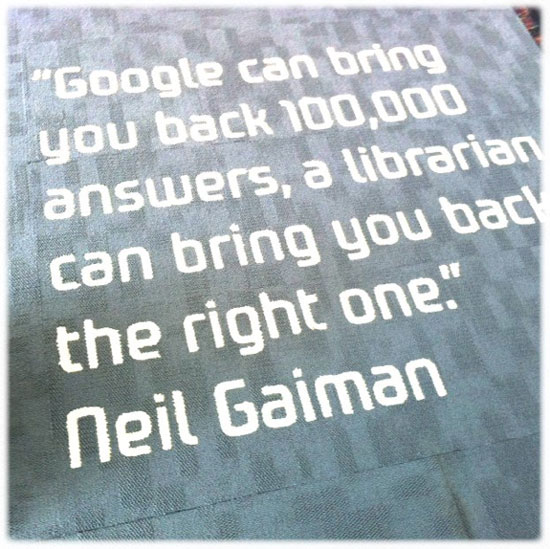
This photo (of the carpet at the Gungahlin Public Library in Canberra, Australia) has been making the rounds, but succinctly sums up why librarians aren't going anywhere:
Thanks Chris.
Tags: australia, canberra, carpet, gaiman, gungahlin, libraries, Library, neil gaiman, public, quotation, quote, quotes, Random
Posted under Uncategorized | 22 Comments »
August 23rd, 2011 Brian Herzog
![I [heart] Ctrl+F](https://www.swissarmylibrarian.net/wp-content/uploads/2011/08/iheartctrl+f.jpg "Available as a t-shirt, I'm sure") I was surprised when I read a recent article reporting that 90% of people don't know how to use CTRL+F.
I was surprised when I read a recent article reporting that 90% of people don't know how to use CTRL+F.
I don't expect most patrons I work with to know keyboard and mouse shortcuts, but it's obviously more widespread than that. I use shortcuts a lot, and will sometimes get stopped during a meeting or presentation and asked what the heck I just did. Which might be the best way to teach shortcuts - in context and with a demonstration*.
But of course, my first impulse when reading the article was to make a list of common and helpful shortcuts to hand out to patrons - so I added that to my to-do list. There already are lists of available shortcuts, even a list of lists, but I like BoingBoing's approach - make a short-list limited to ten (or three) that can improve everyone's computer experience.
So here's what I've come up with so far (which are Windows-centric) - do you have any more to add to the list?
| Shortcut |
Description |
| CTRL+C |
Copy highlighted text |
| CTRL+X |
Cut highlighted text |
| CTRL+V |
Paste highlighted text |
| CTRL+Z |
Undo last action |
| CTRL+Y |
Redo last undo |
| CTRL+P |
Open print window |
| CTRL+F |
Find on page |
| CTRL+H |
Find and replace |
| Right-click |
With mouse; provides useful menu on just about anything |
A little more advanced shortcuts...
| Shortcut |
Description |
| CTRL+TAB |
Go to next tab (in Firefox and other tab-based applications) |
| CTRL+SHIFT+TAB |
Go to previous tab (in Firefox and other tab-based applications) |
| ALT+TAB |
Tab through open applications |
| ALT+SHIFT+TAB |
Tab through open applications backwards, but it's awkward (for me) to press these keys |
| WindowsKey+E |
Open Windows Explorer File Manager (I wouldn't add this one to the list for patrons, but I didn't know about it so just wanted to share it here) |
Again, these are primarily for Windows, since that's what we use in the library. I'll work on making up a handout for patrons and post it here in case anyone else would like to use it too.
It'll be handy for the library, but since most new devices don't use physical keyboards, we'll also have to learn a whole new crop of shortcuts and methods. For instance, a patron wanted to copy/paste something on her iPad, and we had to look it up on YouTube to figure it out.
via Slashdot
*When helping patrons, I always point out the shortcut codes on the right of menus - almost everyone misses those. I tell them not to try to memorize all of them, but if they find they're going back to the same menu item often, see if using the shortcut is easier. Of course, Office 2007's ribbons don't display the shortcut codes, so that has changed things.
Posted under Uncategorized | 21 Comments »
August 20th, 2011 Brian Herzog
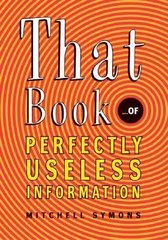 A boy of about 10 comes to the desk with That Book of Perfectly Useless Information, holds it up to me, and says,
Do you have any other books of useless trivia, because I really like useless trivia and want to learn more useless trivia.
So naturally, knowing we have lots of books like this, I spin my computer monitor towards him and type in a keyword search, limited to our library, for "useless trivia." I click the search button, and am instantly embarrassed by the result.
Oops. But his response was classic - absolutely dead-pan, he just says "no, I'm not interested in that."
Trying quickly to recover, I searched for the book he has in hand, explaining that each book is assigned subjects, which will link to more books on that same subject. It does, and a bunch come up - all at the same call number of course, so I walk him over to that shelf and help him find a few good ones. He is pleased and goes off to the Circulation Desk to check them out.
Now, I go back to the catalog record for the book he had, because something caught my eye. The subject heading for that book was "Handbooks, vade-mecums, etc."
I don't think I've ever seen this particular subject heading before, and I didn't know what "vade-mecums" meant. I was half expecting it to be Latin for "useless trivia," but according to Merriam-Webster, it means "a book for ready reference." Amazing that in all my time as library student and reference librarian, I hadn't come across that term before. I guess you really do learn something new every day.
(Incidentally, the Latin for "useless trivia" is frustra turpis, according to Google Translator.)
Tags: book, Books, etc., Handbooks, Handbooks vade-mecums etc., lcsh, libraries, Library, public, Reference Question, subject heading, subject headings, vade-mecums
Posted under Uncategorized | 6 Comments »
August 18th, 2011 Brian Herzog
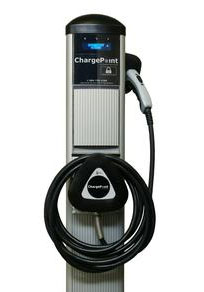 Well, the fun never stops at the Chelmsford Library - I recently read in the newspaper that we'll be getting a car charger for electric cars.
What?!?, you might exclaim - I did, anyway. I was surprised to be finding out about it from the newspaper, but also the logic of placing it at the library wasn't immediately apparent to me.
According to the article, the charging station is a result of a state grant our Town Manager applied for (Chelmsford was one of 25 towns included in the grant), and it seems this project is really being driven by the Town (rather than the library).
The Town's Facilities Manager is attending an informational meeting this week, and hopefully will have more details to share after that. Right now, it's not entirely clear where the charger will be located, and therefore what kind of impact it will have on parking. I'm not sure if we'll have to dedicate a parking spot to this, how long it takes cars to charge, or if anything will be required of library staff. We've been assured that this won't be added to our electricity usage though, so that's good.
I'm pretty happy that car chargers will start popping up around the state - especially that many of the town listed on the grant are small rural towns, and not just big cities. Chelmsford makes sense because a lot of commuters go through here, so hopefully we'll be seeing more of these as electric cars become more popular (which they probably won't until chargers are widely-available, so I don't know if that makes us the egg or the chicken).
Since this was a Town project, I understand why they're placing it at a Town building, situated in the center of town. But it still does seem like an odd fit for a library - even more of a stretch than a Redbox. However, our solar panel array was also part of a Town grant, and the library was chosen in that case to help showcase the use of renewable energy, and we also built a print collection around it. Hopefully we'll be able to do the same for electric cars.
By the way, here's a Sun-eye view of the solar panels at the Chelmsford Library:
Tags: array, car, cars, charging, electric, energy, green, libraries, Library, panel, public, renewable, solar, station
Posted under Uncategorized | 6 Comments »
August 16th, 2011 Brian Herzog
Something the whole Web 2.0 revolution introduced was the ability for websites to include user-reviews right along side product/company information. Yelp.com is my favorite example, listing a restaurant's address and details, and reviews from diners about their experience. This, perhaps more than most things, changed the nature of how people use the internet (and how companies on the internet use people).
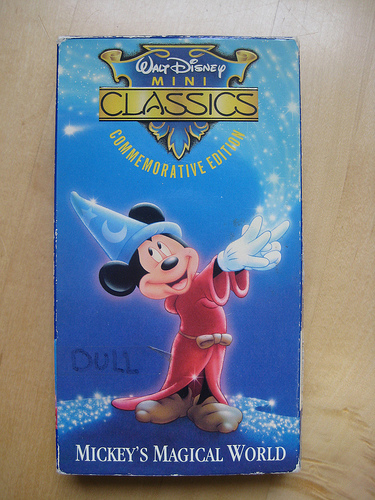
So anyway, this past weekend was one of my library's drop-off days for our annual Friends of the Library book sale. While going through some of the donations on Saturday, I found the movies below - the previous owner added their own review right to the cover.
I don't know if this was for personal use, or staff reviews from a video store, or someone writing reviews for a family member to read, but I love the idea. It's the same as posting reviews on Amazon, Yelp, or in the library catalog, but just in the physical world.
Every once in awhile I'll request a book from another library, or buy an old library book at a used book sale, and stuck inside the front cover will be a review from a newspaper or magazine. I would love it if my library could do this, but the volume of new items just makes this practice unsustainable. Not only would it be helpful for patrons, it would also remind me why I bought the book in the first place.
Of course, since I do most of my selection via RSS feeds, instead of by reading physical journals, I guess it wouldn't work anyway. Sigh.
Tags: donation, donations, dvd, dvds, libraries, Library, movie, movies, patron, patrons, public, Random, review, reviews, user, users
Posted under Uncategorized | 4 Comments »