November 6th, 2010 Brian Herzog
Do you ever wonder how I spend my Saturday nights? Why, advocating library services, of course - here's a Twitter conversation that occurred last weekend about 10pm (read from the bottom up):
The two points I'd like to make about this are:
- Libraries provide free and legal access to things patrons might otherwise "improvise" access* to. But that is only marginally helpful because...
- ...the target audience for many library services don't always (or ever) think of the library as a source. So how do we promote ourselves to bring patron and service together? That is frustrating.
I felt pretty good after this exchange, and the patron was happy to not violate copyright to get the content he wanted. Until now I've been pretty passive about this, but perhaps it's time to more deliberate about engaging in "social reference."
Incidentally: I saw his tweet because I have a Twitter search rss feed for the word "library" in any tweet within 10 miles of Chelmsford. That picks up people outside of town, but we get a lot of non-residents in my library, so it all evens out. Besides, on the internet, all reference is local.
*I get daily traffic to my website from Google searches such as "overdrive media hacks," so people are definitely looking to improvise.
Posted under Uncategorized | 6 Comments »
November 2nd, 2010 Brian Herzog
 Yesterday afternoon, patrons suddenly started asking our Circulation staff why there was a man on our front steps holding a "Free Hugs" sign.
This was news to us, and since there were also a couple complaints, our Head of Circulation walked out and told the man that he can't do that on library property. The man, very nicely and politely, said okay and left.
It was a little strange, and got us thinking - why can't he do that? Our first thought was that it violated our "no soliciting" policy - but technically he was giving out hugs, not asking for them. We couldn't come up with a hard and fast rule that he was breaking, other than it was creeping out patrons and affecting their library use - which does violate our Appropriate Library Behavior policy.
But come on, hugs? I know libraries are open public buildings, and we need to make sure everyone feels comfortable using them. But when the free hugs guy gets banned, maybe dialing back the fear and restoring sanity isn't a bad idea.
But it gets better - a few hours later I saw this tweet:
Apparently he went from the library to the Town Center, where loads of people were out holding campaign signs (loitering?) - and someone called the cops on him for his "Free Hugs" sign.
Tags: appropriate, behavior, free hugs, libraries, Library, Policies, policy, public, Random, sign, signs, soliciting
Posted under Uncategorized | 10 Comments »
October 30th, 2010 Brian Herzog
Instead of a reference question this week, I wanted to highlight something else from NELA2010.
In the Trends in Reference session, Pingsheng Chen from the Worcester (MA) Public Library discussed the overall trend of reference questions in general - that there are fewer of them, but the questions we do get asked are harder and less traditional.
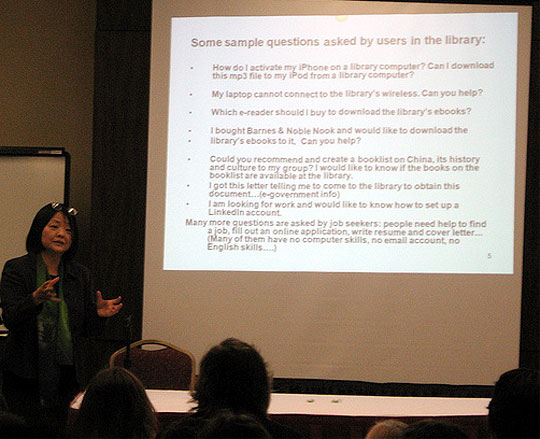
This is due to people turning to the internet to answer the easy factual questions, but still coming to us with the tough ones that require assistance or instruction. Her slide below listed a few example questions she's gotten in Worcester:
I'm sorry the photo is tough to read - the questions are:
- How do I activate my iPhone on a library computer? Can I download this mp3 to my iPod from a library computer?
- My laptop cannot connect to the library's wireless. Can you help?
- Which e-reader should I buy to download the library's ebooks?
- I bought Barnes & Noble Nook and would like to download the library's ebooks to it. Can you help?
- Could you recommend and create a booklist on China, its history and culture to my group? I would like to know if the books on the booklist are available at the library.
- I got this letter telling me to come to the library to obtain this document...(e-government info)
- I am looking for work and would like to know how to set up a LinkedIn account.
- Many more questions are asked my job seekers: people need help to find a job, fill out an online application, write a resume and cover letter... (Many of them have no computer skills, no email account, no English skills...)
Her question to us was, if you were asked these, how would you answer them?
Most of the libraries represented in the room had at least one person on staff who is the go-to person for "techie questions." But is that good enough anymore? Do you feel the questions above are beyond the scope of reference work, or are you of the opinion that modern reference staff should have the knowledge and training to answer modern reference questions?
So that's the challenge for this week - how would you handle these questions if you were asked them by a patron?
Posted under Uncategorized | 7 Comments »
October 28th, 2010 Brian Herzog
 You're probably sick of hearing about things I picked up at NELA2010, but I'm not done yet.
In the very last session of the conference, Steve Butzel from the Portsmouth (NH) Public Library demonstrated the Online Newsstand he created to boost their online magazine usage. That was neat in itself, but what I really took away from his talk was that I needed to - and easily could - create a version of our website specifically designed for mobile phones.
He showed theirs (in beta), which is simple and awesome. It inspired me to give it a try.
I started on http://chelmsfordlibrary.org/mobile/ yesterday, and am still working on it yet (in fact, I haven't even told anyone at my library yet that I'm doing it - surprise!).
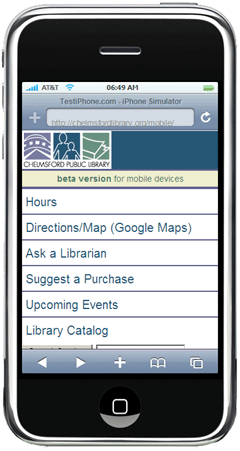
I don't have a cell phone and so haven't tested this on a smartphone yet. I have been using testiphone.com (an online tool Steve highlighted - there are other tools, too), so please give it a try and let me know how it works.
Steve's point was that it could be very simple - hours, directions, events, a contact link, and a purchase suggestion link for patrons who are in a bookstore (great for people with apps like RedLaser). Here's the logic of what to include:
- Hours
- Directions (right now it just links to Google Maps, but I need to also include a link for our branch library)
- Ask a Librarian (haven't created this yet, but it will be a simple email form)
- Purchase Suggestion (also not done, but will be a simple form)
- Upcoming Events (our calendar was not at all mobile-friendly, so I just grabbed the rss feed and ran it through feed2js.org to create just a list of our upcoming events. There could be separate feeds for adult events, childrens events, etc., but that might be overkill)
- Link to the catalog (I also embedded a catalog search, but that might be too much. And I found the catalog isn't entirely mobile-friendly either - we'll be moving to the Evergreen ILS soon, so I'll wait and see on this, otherwise I'd investigate LibAnywhere from LibraryThing, which Steve also mentioned)
- Link back to the main library website for everything else
The next trick will be getting our regular homepage to automatically detect mobile devices and reroute them to the mobile website. I haven't even attempted this yet, but have done a little research.
Apparently, cell phones and smartphones aren't just a fad after all, so having a website that works well on these devices is just as important as a browser-based website - and this will only become more important as a way to serve our patrons on their terms. I was happy with how easy it was. Now I need to find out what my coworkers think.
Tags: cell, cell phone, conference, Conferences, iphone, libraries, Library, mobile, nela10, nela2010, new england library association, phone, phones, public, smart, smart phone, smartphone, steve butzel, Technology, website
Posted under Uncategorized | 14 Comments »
October 26th, 2010 Brian Herzog
 NELA2010 was last week, and I'm still mulling over ideas I learned there, trying to figure out if I can synthesize them for use in my library.
One that stood out came up during the audience participation portion of the Trends in Reference panel discussion. Demetri Kyriakis from the Morse Library in Natick, MA, mentioned "reference triage," and I followed up with him in the hall later in the day to get some more information.
This approach seems like it will help libraries with staff cuts or an awkwardly-located reference desk. The basic idea, as you can probably surmise, is to direct patrons to different staff members based on the difficulty of their question. Our Circ staff informally does this already, since that is the first service desk patrons see when they enter the library - Circ handles what it can, and sends the rest downstairs to Reference.
What was novel about Demetri 's approach is that he said there are some questions they just won't answer at the Reference Desk - the really time-intensive ones - because he just can't do them justice when he's alone and the library is busy.
Instead of giving the patron an incomplete answer, or making everyone else wait for a half-hour while he completes that question, he has the patron set up an appointment with him - at which time he's able to give them his undivided attention, and a full and unhurried answer.
I like that idea. We used to do something similar with our One-on-One computer sessions, until we had to discontinue those due to staff cuts. But there are sporadic times during the week with enough coverage desk that could allow me to get away for twenty or thirty minutes for a patron appointment.
Some examples of questions that would require an appointment:
- Help with Overdrive (especially the people who are willing to learn all the steps it takes to do it right, not just the people who want to download something right now)
- Help with job searching or creating a resume
- Help with a digital camera
- Help with genealogy
- Learning Twitter/Facebook/et al.
Of course, making an appointment to come back later might not be every patron's idea of a good time. Hopefully they'd be able to see the trade-off between immediate incomplete help and an appointment for thorough assistance.
Posted under Uncategorized | 6 Comments »
October 23rd, 2010 Brian Herzog
 This week's question is actually one I needed to answer myself - it's a little bit random, so bear with me.
My library just held our annual thank-you dinner for all of our adult volunteers. To illustrate "the value of volunteers" (in other words, how much money volunteers save us) my director and I came up with a "volunteer stats" bookmark* [ppt, 1.2MB] to hand out.
We had 241 volunteers last year, with a total of 5804 volunteer hours. We figured if we paid them each $15/hour, their labor would have cost the library $87,060. Just to add another little fact to the bookmark, I wanted to figure out just how tall $87,060 was in $100 bills.
So of course, I turned to the internet. I did a search for something like how tall is a stack of money, and after clicking on a few results, I found a forum posting that provided the Excel formulas needed to calculate not just the height of a stack of bills, but also the cubic volume and value of different denominations. Neat.
I copy/pasted the formulas into an Excel spreadsheet* [xls], and after a little tweaking, had my answer. And just to double-check it, I went back to the internet to find a "known value" (in this case, the height of $1 million in $100's). It checked out, so I had my fact for the bookmark, and a job well done, right?
Well, not so fast: being me, I thought, "hey, wouldn't it be awesome to turn this Excel spreadsheet into a web form that other people could play with? After all, that was so popular the last time."
But this was all happening late in the day on Thursday, and I didn't have time to figure out how to convert the Excel formulas into javascript. So once again, I turn to the internet, thinking, "I just bet there's some easy spreadsheet-to-javascript converter out there."
And it turns out, there is: I found SpreadsheetConverter.com, which does exactly that. After you download the software, it converts spreadsheets to a web-ready format with just a click of a button - pretty neat.
But even better was their free demo offer, where you email them your spreadsheet and they convert it for you. Within 24 hours they sent back the converted webpage, and it works great - just enter the height** of your money stack below, and the spreadsheet tells you the value of various denominations, for both a single stack and a cubic block of bills.
One condition of the free demo is that it is for evaluation purposes only, so evaluate away and keep this tool in mind if you ever need to throw a spreadsheet up on your website - it can save you a lot of time. Too bad I didn't know about it when I was coding the Library Use Value Calculator.
The thank-you dinner went well, and the bookmarks were a big hit. Yay for volunteers.
*Feel free to download, edit and reuse our volunteer bookmark* [ppt, 1.2MB] or the Excel spreadsheet* [xls] if you like.
**This was designed to figure out height in inches - to use different measurements, the form below will convert those values into inches:
Tags: bill, bills, calculator, conver, converter, dollar, dollars, excel, formula, formulas, javascript, libraries, Library, money, online, public, Reference Question, spreadsheet, Technology, value, volunteer, volunteers, web
Posted under Uncategorized | 4 Comments »