July 23rd, 2011 Brian Herzog
 This questions wasn't at all difficult, but I thought it was interesting because it was something I thought I knew how to do, but it turns out I didn't.
A patron walks up to the desks and says,
I have some software at home I want to install on my computer. However, there are two install disks - one for computers with a 32 bit processor and one for computers with a 64 bit processor. How do I tell what processor my computer has?
The patron had an XP computer, which is also what I was on at the desk, so that made things easier.
My first instinct was to go to Device Manager, so we did, but no matter where we looked, nothing I could find gave the processor speed. I sure there are multiple ways to find this out, but in the interest of time I searched the internet for is my processor 64 bit or 32 bit xp. The first result was titled What operating system Do I have? A 32bit or a 64bit? | Computer Tips - perfect.
The site itself looked a little suspect, but as we read the page together, the information seemed okay. It gave instructions for both XP and Vista - and the XP instructions guided us to somewhere I never would have even thought of:
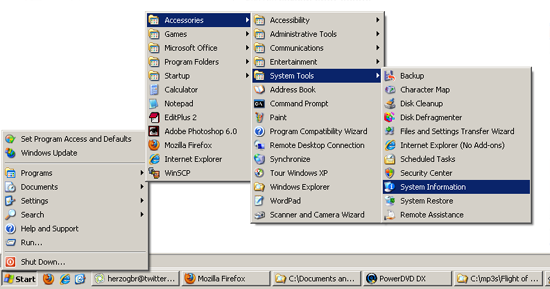
Start > Programs > Accessories > System Tools > System Information
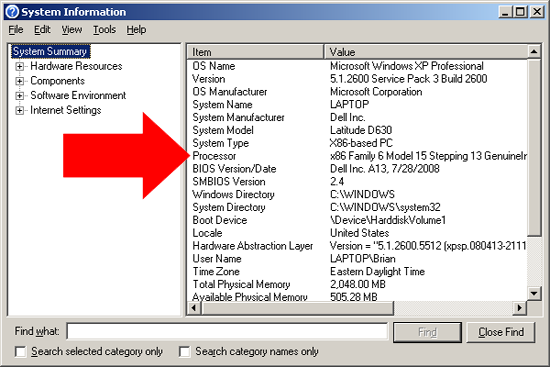
When that window opens, look for the Processor line:
Here's how the site says to read it:
If it says x86 then you have a 32 bit operating system. If the processor area mentioned ia64 or AMD64 then this means you have a 64 bit processor. If it said Microsoft Windows XP Professional x64 Edition Version then this means it is a 64 bit operating system. However as you can see from above, it says Microsoft Windows XP Professional and the processor starts with X86 so therefore this is a 32 bit processor with a 32 bit operating system.
This answered the patron's question, and since we both learned something, it was a good exchange. The funny part (to me) is that the patron said he was right in the middle of installing the software, and came to the library because it was the only place he could think of that would give him free computer information. He was happy I found the answer so quickly and he apologized for rushing out.
Free is questionable, but quite timely on people thinking of the library as genius bar - all the more reason reference staff need to also provide some degree of technical support.
Posted under Uncategorized | 4 Comments »
July 21st, 2011 Brian Herzog
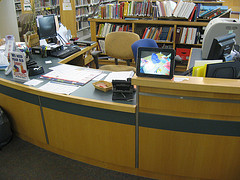 Usually I'm pretty good at math, but in this case it took me awhile to put two and two together.
Awhile ago, our Childrens Department put a digital picture frame on their desk, using it to display photos of their various programs*. I'd seen and heard of other libraries using digital picture frame like this, and for in-building informational signs (like upcoming events), but I never thought of an application for it at the Reference Desk.
Until a couple weeks ago, when I was in the Apple Store in Boston. I'm not at all an Apple fanboy, but I admit that once in awhile, they come up with a good idea.
A friend of mine was having trouble with her Mac laptop, so we took it to the genius bar to having someone help us with it. I still really like the idea of the genius bar in and of itself, but what got my attention was that, behind the genius bar were great big screens scrolling through tips and information. The messages were all about using or fixing Apple products, which were perfectly targeted at the captive audience of people waiting for the genius bar.
I didn't get any photos myself (Apple is funny about taking pictures in their store), but here are some from the interweb:
You get the idea.
When I saw that, it finally dawned on me - this would be an easy thing for libraries to do at service desks, using a simple digital picture frame. As soon as I can get approval (and funding) to purchase one, I'd like to try one with rotating tips on topics like:
- how to renew books
- how to book museum passes
- using online resources and databases
- where the bathrooms are
- online events calendar
- how to find summer reading books
Really, good topics are anything that might be interesting to someone waiting in line at the Reference Desk.
The "photos" will just be slides created in PowerPoint, and hopefully, having something interesting to look will give patrons waiting in line something to do (in addition to teaching them something they may not have known).
I bet other libraries have already thought of this, so if you're doing it, please comment with how it's working. When I get ours up and running, I'll post an update with how it went.
*They decided to use a digital picture frame rather than flickr or other online service, because they were reluctant to post photos of kids on the internet. Keeping the photos offline and in the Childrens Room was a good compromise (between online or not at all), and it might be more likely for the kids to see themselves, too.
Tags: childrens desk, digital, digital picture frame, digital picture frames, frame, frames, libraries, Library, photo, photos, picture, pictures, public, reference desk, sign, signage, signs, Technology
Posted under Uncategorized | 24 Comments »
July 16th, 2011 Brian Herzog
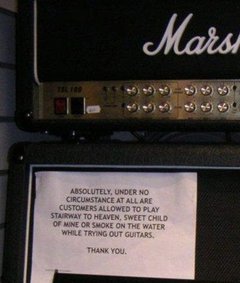 This question made me laugh - partly because it is so odd, and partly because it's not the first request like this that we've had.
We received the following email from a patron with a Subject of "Request for a room" (I edited it a little for clarity):
-----Original Message-----
Subject: Request for a room
I would like to do some recordings with my guitar and voice (moderate volume) using a hand held recorder. I am currently working on a set of folk songs. Is there a isolated room in the Chelmsford Library where I could record during my weekday lunch hour?
One of my coworkers had a good response:
"isolated room" and public library - not a good combo.
We don't have anything in the library that is even close to being sound-proof enough so that his guitar playing wouldn't be heard by other patrons. Which may or may not actually bother people, but I would feel bad telling him yes, then having someone complain after he got all set up and going and then making him stop.
So the staff came up with a list of alternative potential places around town that might be able to handle this, including the local community center, performing arts center, and even the local cable television station (which at least has actual studios).
We sent a message back saying the library couldn't accommodate his request, and referring him to the list of other places we came up with. I haven't heard back if he found somewhere to go, but it would seem to lend some folk-cred if you record your album in a public library.
I do always feel bad when we reach a limit on how we can accommodate people, but at the same time it makes me happy that people continue to think of the library for just about anything.
Tags: guitar, libraries, Library, music, play, playing, practice, public, recording, Reference Question, Service, studio
Posted under Uncategorized | 8 Comments »
July 12th, 2011 Brian Herzog
 There's a new program starting this week at my library - a Jelly.
What's a Jelly?!
A Jelly is a casual yet organized assembly of people who choose to work in a social atmosphere - with other interesting and creative people to talk to, collaborate with, and bounce ideas off.
The idea for the Chelmsford Jelly actually originated with a patron. He approached our programming librarian and asked if the library could host a Jelly. After researching online to find out what the heck a Jelly was, we agreed - we're providing a room and some publicity, and he's doing everything else. He's also set up a meetup page for the Jelly to manage it.
I think the idea of "coworking" is a good one. There are lots of people now who, for whatever reason, do work at home, in coffee shops, in parks, whatever, instead of going into an office. There is a lot of freedom in that, but sometimes it helps to be around people who are also doing work. The coworking approach is just that - working around other people who are also working. They're not necessarily working together, just near each other - near enough to enjoy each other's company, use as a sounding board, share lunch, and share the experience of working. Basically, social networking in person.
For us, the Jelly will meet every third Friday from 11:30-4:30. We're not sure how successful it will be, but since the library's core mission is providing community space for patrons (and this program requires extremely little effort on our part), we want to support this program as much as possible.
Update: At our first Jelly, I think there were about 4-5 people who came to work, and stay for part or all of the day. But I was told there was a steady stream of other people who just popped their heads in to see what it was, or, as one man said, "to see what kind of people come to these things." I think this will become more popular as word spreads over time, so I'll post an addition update after a few sessions.
Posted under Uncategorized | 5 Comments »
July 8th, 2011 Brian Herzog
 This question was just kind of strange from start to finish.
A patron comes up to the desk with two articles photo copied from the Boston Globe - one from June 10, 2011, titled Americans conflicted on abortion issue, survey shows, and the other from July 2, 2011, titled Judge puts Kansas abortion law on hold. She slides them over to me and says,
Now this first article I know is from June 10th, but I don't know the page number. In this second article, this judge is mentioned [US District Judge Carlos Murguia] - can you tell me what President appointed him?
Okay, fair enough. For the page number question, I show her where we keep our newspaper back issues, and tell her than while she looks through them for June 10th, I'll look online about the judge. She's happy to be involved, so I walk back over to the desk (which is literally four feet away).
I know it won't take her long to find the newspaper, so I do the quickest search I can think of - just search for US District Judge Carlos Murguia, scan for the Wikipedia article (which are reliably in the top few results), scroll to the Sources section at the bottom, and click through to the Federal Judicial Center's Biographical Directory of Federal Judges entry for Judge Murguia* - which tells me he was appointed by Bill Clinton.
Just then the patron walks up and says she can't find the June 10th paper - she can find back to the 12th, but that's it. Usually, we keep old papers for a month, but really how far back we keep depends on how much space we have on the shelf, and I think the person who manages our newspaper archive just ran out of room and had to get rid of the 10th.
I ask her for the article so I can try looking it up in our Boston Globe database - but then notice the byline says it's an AP article, which aren't included in the database. I apologize for not being able to get this for her, she says she understands. A line of patrons has formed by this time, so she lets this question go and goes back to her computer.
I get busy after that, helping patrons in-person and on the phone. At one point while I'm helping a phone patron, I notice this newspaper patron walk up to the desk speaking over-loudly on a cell phone - she stands across the desk from me talking for a minute, then wanders away. I never would have guessed this patron would have a cell phone at all, let alone whip it out and use it in the library, but there you go. I continue helping people.
A little while later, when there is a break in my activity, this newspaper patron comes back up to the desk. She said she had called the Nashua Library (about 20 minutes away from us, across the border into New Hampshire), and they said they do have the June 10th paper. She slides me a piece of paper with Nashua's phone number on it, and three names - Katie, Katy, Kathy. She asks if I can call them and have them email me a copy of the newspaper, and the librarian's name is something like one of those she wrote down, but she can't remember.
I ask her if it's okay if I just ask them what page the article is on and they tell me over the phone, but she says no - she needs "documentation."
So I call Nashua, and, guessing, ask for Katie at the Reference Desk. I get transferred and when I say who I am, Katie laughs and said she had an idea why I was calling (knowing this patron, Katie probably got an earful on the phone).
Anyway, any librarian knows that photocopying a newspaper article can be difficult, not to mention trying to include the page number on the photocopy - not to mention trying to email/fax it when you're done. So Katie suggests she email me confirmation that she found the article and what page it is on, essentially providing a testament for the "documentation." This sounds good to me, and if the patron still needed more, then we could figure out a way to actually get a copy of the paper.
A few minutes later, the following email arrives:
I located the Associated Press article "Americans conflicted on abortion issue, survey shows" in the print edition of The Boston Globe for Friday, June 10, 2011 (Volume 279, Number 161). The article appears on the right hand side of page A2, and does not continue to any other page. This is the News section of the paper, and the article falls under the subsection heading "The Nation."
I print it and give it to the patron, and she is pleased and thanks me.
I can hardly take credit however - I had already given up on the question, since we didn't have that resource in the library, and there were too many other patrons waiting for me to try to track it down outside the library right then. I think it's kind of funny the patron contacted another library on her own, and I'm very grateful to Katie for being willing to provide an answer with the proper documentation.
This might be the single biggest thing I love about being a librarian - cooperation. Being able to have a short phone call with a colleague (a colleague, yes, but a complete stranger, too) in a different state, and within minutes have the exact right answer delivered to me - it really is just amazing. Sorry LinkedIn, library service desks are the single best professional network around.
*The Sources, References, and External Links sections alone make the entire Wikipedia project worthwhile. Even if the articles themselves didn't exist, simply compiling authoritative web links on just about any subject is the kind of topic-based bibliography directory librarians have always loved about the internet.
Posted under Uncategorized | Comments Off on Reference Question of the Week – 7/3/11
July 7th, 2011 Brian Herzog
 I have less and less time to keep up with reading RSS feeds these days, but a fantastic post by Carrie Straka, a contributor at Tame the Web, reminded me why it's worth it to keep current on blogs.
She attacks the myth that everything in the library is free, and explains why "a library card isn’t a 100% off coupon." Library materials aren't free - we make them freely accessible, because they have already been paid for. It's like the food in your refrigerator - it was purchased at one point, to be consumed at your leisure (or not used and wasted).
Many users believe that the services and materials we provide are free. As all library staff knows, this is a misconception. The services and materials we provide are not free. In fact, they are far from it. Librarians work within a budget and use all money provided to us through taxes, tuition, or other means.
The comments are also interesting.
And something else I'd like to add, in terms of patrons having misconceptions about ownership of library resources: I've heard some patrons say that they're not returning some item, because their tax dollars have paid for it and they want to keep it - and besides, their tax dollars pay my salary so they can tell me what to do.
This too is a misconception. In libraries, there is no translation between one person's tax share and possessive ownership over a portion of the collection. The entire community's taxes are pooled to build a shared community resource, and library staff are paid to maintain a useful collection and ensure all the materials remain available for the entire community.
It seems a little contrary to the library spirit, but I do tend to err on the side of serving the community rather than the individual. It's a fine line to walk, and my library's yes-based policy means we are accommodating in individual situations - but when push comes to shove (which is thankfully rare), I do consider the library a community resource, not a private one.
Posted under Uncategorized | 7 Comments »