Earlier this week, a patron walked up and asked if we had any tax forms. I showed him where we keep the leftovers from last tax season, and told him anything he couldn't find there we could print from the IRS and state websites.
He looked at the forms for a few seconds, then turned to me and said,
No, I want the new forms for this year, so I can get an early start on them.
I feel the need to reemphasize that this happened this week, specifically on September 14th (eight months and one day early!). Being asked for tax forms in December and January always seemed early, but September?
Just recently, someone who follows my blog sent me this email:
I have just started a job as a library reference assistant in a public library system in a city of over 500,000 people. I will be in one of the busier neighborhood libraries (there are around a dozen neighborhood libraries and a central library).
Any tips/advice for a new library reference assistant with only patron experience (and that, only checking out books, no reference usage) in a library?
Anyway, I thought I'd put together a Top 5 list for advice for new library employees. It's tricky, as library jobs can be so different, but here's the advice (mostly reference-related) I came up with - please submit more advice in the comments:
Don't be afraid to tell the patron you're new, and might not know something
Don't be afraid to ask coworkers for help (this will also save the patron's time)
When working on a difficult or complex question with a patron, I will get the patron started in one area (say, browsing the right Dewey section) while I go back and continue searching on my own. I find it much easier to think when a patron isn't standing there staring at me, and I think they get more out of it by being involved in the search
During downtime, learn your library's policies and about what resources & tools available to you - the catalog, vertical files, information at the reference desk, etc. (this is especially true for local information, which always seems like the hardest thing to find)
Practice - a little while ago I posted a couple tests used for hiring and training new staff - the more experience you have and the more familiar you are with the quirks of your tools, the more comfortable and helpful you'll be
And on the lighter side of interviewing for a library position, here's a classic Monty Python sketch - humorous, yes, but most of what the interviewers say is still spot on:
Hi everyone - I'm hoping you can help out with a quick survey. Kersten Matera from the Nashua (NH) Public Library is compiling data on how libraries handle digitized collections of historical photos.
Please, take a couple minutes to fill out the survey below. It's always interesting to compare how libraries handle similar tasks, and I'm particularly curious to learn what software libraries use to share their digital collections.
When the survey is complete, Kersten and I will post the results for everyone to check out - thanks for helping:
A patron comes to the desk and asks where the books on back pain are. I get up to show him, but he says he can find them himself, if I just write down the call number for him. So I write 617.564 on scrap paper and he was off.
A few minutes later he comes back and says he needs help after all. He found the books okay, but it turned out they are all on the bottom shelf and his back hurts too much to bend over.
We have a laugh at the irony, then I pull them all and put them on a cart, so he can take them over to a chair.
I was watching a show called The Book Group on Hulu recently, and got a taste of how they recommend other shows to people.
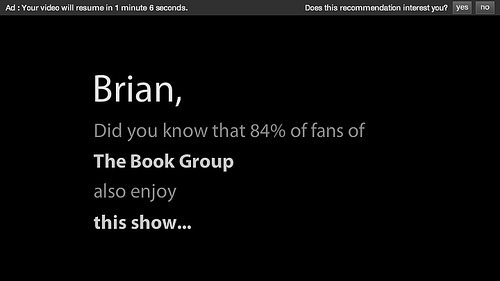
The bottom of every show page always has a "You Might Also Like" section, recommending similar shows, which I have used that in the past. But because a couple of the episodes of The Book Group were rated TV-MA, and required me to log in, during one of the commercial breaks I got this ad:
Which I read as,
Brian, not only are we violating your privacy, but we also think you have bad taste.
I'm sure the "27x more fans" thing is just to induce me to watch the other show (Peep Show, which I did watch a few episodes of and didn't really like). However, requiring me to log in and then using that to track me and "personalize" suggestions does feel like a violation. A different ad seemed more reasonable:
This conveys the exact same message, but doesn't also imply a deficiency on my part. So, I guess a word of caution to anyone providing readers advisory or viewing suggestions on your website - careful how you word the message.
Also, this got me thinking about two types of suggestions: item-oriented suggestions and person-oriented suggestions. Item-oriented is like NoveList or LibraryThing for Libraries - basically, providing suggestions based on the characteristics of an item.
Person-oriented suggestion is more like a personal shopper, or saying, "based on our monitoring of your behavior, we think you'd like this" - providing suggestions based on the preferences (or past behavior) of a person (or people). Amazon's "Customers Who Bought This Item Also Bought" or "Frequently Bought Together" sections are like this, as well as their "Recently Viewed Items." Which isn't a bad thing, unless the person being monitored don't know about it, or has no choice about it.
Hulu might be genericizing the data of what other people are doing, but it seems like they're still tracking what individual people do on their website, and I will always feel uncomfortable with that.
Last week I started talking about newspaper obituaries. Today's post details how we're improving access to the obituaries we do have in our newspaper microfilm records, using an online index created with Yahoo Pipes.
Our microfilm records of the local papers go back to 1940. But microfilm is primarily an archival format, rather than an accessible format, so it can be cumbersome to use. Our biggest impediment was that we didn't know what was there - when a patron contacted the Reference Desk asking for someone's obituary, it was very time-consuming for us to search the microfilm for an obituary, which may or may not have even appeared in the paper - we wouldn't even know until we checked.
So we created an online searchable index to the newspaper's obituaries - not the text of the obituaries, just a name/date/page index. Patrons and staff can use this to know whether someone's obituary appeared in our newspaper, instead of having to check the microfilm every time.
Here's how we did it: first, for about the past 10 months, volunteers have been going through every microfilm reel we have, page by page, and building an Excel spreadsheet with the following information:
Newspaper
Year
Month
Day
Page
FirstName
MiddleInitial
LastName
Maiden-Jr-Sr
The first column is necessary because we have records for both the Chelmsford Newsweekly (1940-1993) and the Chelmsford Independent (1986-present). The middle columns are reference and retrieval information. In the last column, we included extra information, like maiden name, whether a person was a "Jr." or "Sr." etc., and anything else that was random and didn't fit into another column.
The spreadsheet itself is useful, but I wanted to put this online so anyone could search it. The tool I chose was Yahoo Pipes, which has both pros and cons:
Pros:
It's easy to play with and learn (like most Web 2.0 tools), but is also very powerful so we can grow into it
It can use a csv file for the data, which is easy to create with Excel
Beyond a simple search, it also provides fancy features like RSS feeds and tie-ins with other social media tools
Using Yahoo Pipes is covered in Chapter 7 of Library Mashups, written by Nicole Engard
The data is easy to update as the file continues to grow
It worked
Cons:
Searching a database is not what Pipes is intended to do, so it's probably not the best tool out there (I wanted to use DabbleDB, but they're in transition right now)
The csv file must be ftp'ed to the webserver, which will be increasingly problematic - right now the file is 17,000+ lines and over 1MB. It will only get bigger, and the entire thing needs to be uploaded each time it's updated
Pipes has funny rules that you don't know about until something breaks. For instance, field names must be single words (hence "FirstName" and "Maiden-Jr-Sr"), you can't use certain characters in the data (like /), the search doesn't let you combine keywords (so far - I'm sure there must be some kind of fancy loop setup that will allow it, but right now people can only search either by first name or last name or year)
There isn't an easy way to embed the search box back into our website (there are Badge options, but only for search output) - you have to use the Pipe interface to search
There doesn't seem to be a wildcard for search
The results can't not link to something - I wanted the names and dates just to be displayed, but the way Pipes works requires the results to link to something
The last point was initially a pain, but it forced me to be creative, and I think the solution is actually more helpful for patrons than what I originally wanted. Now, when a patron finds the obituary listing they'd like to read, they click the link, and it automatically fills the obituary information into an email contact form on our website. That request gets sent to Reference staff, who then have an easy time of retrieving the obituary from the microfilm. Unfortunately, our microfilm machine isn't connected to a computer, so we'll just print and mail or fax the obituary to the patron. When possible we'll type them in and email them, and of course that will go into the searchable database too.
To make the connection from the Pipes listing to our email form, I had to use some javascript (which introduced another glitch: javascript makes names like O'Conner problematic, because it stops at the ', but I'll worry about this later).
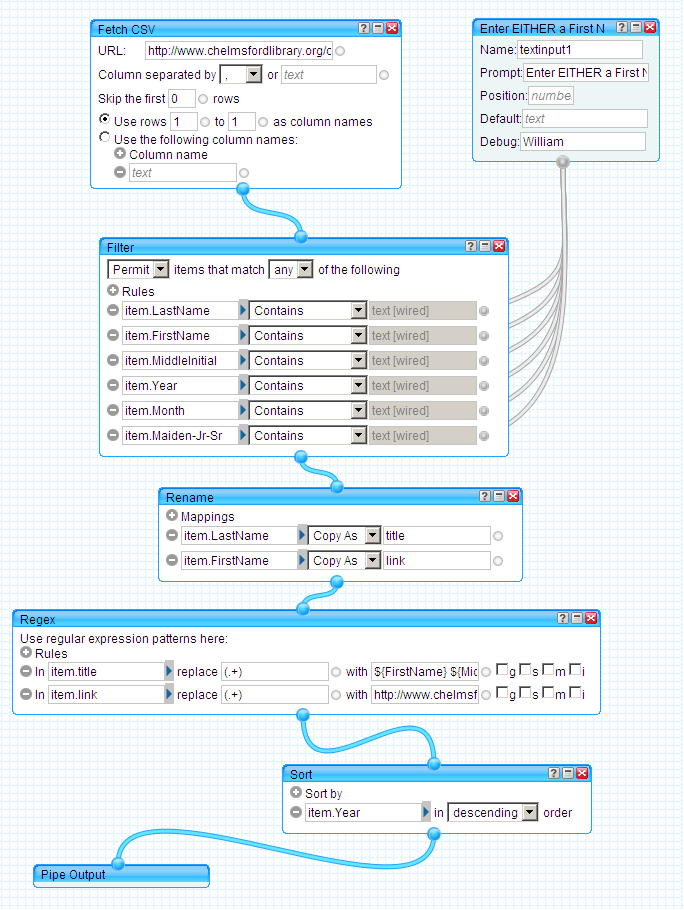
The "Fetch CSV" module is the path to the csv file on our webserver
The module to the right of that controls what the patron search input box looks like. The "Label" field is "Enter EITHER a First Name, Last Name OR Year:" and you can see where that displays on the Pipe page
Both of those modules feed into "Filter" module - this one takes what the patron enters into the search box and filters the data from the csv file to create a subset of just matching records. Whatever the patron enters gets searched for in all the fields listed in the "Filter" module
The next module is "Rename" and I'm not sure I'm using it properly - I needed to create two new fields, so I'm just taking two existing fields, copying them, and renaming them so I can work with them later. The fields that got copied still exist untouched
Next is the "Regex" module, which is the most complicated and powerful, and I use it to create what the patron sees for the search results. The "Title" field is one I created, and here I'm replacing the contents from when I copied it to display what the patron will see on the screen - the code for it is "${FirstName} ${MiddleInitial} ${LastName} ${Maiden-Jr-Sr} - ${Newspaper}, ${Month} ${Day}, ${Year}, Page ${Page} ${Obituary}" which also includes punctuation formatting. So, for example, the result looks like this:
Because this field has to be a link, I also had to define what it links to, which is what I'm doing in the "Link" field. The value for that field is being written as
which carries the data over to the library's website and some javascript pulls the data from the url and puts it in an email form. The patron can fill in their name and contact info into the form and submit it to us as an email message
The "Sort" module is self-explanatory, and I chose to list them with most recent first
This feels far more complicated than it should be, and I'm sharing it here to both save someone else from having to figure it all out again on their own, and to hopefully get suggestions on how to simplify/improve it.
Although, speaking of improving it, I do have one idea for future development: the local Cemetery Department has spreadsheet online listing complete burial locations - it would be neat to mashup up that data, so the obituary is linked to the cemetery plot location.
That's down the road a bit, so in the meantime I just keep adding whatever new obituaries appear in the paper to the csv data file - I had planned to do that weekly, but lately there have been many weeks without any obituaries in the paper (see my previous post). Anyway, we'll see how this works - it only went live last week, but already patrons have been using it, and it certainly does save a lot of staff time.
 Earlier this week, a patron walked up and asked if we had any tax forms. I showed him where we keep the leftovers from last tax season, and told him anything he couldn't find there we could print from the IRS and state websites.