October 5th, 2010 Brian Herzog
 My friend Lichen is moving on from her position at the Manchester (NH) City Library, opening a great spot for a techie librarian with ideas and initiative. The details are:
Librarian III (Head of Info & Technology)
(Announcement No. R-073-10)
Salary Grade 20
Starting Salary: $48,809.48/yr + benefits
Work schedule includes nights and weekends
THE JOB:
Manages the day to day operations of the Information/Technology Division. This position is responsible for maintaining the library’s public computer system, staff training, online presence and recommending technology improvement for the effective and efficient delivery of information to library users. Incumbent partners with the City’s Information Systems Division to maintain staff computers and library networks. Supervises 9 staff members to provide high quality, customer service, and friendly information services to the public using current technology. Oversees the expenditures for material purchases assigned to the division in all formats. Performs related duties. Position is part of the Library’s Administrative team and reports directly to the Library Director.
MINIMUM QUALIFICATIONS:
Master's Degree in Library Science from an ALA accredited program with 4-6 years of progressively more responsible library experience providing library services. Experience in Information Services as well as current Library Technology is required. Supervisory experience is a plus.
NOTE:
Offer of hire conditional on candidate's ability to complete essential job functions, with or without accommodations, as determined by medical exam. A background check, as well as a drug and alcohol test, will be required for this position.
APPLICATION PROCEDURE:
Candidates must complete a City of Manchester employment application. Resume should be submitted with application. Applications may be obtained at www.manchesternh.gov or Monday-Friday, 9:00 a.m. to 4:30 p.m. at
City of Manchester
Human Resources Department
One City Hall Plaza
Manchester, NH 03101
Tel: 603-624-6543 (Voice/TTY)
Fax: 603-628-6065
OPENING DATE: Friday, Oct. 1, 2010 - CLOSING DATE: Monday, Oct. 18, 2010
Tags: job, jobs, libraries, Library, listing, listings, manchester, mcl, opening, position, public
Posted under Uncategorized | 2 Comments »
October 2nd, 2010 Brian Herzog
 Earlier this year we got rid of the pay phone in our lobby (too expensive), so we've become more permissive with letting people (especially kids) use the desk phones to make calls.
I always ask people beforehand if it's a local call, because historically, local calls are no problem, but long distance calls are limited.
This isn't really a reference question, but I get asked this all the time and I'm honestly curious about it - here's a typical exchange (keep in mind I work at the library in Chelmsford, MA, which is in area code 978):
Patron: Can I use the phone?
Me: Sure, is it a local call?
Patron: Uh, I just need to call my mom.
Me: Okay, what's the number? [I always dial for them, to make sure they get an outside line and don't dial 911 accidentally, which does happen with our phone system]
Patron: It's 603-423...
As I get older (and as kids get younger), I've been noticing that fewer and fewer kids have any idea what you're talking about when you say "local call."
When they say "603" (New Hampshire) or "617" (Boston), I will sometimes say something to the effect of, "hey, a different area code is not a local call," and the response from kids is invariably, "we live in Chelmsford, it's my mom's cell phone."
I don't have a cell phone, so I don't know if there is such a thing as local and long distance calls on them, or if everything is charged the same (or just depends on time of day). But wow, the whole local/long distance thing was a big part of my childhood, so it's kind of stunning to think of kids growing up with no concept of that. Depending on how often people move around, a kid's friends could all have cell phones with different area code numbers, and have no idea why*.
But then again, I guess people don't really dial numbers any more anyway - it's just scrolling through the contacts list and clicking a name. Which means the reasoning behind area codes is destined to become historical trivia like the interstate numbering system, or an anachronistic relic like the phrase, "don't touch that dial."
*Tangentially, an old rant of mine is how the FCC dropped the ball when they started issuing phone numbers for cell phones. Instead of issuing cell phone numbers with area code where the phone was registered, and thus running out of numbers and having to slice up area codes and develop new codes (giving rise to situations where the "area" codes make no geographic logic, like 440 in Ohio), they should have created new area codes just for mobile phones. Which would have also helped out with making sure cell phones were always on the Do Not Call List, as they could just forbid those area codes from being called.
Tags: call, calling, libraries, Library, phone, phones, public, Reference Question, Service, Technology, telephone, telephones
Posted under Uncategorized | 14 Comments »
September 30th, 2010 Brian Herzog
 Thanks to everyone who completed the historical photo collection survey. The Nashua Library got answers about 13 different collections, which will help them create their own collection policy.
Kersten Matera from the Nashua Library was kind of enough to compile and summarize the results (below) - a PDF of the full results and individual answers [156KB] is also available.
I was particularly interested in seeing what kind of fees libraries are charging for digital copies of their images collections. To this I asked the question: If the public wants a high-resolution digital copy of an image, will you provide that to them?
- 42% of libraries do not offer high-resolution copies
- 33% offer copies for free
- 25% charge a fee (e.g. $10, $20, $24)
Interesting to note that a call in to Kinko's furnished me with their scanning prices: $6.99 if they scan it and put it onto your storage device, or, an additional $9.99 to burn it onto a CD for you.
Other questions that were asked on the Historical Photos survey included whether or not the library would provide a physical copy of an item in the collection
- 5 libraries said they charge between $.10 and $.25 for what I took to mean a copy on regular paper which is printed using the library's printer
- 4 libraries charge a rate more in line with what a photo shop would charge (i.e. $5.00-24.00)
- 2 libraries do not provide copies
- 1 library will provide them for free
When asked about possible tools to help with a Historical Photos collection, responses included: Flickr, Content DM, Facebook, a library's OPAC (in this case, Polaris), Illinois State Digital Archive, Local History Digital Archive, websites created specifically for such things, and library websites.
How much of your historical photos collection is digitized?
- All of the collection:16.7%
- Some:66.7%
- None:16.7%
Is the collection available/viewable online?
- All are viewable online:25%
- Some:58.3%
- None:16.7%
If the public wants a physical copy of an image in your collection, will you provide that to them?
- No:16.7%
- Yes, for free:8.3%
- Yes, for a charge:75%
Do you have any mark (e.g. a watermark) on the image that marks it as being part of your collection?
No library had a limit to the number of digital copies they would provide.
Thanks again to all who participated!
Tags: collection, digital, digitized, historical, libraries, Library, online, photo, photographs, photos, public, survey, Technology
Posted under Uncategorized | Comments Off on Historical Photo Collection Survey Results
September 28th, 2010 Brian Herzog
 I found out yesterday that the King County (WA) Library System is now live on Evergreen. They did a lot of work to develop the online catalog, and many of their customizations will become part of the core Evergreen code.
Which is good news for many Massachusetts libraries, as we'll be following in their footsteps in May 2011. But development continues, and we can still customize beyond what KCLS has done - so if anyone has comments or suggestions, please submit them to Kathy Lussier at http://masslnc.cwmars.org.
And for the curious, these introductory videos show and explain a little more:
Yay for open source!
Tags: catalog, evergreen, interface, kcls, king county, king county library system, libraries, Library, opac, open source, os, oss, public, search, Technology
Posted under Uncategorized | 6 Comments »
September 25th, 2010 Brian Herzog
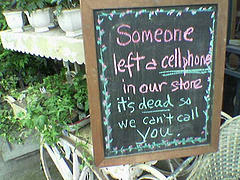 This is more of a reference anecdote than a reference question, but it was still unusual and entertaining. The phone rings...
Me: Reference desk, can I help you?
Caller: Hi, I work at [Local] Bank, and I found a cell phone in my office earlier today. It just rang, and when I answered it, the person who called said the phone's owner is probably at the library right now. Can you find [patron name] and let him know I have his phone?
I had to ask her to repeat all that before I understood it. And she didn't know who the phone's owner was, so didn't have a physical description of him. It seemed like a long shot, but I was game - I made an announcement over the library's overhead paging system asking for that patron by name to come to the Reference Desk (but not before double-checking to make sure this wasn't some kind of Bart Simpson prank).
In about three minutes a somewhat bewildered man presented himself and asked why he was paged. I told him the bank called and said they had his cell phone, gave him the bank's number and offered him our desk phone to call them. Before he did, he stood there for a good five minutes trying to puzzle out how in the heck losing his phone at the bank could evolve into being paged at the library.
After he got off the phone with the woman at the bank, he explained the interworkings of his day:
- He left work for lunch, and stopped at the bank. It was unusually warm today, so he took his jacket off while in the bank, and the cell phone must have slipped out of his pocket
- He left the bank and went to get a sandwich for lunch - at the sandwich shop he looked at his watch to see what time it was, and realized his watch had stopped
- There was a jewelry store across the street, so he went there to see if they could replace the battery. The jeweler said it would be about a half hour, so he gave her his business card (with his cell phone number on it) so she could call him when it was ready. Before he left, he casually mentioned he was on his lunch break and was going to run over to the library after he finished his sandwich
- He comes to the library to browse for DVDs for the weekend
- The jeweler replaces his battery, and dials his cell phone number
- When the cell phone rings under a chair at the bank, one of the employees picks it up. Seeing no obvious owner in the area, and thinking it might be the owner calling to find out where it was, she answers. I can only imagine the conversation the banker had with the jeweler, but the jeweler tells the banker the man said he was going to the library
- The banker decides to call the library to try to track down the man, gets me, and you know the rest
He was funny - the more of the story he related, the more excited he got about how crazy and convoluted it was. I think he used the phrase "weirded out" twice. He was the epitome of bewildered delight, and eventually thanked me for my [small] role in returning his phone and walked off to collect it and his watch.
So, yay for small town helpfulness - and even though we were just a minor cog in this complex anecdote, this is one more patron with a positive library experience.
Also, here's a slightly-related tangent: wristwatches are one of the things becoming obsolete because of cell phones, so stories like this may soon be a thing of the past.
Posted under Uncategorized | 10 Comments »
September 21st, 2010 Brian Herzog
 By now you've probably read other peoples' laments about Bloglines closing down. It makes me sad because I've depended on it for years, personally and for work.
I'm hoping someone will take over Bloglines and continue it, but just in case, I've been testing replacements and thought I would share my findings. (I've heard that RSS readers are a thing of the past, but I have also heard the same thing about email, radio, and libraries, which are also things I use almost every day.)
Anyway, the two I looked at were Tiny Tiny RSS (tt-rss) and NetVibes. There are also others like Google Reader, Pageflakes, FriendFeed, but I already knew I wasn't interested in those.
My criteria was basically everything I liked about Bloglines - a tool that let me get at the information I wanted to read, rather than getting in the way. Specifically, these were:
- organize feeds into categories
- sort feeds any way you want, not just alphabetically
- bookmark posts to read later
- load quickly
- email posts to people
- posts go away automatically after you view them
- three view options for posts - titles only (click to expand to read fully article), post summary, and full post. And the view option can be set differently for individual feeds
 Tiny Tiny RSS
One catch with tt-rss is that it's not just an online reader like Bloglines, but software you install and host yourself - or, if you're like me, ask someone else to host for you (word up, Chris). But listen to this: Blake Carver of LIShost.org has created LISfeeds.com to host tt-rss for librarians to use! So if you can't host it yourself but would like to use tt-rss, contact Blake to create an account. Thank you Blake!
- simple and clean interface
- didn't see a setting for view options - it displays the titles and you have to click to expand
- can organize feeds into categories, but sorting within categories is just alphabetical
- doesn't always display videos inline (Netvibes seems better on that score)
- no ads, which Bloglines did have (although there was a greasemonkey anti-ad script called Stylish to remove them)
- a little slow - switching between feeds, marking as read, etc. - just everything seemed sluggish
- unsure about updating - button doesn't always seem to work, so Chris created a special url that forces updates (which take a few minutes)
- harder to read/skim, because titles are same font and weight as everything else on page
- lots of options listed under articles, which I don't use and kind of distract me
- couldn't find a way to email posts
- no way to see how many other people are subscribed to the feed (which might not be important if it's not a widely-used tool)
 Netvibes
It looks like Netvibes' online RSS reader is just one portion of what they do. It's all I want though, so I just ignored all the widgety dashboard parts.
- the overall interface is nice, but reading posts was still a little easier in Bloglines
- top portion of the screen seems wasted - Bloglines devoted entire screen to feed reading
- no ads, which Bloglines did have (although there was a greasemonkey anti-ad script called Stylish
- setting in top right lets you chose display options per feed - title list, full post, or mosaic
- a little bit slow - not horrible, but just enough to make me notice it
- allows categories, and has drag-and-drop feed sorting which is nice (and easier than Bloglines)
- plays videos inline, which Bloglines had problems with
- updating can be wonky (which happened to Bloglines too) - sometimes you have to click into each category before new posts are displayed
- a couple times every feed showed tons of new posts, but most didn't have anything new - but Bloglines did this too
- it looks like one bad feed can prevent a whole category from loading - I had to delete and then re-add PLA blog feed because it wasn't working for me (but had to go through the category feed by feed to find it)
- there's a link on each post to click right through to the comments, which is nice
- one minor annoyance is that the posts' "mark as read" button is all the way on the right side of the screen, which is a pain with wide screen and a trackpad, because everything else I need to click is on the left side. But there is a "mark as read" button for the whole feed right where it should be
- seems to randomly import posts from long ago, but might be because I'm just starting with it
- have to either scroll past a post or manually click to mark things as read?
- opening one article automatically closes another, which means you can't have more than one open at a time
- handles oddballish feeds better than Bloglines, like Twitter streams and Flickr recent activity
- does allow emailing posts, but I think it might send a link that requires a Netvibes account to clickthrough to - unless I'm doing it wrong
- no way to see how many other people are subscribed to the feed (which might not be important if it's not a widely-used tool)
At the moment, I'm leaning towards using Netvibes. Mainly because it's a little bit faster, it lets me email posts (I'll have to work on the link issue though), I can set individual feeds to show either just titles or entire posts, and it seems closest to what I was used to Bloglines. I'm still sad about Bloglines, but I think I could get used to either of these.
Oh, but something else: since I've been using Bloglines for 5-6 years, I have hundreds of posts bookmarked in there, which I now what to retrieve somehow. Sigh, change.
Tags: bloglines, feed, feeds, libraries, Library, netvibes, public, readers, rss, Technology, tiny tiny rss, tt-rss
Posted under Uncategorized | 13 Comments »



