June 27th, 2012 Brian Herzog
 At a meeting last week, a colleague from my consortium's central office showed off a free program he found called Fences. Its function is simple: group desktop icons together in labelled boxes.
Of course I like organization, so this appealed to me. This was the first time I'd seen something like this, but it wouldn't surprises me if a similar function was native to OS X or Windows 7 (Fences looks like it's Windows-only).
I don' t know that I'd actually use this on my personal computer, but I've been thinking about using this on my library's public workstations.
We deliberately limited the number of desktop icons on the public computers to keep things from being confusing and overwhelming. But, if we organize things with Fences, and label each group, we might be able to present more options while still keeping things understandable.
I could see Fences for Microsoft Office programs, Browse the Internet (with a variety of browsers to choose from), Local Websites (maybe the local news sites, Town Hall, the schools), and then perhaps also some to highlight library tools or pages on our website.
I obviously haven't finalized things yet, but I like that this got me thinking about a new way to do things. Thanks Tracy!
Posted under Uncategorized | 7 Comments »
June 23rd, 2012 Brian Herzog
 This reference question can be filed under, "no matter how much you know about something, there's still more to learn."
One afternoon this week, a patron called in and asked for me specifically. She had a question about Microsoft Word, and since I've always been able to solve her technology questions in the past, she knew I'd have an immediate answer this time. Her question was:
How do you make Word automatically indent the first line of every paragraph?
I thought for a minute, and then realized - I had no idea how to do this. Whenever I want to indent, I just hit the Tab key. But she wanted it to indent automatically - which I was sure Word probably did, I just didn't know where this was in the menus.
I figured it had to be a Paragraph format option though, so I clicked the little square in the bottom right corner of the Paragraph box on the Home ribbon in Word 2007. Nothing immediately stood out, so I did a quick web search for word indent first line of every paragraph, and the first result explained how to do it - turns out I was on the right track.
Once you get to the Paragraph format box, you need to select "First line" from the "Special" dropdown box in the middle of the page. Then you can also set how much to indent by.
Great. I found all this in a minute or so, making small talk with the patron while I searched. As I started guiding her through how to do it, we hit a snag: she's still using Word 2003, and I'm on Word 2007 (which is also what the online directions were for).
I use this Paragraph format box all the time, but for the life of me I could not remember how to get to it in the Word 2003 menus. So, it was another web search for word 2003 paragraph menu, and again it was the first result that gave me the answer: Paragraph was an option on the Format menu.
Now I can navigate the patron to the Paragraph box and explain how to set the auto-indent feature. It work, she was delighted, and I was able to maintain my perfect record for her tech support - even though I had never done this before in my life.
Which just goes to prove the reference librarian's motto: you don't need to know everything, you just need to know how to find everything.
Tags: 2003, 2007, indent, libraries, Library, microsoft, paragraph, public, Reference Question, tech support, Technology, word
Posted under Uncategorized | 3 Comments »
June 20th, 2012 Brian Herzog
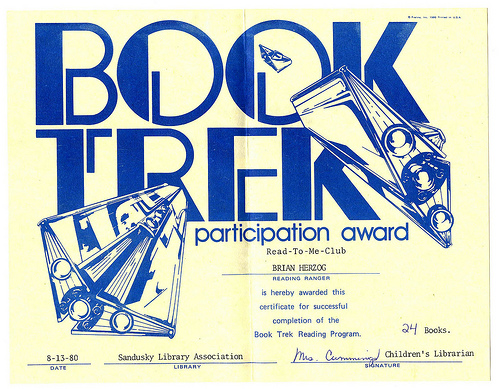
With summer reading programs in full swing, I thought this was appropriate. While cleaning my old stuff out of my parents' house, I came across some of my childhood summer reading logs. They're from the Sandusky (OH) Library from the late seventies - I was born in 1974, so these show what was shaping my mind when I was three and four years old (click through to zoom in):
Yay for the Sandusky Library, and for my parents. I hope everyone is enjoying summer reading - it sticks.
Incidentally, I found a couple other interesting things at my parents house too.
Tags: 1977, 1978, Books, childhood, libraries, Library, log, public, Random, sandusky, summer reading
Posted under Uncategorized | 13 Comments »
June 16th, 2012 Brian Herzog
 I was sitting at the reference desk one day this week, when my coworker answered the phone. After speaking to the patron for a little while, she turned to me and said:
Brian, this patron wants to know if it's okay for her daughter and another student to meet at the library to work on a project - and they need to use a hot glue gun.
The first two things that popped into my head were "mess" and "burned kids," but really I didn't see any reason to say no. I suggested they at least reserve a study room, to contain any potential mess and also prevent anyone else from accidentally bumping into it.
My coworker relayed my permission to the patron, talked for a little while longer, and hung up. Then she turned to me, smiling, and told me the punch line:
The patron's daughter is working on this project with a boy in her class. It's the boy's glue gun, but the patron didn't want her daughter and the boy alone at his house, so she said they had to come to the library.
Ha - a totally legitimate concern, I know, but yet another reminder why ebooks will not destroy libraries.
Anyway, the good news is that the kids showed up later that day, stayed for a few hours working on their project, and left. I checked the room after they were done, and it was in perfect shape (although it smelled a little funny). But yay for another library success.
Posted under Uncategorized | 1 Comment »
June 9th, 2012 Brian Herzog
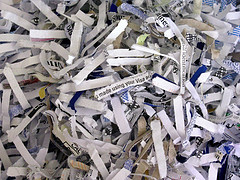 One afternoon, an older female patron called the reference desk and asked:
Do you have a shredder there that I can use?
This has always been kind of a gray area for us. Yes, we do have a shredder in the office for library staff. We have no official policy on the public using it, other than our general yes-based policy. And in the past, if a patron had just a few sheets that needed to be shredded, I would take the pages and do the shredding for the patron. So, I asked:
Me: How many pages do you have to shred?
Patron: Oh, I'd say hundreds.
Arrgh - "hundreds" sounded like more than we could accommodate* (besides, we have just a standard office shredder, not a heavy-duty one). So, reluctantly, all I could suggest to this patron is to contact her bank, as I know a few local banks will shred their customers' documents for free.
I get asked this a few times a year, but the more I thought about it this time, the more I thought this is a perfect service for libraries to offer. A heavy-duty shredder is something not everyone can afford, but something the community could purchase and share (just like other library materials). Plus, with libraries' strong commitment to protecting patron privacy, this seems like a nice way to promote "privacy literacy."
There are questions though - in fact, to find out if there are already best-practices for public shredding, I posted this question on the library stack exchange:
- how heavy-duty of a shredder is necessary?
- should it be a free-access shredder in a public area, or staff-mediated behind a desk or in an office?
- would noise or safety a factor?
- should patrons need to sign a waiver since they're probably leaving personal/private data behind? (shredded, but still, there's always potential)
- should there be a limit on how much patrons can shred? (since it all becomes waste the library needs to pay to remove)
If you've got any suggestions, please feel free to answer on stack exchange or in the comments below - thanks.
*There are a few off-the-books things in the library people can do, if they don't it too much. Shredding is one, using a desk phone to make a call is another.
The most common is probably bringing in magazines - we have a basket into which we put our weeded magazines for people to take (and keep), and patrons always ask if they can bring in their own magazines to leave there for others. Officially the basket is just for library magazines (because we don't want to deal with someone dumping a load of junk there for us to deal with), but we routinely tell patrons that if they just have a few magazines, it's okay.
So far, everyone has been totally fine with this, and no one abuses it. I like these sort of open-ended practices, where you trust people not to be idiots, and it works.
Posted under Uncategorized | 8 Comments »
June 6th, 2012 Brian Herzog
Aaron highlighted a great tool on Walking Paper - a single serving script that shows whether the library is open or not:
Great job Durham County Library for coming up with it, and thank you very much for making the code freely available.
This is definitely going on my library's website (when I get a chance) - but of course, with 24/7 Library Anytime, the answer is always YES!
Posted under Uncategorized | 1 Comment »