May 7th, 2010 Brian Herzog
 I'm sorry to post this on Mother's Day weekend, because it is truly disgusting. Really, if you have a weak stomach, stop.
After helping out at the circulation desk, I was just leaving to go back to Reference when I heard a patron ask one of my coworkers,
Can I have a plastic bag?
I knew she wouldn't need my help for that, so I continued back on down to Reference. At the end of the night, I got the rest of the story.
After the circ person handed him a bag, he opened it and put in his dirty, dripping, reeking underwear (I'm using italics instead of being as graphic as the situation warrants). He then proceeded to tell her that he had a cheeseburger earlier in the day, which upset his stomach, and he didn't make it to our bathroom in time.
That's bad. But what's worse is this happened about 7:00 PM, and I saw this patron downstairs using a computer until about 8:30 PM - with his plastic bag right beside him.
I had no idea what was in it until we closed at 9:00 PM and the circ staff filled me in, but this is one patron I definitely would have asked to leave with his parcel had I known. I don't think we have a policy explicitly forbidding carrying body fluids and fecal matter around the library in a plastic bag, but oh yes, we would have that night.
Not that I wish this on our maintenance staff, but I cannot understand why the patron went to such lengths to keep his underwear - why not just leave everything in the bathroom? Wow.
Posted under Uncategorized | 7 Comments »
May 6th, 2010 Brian Herzog
 Here's something neat - and vital for library staff, both for those who directly provide computer help to patrons and for anyone else who uses a computer in their daily life:
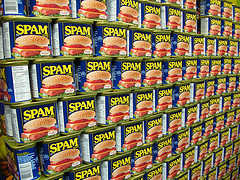
A recent Slashdot post linked to a test to see how well people can identify spam, scam and phishing email messages (which can happen to anybody).
The test is provided by SonicWall, and would be a great for:
- taking as a group during a staff meeting or training day
- testing new employees to help protect your network and increase their tech competency
- showing to students and computer literacy classes to teach them to evaluate websites and email messages
After you're finished, be sure to click the "why" links on the test results to see exactly what looks suspicious and what are the red flags - that is the most helpful part of the test.
Tags: competencies, competency, email, libraries, Library, phishing, public, quiz, scam, scams, security, spam, Technology, test
Posted under Uncategorized | 5 Comments »
May 4th, 2010 Brian Herzog
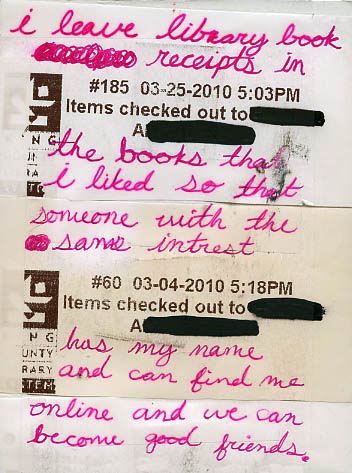
Seen in this week's Post Secrets:
I've thought there was an unusually large number of checkout receipts left in books, and maybe this is why. Although I usually keep the things I find around the library, checkout receipts are one thing I always throw away.
But what if we did offer some sort of in-book messaging? Maybe a sticker with a link to the library's record of the book on LibraryThing or Goodreads, telling people they could discuss it there and meet other people who liked it. Or better yet, remind them to write a review in the library's catalog, along with an opt-in social feature (I wish we had that functionality, but maybe soon).
Tags: check out, circ, circulation, libraries, Library, patron, public, Random, receipt, receipts, slip, slips, social, social networking
Posted under Uncategorized | 6 Comments »
May 1st, 2010 Brian Herzog
 I know I'm late to the party on a lot of things. Sometimes I'll even know about the party, but it just doesn't occur to me to show up - until it suddenly does.
I don't mean to be cryptic - I'm just trying to be creative about to introducing you to my stupid side.
This week's reference question is one that I've been asked occasionally since the late 1990's (way before my library days). The question is this:
How do I get a list of the names of all of the file that are on my disk?
In Windows, I had never found a good way to do this, which meant either using a screenshot, or typing out all of the file names, or, on each file, Right-click > Rename then highlighted the text and Copy. I think other OS's, even DOS, do a better job of this, but or public workstations are limited to Windows.
But when a patron asked me this question this week, this very obvious workaround popped up out of nowhere: just browse to that disk using an internet browser.
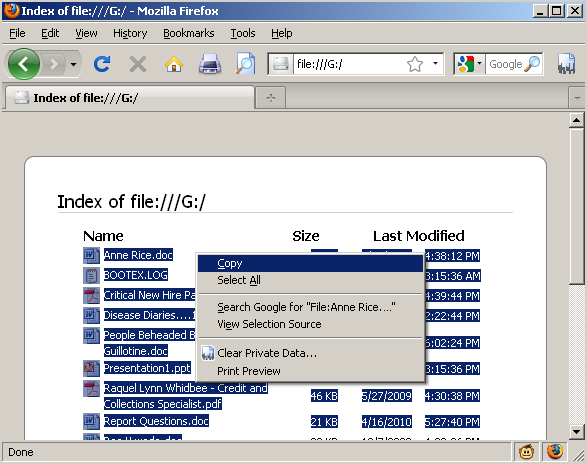
When we plugged her flash drive into the computer, the contents of the drive popped up in a Windows Explorer window. I right-clicked on the Address bar and copied the directory path:
Then I pasted that path into Firefox's address bar and hit Enter (this will work for any directory, folder, floppy disk, CD, etc.). The contents of the flash drive were displayed, and I could highlight and copy the file names:
In this case, the patron wanted to paste the list into an email message, so I pasted them into Notepad to show them below:
She had to delete the "File:" that was tacked on to the beginning of each file name, and I think she deleted some of the file details. This was much better than having to retype all of the file names, so she was happy about it.
I have no idea why this never occurred to me before - I guess this question can be filed under "eureka" and crossed-referenced under "d'oh."
Tags: copy, file, file names, files, libraries, Library, name, names, paste, public, Reference Question, Technology, windows
Posted under Uncategorized | 9 Comments »
April 29th, 2010 Brian Herzog
 I was at MLA2010 yesterday and participated in a panel discussion of Top Tech Trends (it was good, and if I find the other talks online I'll link to them). The two trends I chose aren't exactly new, but are two things I think will have an impact at the reference desk. They deal with ownership of the resources we offer to the public.
[note: this post might not be news to anyone, but the links from which I drew my information are worth reading]
Trend One: Subscription Databases
This has been a pretty happy segment of the library world for a long time, and libraries probably are familiar and comfortable with subscribing to and offering this kind of content. But in the last couple years, new exclusive deals signed between publishers and database vendors has limited access to many popular periodicals (this also happened last year with Consumer Reports).
EBSCO was the focus of much criticism, but Library Journal reports that the publishers are also interested in exclusive contracts. I don't mean to vilify them, because businesses will always act in their own self-interest. But I couldn't tell what bothered me more: loss of access to these periodicals, or corporate press releases [pdf] saying these contracts were in libraries' best interest - there is a difference between "all libraries" and "libraries that are our customers," which is a distinction database vendors don't seem to make.
We non-customers can't afford to keep buying more and more subscriptions because these exclusive deals demand it, so our patrons lose out. The bottom line is that it took resources away from many libraries, and I'm sure this isn't the end of it.
Trend Two: Ebooks
People might be sick of hearing about ebooks* already. However, since it contains the word "books," there is a natural expectation for libraries to offer them, so you can either jump or be dragged into this discussion.
The problematic trend is that the "e" part of ebooks makes them an entirely different animal from print books. Lots of people are trying to figure out how libraries can offer them to patrons, but ebooks have the potential to drastically change the publishing industry (including a power struggle within the distribution chain), and there's no nice model right now that seems to include libraries.
Another problem (for libraries) is that the two most talk-about ebooks readers (the Kindle and the iPad) are also the most restrictive. Like publishers and database vendors, Amazon and Apple are companies acting in their own self-interest, and what they're interested in is sales. Their tactic to maximize their sales is to control where the customers can get ebooks - which excludes libraries.
At least right now: the same thing was true with the iPod and Overdrive audiobooks - when we initially signed up with Overdrive, they did not work on the iPod (which is what all of our patrons had). Eventually Apple relented, so I'm hopeful they'll also eventually open up the iPad to outside ebook sources.
However, there is a case to be made that the iPad is not designed for reading anyway.
Statistics for the Future
Ebooks are popular, but right now they only account for 2-5% of overall book sales. That seems small, but library sales are about 4%. Ebook sales will definitely grow, whereas library sales probably will not. Since the future of ebooks will hinge on decisions made by businesses, libraries will need to speak up to make sure we have a role in this market.
Bonus Trend: HTML5
Something I forgot to mention in my talk also related to the iPad: watching videos online using Flash might be a thing of the past, because the iPad does not support Flash (per Steve Jobs). Instead, the iPad is looking to HTML5, and so is Google. The most obvious impact will be in Flash-based like Youtube and Hulu, but it's worth reading about HTML5 to get an idea of what the web might look like in the next few years.
*I don't know if there is an official style guide for these things, but I decided to always spell "ebooks" the same way I spell "email." If it starts a sentence the first letter gets capitalized, but otherwise it's always all in lowercase, as opposed to eBooks, e-books, etc.
Tags: 2010, annual, conference, Conferences, content, ebooks, exclusive, html5, ipad, kindle, libraries, Library, massachusetts library association, mla2010, ownership, public, tech, Technology, trends
Posted under Uncategorized | 1 Comment »
April 27th, 2010 Brian Herzog
 I'm sure most people by now have seen the story about George Washington having overdue books from the New York Society Library.
This got me thinking about overdue books. The ALA's 2010 State of American Libraries Report was just released, but one statistic it did not include was the number of American households with overdue library material. It must be a high percentage, or else this news story (via LISNews) from Solano County, CA, wouldn't be possible:
Someone has been calling residents posing as a collection agency working with the library, and demanding they provide their credit card number over the phone to pay off fines for overdue material. It sounds like an Urban Legend (but it's not), and since it's on the internet, the same scam might start cropping up in other communities.
My library doesn't charge overdue fines (though we do suspend borrowing privileges for gross offenders), but it's never a bad time to review library policies in case patrons (or staff) have questions. If we did charge fines, I would lobby to implement my favorite tactic, overdue amnesty week, with people getting their fines waived if they return library materials with a non-perishable food item. Or, we could try (passive-aggressive) anti-theft signage.
Posted under Uncategorized | 2 Comments »