July 23rd, 2011 Brian Herzog
 This questions wasn't at all difficult, but I thought it was interesting because it was something I thought I knew how to do, but it turns out I didn't.
A patron walks up to the desks and says,
I have some software at home I want to install on my computer. However, there are two install disks - one for computers with a 32 bit processor and one for computers with a 64 bit processor. How do I tell what processor my computer has?
The patron had an XP computer, which is also what I was on at the desk, so that made things easier.
My first instinct was to go to Device Manager, so we did, but no matter where we looked, nothing I could find gave the processor speed. I sure there are multiple ways to find this out, but in the interest of time I searched the internet for is my processor 64 bit or 32 bit xp. The first result was titled What operating system Do I have? A 32bit or a 64bit? | Computer Tips - perfect.
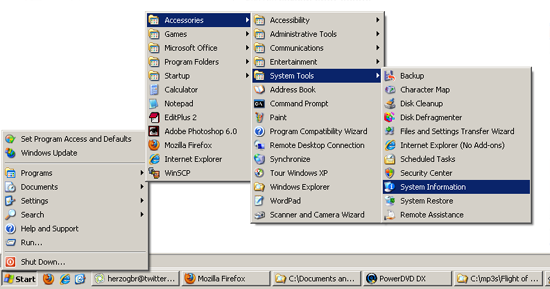
The site itself looked a little suspect, but as we read the page together, the information seemed okay. It gave instructions for both XP and Vista - and the XP instructions guided us to somewhere I never would have even thought of:
Start > Programs > Accessories > System Tools > System Information
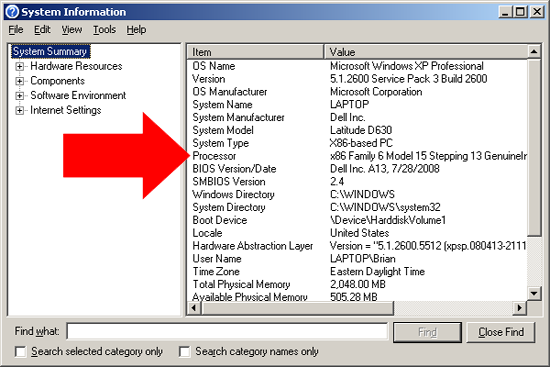
When that window opens, look for the Processor line:
Here's how the site says to read it:
If it says x86 then you have a 32 bit operating system. If the processor area mentioned ia64 or AMD64 then this means you have a 64 bit processor. If it said Microsoft Windows XP Professional x64 Edition Version then this means it is a 64 bit operating system. However as you can see from above, it says Microsoft Windows XP Professional and the processor starts with X86 so therefore this is a 32 bit processor with a 32 bit operating system.
This answered the patron's question, and since we both learned something, it was a good exchange. The funny part (to me) is that the patron said he was right in the middle of installing the software, and came to the library because it was the only place he could think of that would give him free computer information. He was happy I found the answer so quickly and he apologized for rushing out.
Free is questionable, but quite timely on people thinking of the library as genius bar - all the more reason reference staff need to also provide some degree of technical support.
Posted under Uncategorized | 4 Comments »
July 21st, 2011 Brian Herzog
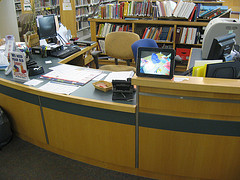 Usually I'm pretty good at math, but in this case it took me awhile to put two and two together.
Awhile ago, our Childrens Department put a digital picture frame on their desk, using it to display photos of their various programs*. I'd seen and heard of other libraries using digital picture frame like this, and for in-building informational signs (like upcoming events), but I never thought of an application for it at the Reference Desk.
Until a couple weeks ago, when I was in the Apple Store in Boston. I'm not at all an Apple fanboy, but I admit that once in awhile, they come up with a good idea.
A friend of mine was having trouble with her Mac laptop, so we took it to the genius bar to having someone help us with it. I still really like the idea of the genius bar in and of itself, but what got my attention was that, behind the genius bar were great big screens scrolling through tips and information. The messages were all about using or fixing Apple products, which were perfectly targeted at the captive audience of people waiting for the genius bar.
I didn't get any photos myself (Apple is funny about taking pictures in their store), but here are some from the interweb:
You get the idea.
When I saw that, it finally dawned on me - this would be an easy thing for libraries to do at service desks, using a simple digital picture frame. As soon as I can get approval (and funding) to purchase one, I'd like to try one with rotating tips on topics like:
- how to renew books
- how to book museum passes
- using online resources and databases
- where the bathrooms are
- online events calendar
- how to find summer reading books
Really, good topics are anything that might be interesting to someone waiting in line at the Reference Desk.
The "photos" will just be slides created in PowerPoint, and hopefully, having something interesting to look will give patrons waiting in line something to do (in addition to teaching them something they may not have known).
I bet other libraries have already thought of this, so if you're doing it, please comment with how it's working. When I get ours up and running, I'll post an update with how it went.
*They decided to use a digital picture frame rather than flickr or other online service, because they were reluctant to post photos of kids on the internet. Keeping the photos offline and in the Childrens Room was a good compromise (between online or not at all), and it might be more likely for the kids to see themselves, too.
Tags: childrens desk, digital, digital picture frame, digital picture frames, frame, frames, libraries, Library, photo, photos, picture, pictures, public, reference desk, sign, signage, signs, Technology
Posted under Uncategorized | 24 Comments »
July 19th, 2011 Brian Herzog
 For anyone who uses WordPress, here are a couple resources you might want to check out:
Using WordPress as a Library Content Management System
A recent Library Technology Reports covers using WordPress to run your entire library's website. My library uses WordPress just for our two blogs right now, but are looking to migrate the entire site to a CMS. Thanks to Michael Stephens for highlighting this, and linking to the full-text of the first chapter.
2011 WordCamp Boston
For those in the Boston area, WordCamp 2011 is happening this weekend at BU. I'm looking forward to it because I've never actually attended an official WordPress-devoted event - I'm going to attend sessions everywhere from basic introduction to advanced fanciness. It's $40 for the weekend, which is less good than free, but I think it's still well worth the price. And for people who can't make it to Boston, look for a WordCamp in your area.
Tags: 2011, ala, boston, cms, Library, library technology report, ltr, Technology, Websites, wordcamp, wordpress
Posted under Uncategorized | 2 Comments »
July 16th, 2011 Brian Herzog
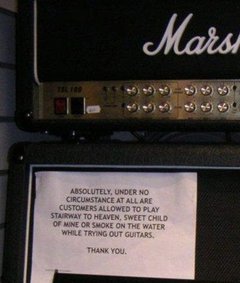 This question made me laugh - partly because it is so odd, and partly because it's not the first request like this that we've had.
We received the following email from a patron with a Subject of "Request for a room" (I edited it a little for clarity):
-----Original Message-----
Subject: Request for a room
I would like to do some recordings with my guitar and voice (moderate volume) using a hand held recorder. I am currently working on a set of folk songs. Is there a isolated room in the Chelmsford Library where I could record during my weekday lunch hour?
One of my coworkers had a good response:
"isolated room" and public library - not a good combo.
We don't have anything in the library that is even close to being sound-proof enough so that his guitar playing wouldn't be heard by other patrons. Which may or may not actually bother people, but I would feel bad telling him yes, then having someone complain after he got all set up and going and then making him stop.
So the staff came up with a list of alternative potential places around town that might be able to handle this, including the local community center, performing arts center, and even the local cable television station (which at least has actual studios).
We sent a message back saying the library couldn't accommodate his request, and referring him to the list of other places we came up with. I haven't heard back if he found somewhere to go, but it would seem to lend some folk-cred if you record your album in a public library.
I do always feel bad when we reach a limit on how we can accommodate people, but at the same time it makes me happy that people continue to think of the library for just about anything.
Tags: guitar, libraries, Library, music, play, playing, practice, public, recording, Reference Question, Service, studio
Posted under Uncategorized | 8 Comments »
July 14th, 2011 Brian Herzog
 I know this is a little random, but it is book-related. I was listening to NPR last weekend, when I heard a story claiming that reading romance novels is actually bad for your health.
There's a write-up on the Common Health blog, and it seems they are considered unhealthy because of all the unrealistic imagery and situations they contain. Not unlike magazines airbrushing the already almost-flawless supermodels, romance novels create a nearly-impossible fantasy world. If romance readers aren't diligent about separating fictional fantasy from reality, their expectations can get skewed, which can lead to unfulfillment, disappointment, and depression.
The article also referred to non-consensual sex, and the excitement of women being "taken" by dominating alpha-males. And that safe-sex is continually portrayed as unromantic. It seems that most of this would be counteracted by simple common sense (I watched a lot of Bugs Bunny growing up, but never tried to walk off a cliff or drop an anvil on someone), but their findings indicated that there is a correlation between frequent reading of romance novels and a disregard for healthy sexual practices.
Which is especially worrying in the ebook era, as the introduction of ereaders has increased the popularity of romance novels. Anecdotally, they're less embarrassing to read now that ereaders allow them to be read in public without anyone being able to see what your reading by the cover - although to be totally hidden, readers also need to keep their heaving bosoms in check.
Whenever I hear of something like this, my first reaction is for the library to try to somehow protect patrons from it. But you cannot protect people from themselves, and it's not really the library's place to restrict what people read - we can provide information, but they need to make their own decisions.
But wow, it would be funny if we had to ration patrons to no more than two romance novels a month - I'm sure our circ stats would take a hit.
Tags: book, Books, health, healthy, libraries, Library, novel, novels, reading, romance, unhealthy
Posted under Uncategorized | 12 Comments »
July 12th, 2011 Brian Herzog
 There's a new program starting this week at my library - a Jelly.
What's a Jelly?!
A Jelly is a casual yet organized assembly of people who choose to work in a social atmosphere - with other interesting and creative people to talk to, collaborate with, and bounce ideas off.
The idea for the Chelmsford Jelly actually originated with a patron. He approached our programming librarian and asked if the library could host a Jelly. After researching online to find out what the heck a Jelly was, we agreed - we're providing a room and some publicity, and he's doing everything else. He's also set up a meetup page for the Jelly to manage it.
I think the idea of "coworking" is a good one. There are lots of people now who, for whatever reason, do work at home, in coffee shops, in parks, whatever, instead of going into an office. There is a lot of freedom in that, but sometimes it helps to be around people who are also doing work. The coworking approach is just that - working around other people who are also working. They're not necessarily working together, just near each other - near enough to enjoy each other's company, use as a sounding board, share lunch, and share the experience of working. Basically, social networking in person.
For us, the Jelly will meet every third Friday from 11:30-4:30. We're not sure how successful it will be, but since the library's core mission is providing community space for patrons (and this program requires extremely little effort on our part), we want to support this program as much as possible.
Update: At our first Jelly, I think there were about 4-5 people who came to work, and stay for part or all of the day. But I was told there was a steady stream of other people who just popped their heads in to see what it was, or, as one man said, "to see what kind of people come to these things." I think this will become more popular as word spreads over time, so I'll post an addition update after a few sessions.
Posted under Uncategorized | 5 Comments »